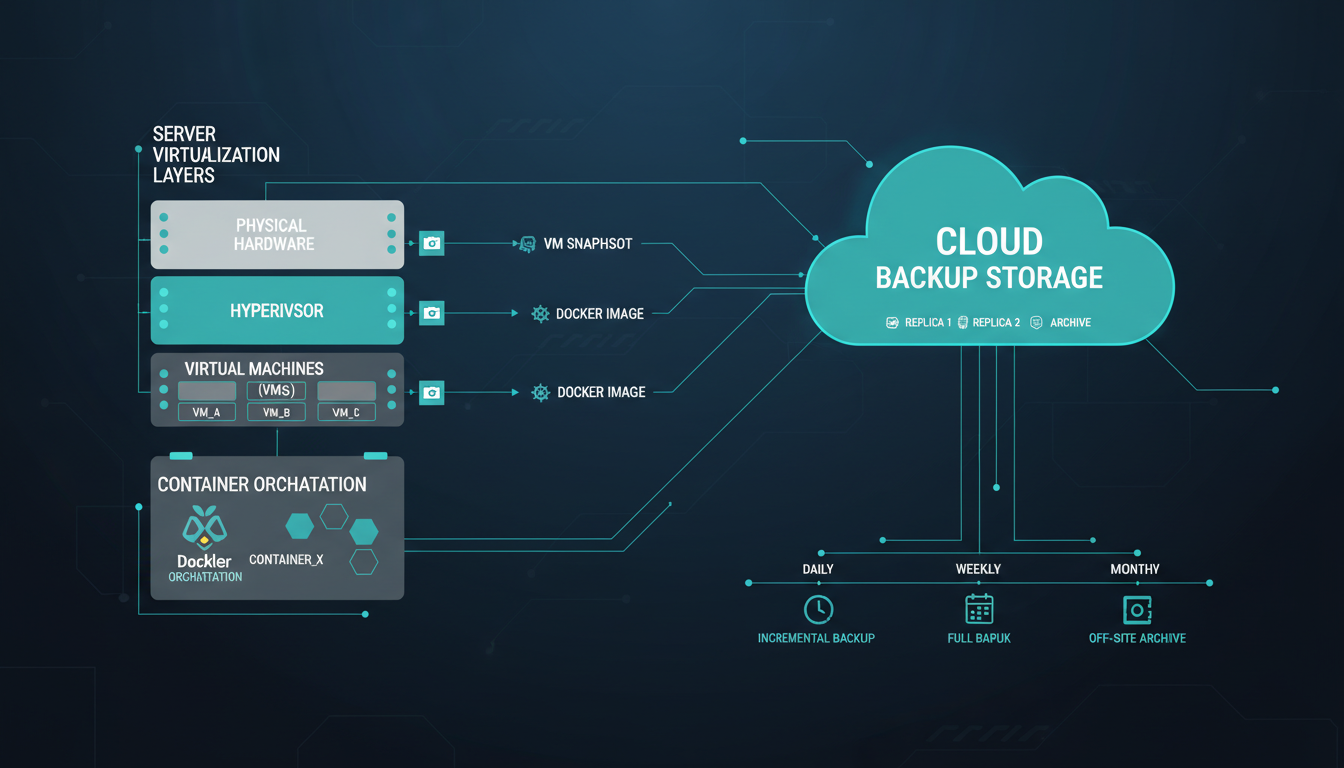
Virtualisation and containerisation have fundamentally changed how UK businesses deploy and manage their IT workloads. Virtual machines running on Hyper-V, VMware, or Azure host the majority of business-critical applications, while containers orchestrated through Docker and Kubernetes are increasingly used for modern microservices architectures, development environments, and cloud-native applications. But with this shift in how workloads are deployed comes a corresponding shift in how they must be protected.
Backing up virtual machines and containers is conceptually different from backing up traditional physical servers, and the strategies that worked well in the physical world do not always translate directly to virtualised and containerised environments. UK businesses that fail to adapt their backup strategies to these modern workload types risk discovering - too late - that their backup and recovery capabilities have significant gaps.
This guide explains the key principles, tools, and strategies for backing up both virtual machines and containers effectively, ensuring your business can recover from any data loss scenario - whether caused by hardware failure, ransomware, human error, or natural disaster.
Virtual Machine Backup Fundamentals
Virtual machines consist of two main components: the virtual disk files (containing the operating system, applications, and data) and the configuration files (defining the VM's hardware settings, network connections, and resource allocations). A complete VM backup must capture both components to enable full restoration.
Modern VM backup solutions use hypervisor-level snapshots and Changed Block Tracking (CBT) to create efficient backups without installing agents inside each VM. Rather than backing up every block on the virtual disk for each backup job, CBT identifies only the blocks that have changed since the last backup, dramatically reducing backup windows, network bandwidth consumption, and storage requirements.
The three primary backup approaches for VMs are image-level backups (capturing the entire VM as a single unit, enabling full VM restoration), file-level backups (backing up individual files and folders within the VM, enabling granular restoration), and application-aware backups (understanding the internal state of applications like SQL Server, Exchange, and Active Directory to ensure consistent, recoverable backups). The most robust backup strategies combine all three approaches.
A standard VM snapshot captures the state of the virtual disk at a point in time - but if a database is in the middle of writing a transaction when the snapshot occurs, the backed-up database may be in an inconsistent state. Application-aware backups use VSS (Volume Shadow Copy Service) on Windows or equivalent mechanisms to signal applications to flush their buffers and enter a consistent state before the snapshot is taken. For any VM running a database, email server, or domain controller, application-aware backups are not optional - they are essential for producing recoverable backups.
Backing Up VMs on Different Platforms
Microsoft Hyper-V
For UK businesses running Hyper-V - whether on-premises Windows Server or Azure Stack HCI - several backup solutions integrate natively with the hypervisor. Veeam Backup and Replication is the market leader, offering comprehensive Hyper-V backup with CBT support, instant VM recovery, and flexible storage targets. Windows Server Backup provides a basic but free option included with Windows Server, suitable for smaller environments. Altaro VM Backup (now Hornetsecurity) offers an SME-focused solution with straightforward pricing and excellent Hyper-V integration.
VMware vSphere
VMware environments benefit from a mature backup ecosystem. Veeam again leads the market, with deep vSphere integration, Storage API for Data Protection (VADP) support, and advanced features like SureBackup for automated recovery verification. Nakivo Backup and Replication provides a cost-effective alternative with strong VMware support, while Commvault offers enterprise-grade protection for larger environments.
Azure Virtual Machines
Azure VMs benefit from Azure Backup - Microsoft's native backup service that provides agent-less VM backup with application-consistent snapshots, configurable retention policies, and geo-redundant storage options across UK data centres. Azure Backup is deeply integrated with the Azure platform, making it the natural choice for most UK businesses running Azure workloads. For organisations requiring cross-platform backup management (Azure plus on-premises), third-party solutions like Veeam Backup for Azure provide a unified management experience.
| Backup Solution | Hyper-V | VMware | Azure VMs | Containers | Typical UK SME Cost |
|---|---|---|---|---|---|
| Veeam Backup & Replication | Excellent | Excellent | Good (via plugin) | Kasten K10 | £800-3,000/yr |
| Azure Backup | Basic | No | Excellent | No | Pay-per-use |
| Nakivo | Good | Good | Good | No | £500-2,000/yr |
| Altaro / Hornetsecurity | Excellent | Good | Limited | No | £400-1,500/yr |
| Velero (open source) | No | No | No | Kubernetes native | Free (storage costs only) |
Container Backup: A Different Challenge
Containers present fundamentally different backup challenges compared to virtual machines. By design, containers are ephemeral - they are created, run their workload, and can be destroyed and recreated at any time. The container image itself (the blueprint from which containers are launched) is typically stored in a container registry and does not need traditional backup in the same way as a VM. What does need backing up is the persistent data associated with containerised applications - the databases, file stores, and configuration data that containers access through persistent volumes.
The distinction between stateless and stateful containers is crucial for backup planning. Stateless containers (such as web servers and API gateways) can be recreated from their image and configuration without data loss - their "backup" is essentially the container image in the registry and the orchestration configuration (Kubernetes manifests or Docker Compose files). Stateful containers (such as databases, message queues, and file storage services) maintain data in persistent volumes that must be backed up using dedicated strategies.
Kubernetes Backup Strategies
For UK businesses running Kubernetes - whether on Azure Kubernetes Service (AKS), Amazon EKS, or on-premises clusters - the backup strategy must encompass both the cluster state (namespaces, deployments, services, config maps, secrets) and the persistent volume data. Velero (formerly Heptio Ark) is the most widely used open-source tool for Kubernetes backup, providing the ability to back up and restore both cluster resources and persistent volumes. Kasten K10 by Veeam offers a more feature-rich commercial solution with a user-friendly dashboard, application-aware backup policies, and multi-cluster support.
The 3-2-1 Rule for Modern Workloads
The time-tested 3-2-1 backup rule remains relevant for virtual machines and containers: maintain at least three copies of your data, stored on at least two different types of media, with at least one copy held off-site. For UK businesses, this typically translates to the production data on your primary storage, a local backup on a dedicated backup repository (NAS, SAN, or dedicated backup server), and an off-site copy in a UK-based cloud storage service or a second geographic location.
For businesses subject to ransomware risk - which effectively means all UK businesses - consider extending this to a 3-2-1-1 strategy, where the additional "1" represents an immutable or air-gapped backup copy that cannot be modified or deleted by ransomware, even if attackers gain administrative access to your systems. Azure Immutable Blob Storage, AWS S3 Object Lock, and Veeam's hardened Linux repository all provide options for creating immutable backup copies.
VM and Container Backup Best Practices
- Use hypervisor-level backups with CBT for VMs
- Enable application-aware processing for databases
- Back up Kubernetes state and persistent volumes
- Store container images in a replicated registry
- Follow the 3-2-1-1 rule with immutable copies
- Test restores regularly - at least quarterly
- Document RPO and RTO for each workload
- Store at least one copy in a UK data centre
Common Backup Mistakes
- Assuming containers do not need backup
- Only backing up VMs without application awareness
- No off-site or immutable backup copy
- Never testing restore procedures
- Backing up data but not configuration and state
- Using the same credentials for backup and production
- No monitoring of backup job success or failure
- Undefined RPO and RTO targets
Disaster Recovery Planning for Virtualised Environments
Backup and disaster recovery are related but distinct disciplines. Backup focuses on protecting data - ensuring you can recover files, databases, and system states after loss or corruption. Disaster recovery focuses on restoring entire services - returning your business to operational status after a major disruption such as a site failure, ransomware attack, or natural disaster. For UK businesses running virtualised workloads, the distinction is critical because disaster recovery requires orchestrating the restoration of multiple interdependent VMs and services in the correct sequence.
Recovery Point and Recovery Time Objectives
Every workload should have defined Recovery Point Objective (RPO) and Recovery Time Objective (RTO) targets. RPO defines how much data you can afford to lose - a four-hour RPO means you accept losing up to four hours of data changes. RTO defines how quickly the service must be restored - a two-hour RTO means the service must be operational within two hours of the incident being declared. These targets drive your backup frequency and recovery infrastructure requirements. Tier 1 workloads like ERP systems and customer databases typically require RPOs of 15 minutes to one hour and RTOs of one to four hours. Tier 2 workloads such as file servers and internal applications may accept RPOs of four to 24 hours and RTOs of eight to 24 hours. The UK Financial Conduct Authority requires regulated firms to maintain documented RPO and RTO targets for all critical business services and to demonstrate through testing that these targets can be met consistently.
VM Replication for Near-Zero RPO
For workloads requiring minimal data loss, VM replication provides continuous or near-continuous copying of VM data to a secondary site. Hyper-V Replica, VMware vSphere Replication, and Azure Site Recovery all provide VM replication capabilities with configurable intervals as short as 30 seconds. Unlike traditional backup, replication maintains a near-real-time copy of your VMs at a secondary location, enabling rapid failover with minimal data loss. Azure Site Recovery is particularly popular among UK businesses as it enables replication from on-premises Hyper-V or VMware environments to Azure UK South or UK West data centres, providing a cost-effective DR solution without requiring a secondary physical site. According to Microsoft adoption data, UK businesses using Azure Site Recovery report average failover times of under 15 minutes for critical VMs.
Orchestrated Failover and Geographic Considerations
Modern business applications rarely run on a single VM - they typically span multiple interconnected VMs and containers with specific startup dependencies. A web application might require the database VM to start first, followed by the application server, then the web front-end and load balancer. DR orchestration tools automate this process, ensuring VMs and services restart in the correct order with appropriate network configurations. Veeam Orchestrator, Azure Site Recovery recovery plans, and Zerto all provide orchestrated failover capabilities that can be rehearsed without impacting production. For UK businesses requiring geographic redundancy, Azure offers two UK regions - UK South (London) and UK West (Cardiff) - enabling cross-region replication that keeps all data within UK borders while providing meaningful protection against regional events. The 150-kilometre separation between these regions satisfies most regulatory requirements for geographic diversity.
Testing Your Recovery Capabilities
A backup that has never been tested is not a backup - it is a hope. Yet studies consistently show that the majority of UK businesses never perform full restore tests. They assume that because the backup job completes successfully each night, they will be able to recover when needed. This assumption is dangerously optimistic.
Establish a regular restore testing schedule. At minimum, perform a full VM restore test quarterly and a file-level restore test monthly. For containers, practise restoring a complete namespace from backup into a test cluster. Document the restore procedure, time how long each step takes, and verify that the restored systems function correctly. The goal is not just to confirm that the data can be restored, but to verify that your team can execute the recovery process under pressure and that recovery times meet your business requirements.
Veeam's SureBackup feature automates much of this process for VM backups, automatically restoring VMs into an isolated sandbox environment and running verification scripts to confirm they boot correctly and key services are running. For organisations with the resources, regular disaster recovery drills that simulate complete site failures and test end-to-end recovery across VMs, containers, and supporting infrastructure provide the highest level of confidence.
Backup Monitoring, Alerting, and Compliance
A backup programme is only as reliable as its monitoring. Without active oversight of backup job success and failure, businesses routinely discover that their backups have been silently failing for weeks or months - a discovery typically made at the worst possible time, when a restore is urgently needed.
Automated alerting should notify your IT team immediately when any backup job fails, completes with warnings, or takes significantly longer than expected. Configure alerts for missed backup windows (jobs that did not start on schedule), backup size anomalies (sudden changes in backup size may indicate data loss or corruption), and storage capacity thresholds (backup repositories approaching capacity). Most enterprise backup solutions - Veeam, Commvault, Veritas - provide built-in alerting capabilities, and integration with monitoring platforms like Azure Monitor, PRTG, or Datadog enables centralised alert management across your entire infrastructure.
Backup reporting should provide both operational and compliance views. Operational reports track daily backup success rates, data volumes, backup windows, and storage consumption. Compliance reports demonstrate adherence to backup policies, retention requirements, and regulatory obligations. For UK businesses subject to GDPR, maintaining evidence of regular, successful backups of systems processing personal data supports compliance with Article 32 requirements for data security and Article 5 requirements for data integrity. The Information Commissioner's Office (ICO) has cited inadequate backup practices as a contributing factor in several enforcement actions, making documented backup compliance increasingly important for UK organisations of all sizes.
Retention policies must balance compliance requirements with storage costs. UK GDPR requires that personal data is not kept longer than necessary for its purpose, meaning backup retention periods should align with your data retention policy. At the same time, regulatory requirements in sectors such as financial services (the FCA requires seven years for transaction records), healthcare (the NHS requires eight years minimum for adult patient records), and legal services (the SRA requires six years after matter closure) may mandate extended retention for specific data categories. Configure your backup retention policies to meet the longest applicable requirement for each data set, and ensure that expired backups are securely deleted on schedule to maintain compliance.
Audit trails and access controls protect the integrity of your backup infrastructure. Restrict access to backup systems using the principle of least privilege - backup operators should have the minimum permissions necessary to perform their duties, and administrative access should require multi-factor authentication. Maintain detailed audit logs of all backup operations, configuration changes, and restore operations. In the event of a security incident, these logs provide crucial forensic evidence and demonstrate the integrity of your backup chain to regulators and insurers.
Backup Cost Optimisation for UK Businesses
Backup infrastructure costs can escalate rapidly in virtualised environments, particularly as data volumes grow and retention periods extend. UK businesses can optimise their backup costs without compromising protection by applying several proven strategies that balance performance, resilience, and expenditure.
Tiered storage uses different storage classes for different retention periods. Recent backups from the last 7 to 30 days are stored on fast, accessible storage for rapid recovery. Older backups are automatically moved to cheaper, slower storage tiers. Azure Blob Storage offers Hot, Cool, and Archive tiers, with Archive storage costing approximately 85% less per gigabyte than Hot storage. AWS S3 offers similar tiering through Glacier and Glacier Deep Archive. For a typical UK SME backing up 5TB of VM data with 90-day retention, intelligent tiering can reduce monthly cloud storage costs from approximately £150 to £60-£80 - a significant saving that compounds as data volumes grow over time.
Deduplication and compression reduce the physical storage required for backups. Modern backup solutions like Veeam achieve typical deduplication ratios of 2:1 to 5:1, meaning 10TB of source data may require only 2 to 5TB of backup storage. Compression further reduces this by 30 to 50 percent. Enable both deduplication and compression on your backup repository to maximise storage efficiency. For businesses with many similar VMs - such as VDI environments or standardised server builds - deduplication ratios can be even higher, sometimes exceeding 10:1, delivering substantial cost reductions.
Right-sizing backup frequency ensures you are not over-protecting low-value workloads at the expense of budget that could be better allocated to critical systems. Not every VM needs hourly backups - classify your workloads by business criticality and assign backup frequencies accordingly. Tier 1 systems (customer-facing, revenue-generating) might warrant hourly backups, Tier 2 systems (internal business applications) might be backed up every four to six hours, and Tier 3 systems (development and testing) might require only daily backups. This tiered approach typically reduces overall backup storage and licensing costs by 25 to 40 percent compared to applying a uniform backup frequency across all workloads.
Leveraging Azure Hybrid Benefit can reduce costs for UK businesses already licensed for Windows Server. Azure Hybrid Benefit allows you to use your existing Windows Server licences to reduce the cost of Azure VMs used as backup targets or disaster recovery replicas. Combined with Azure Reserved Instances for always-on backup infrastructure, UK businesses can reduce their Azure-related backup costs by up to 60 percent compared to pay-as-you-go pricing. These licensing optimisations are frequently overlooked but represent substantial savings for businesses with significant Windows Server estates migrating backup workloads to the cloud.
Protect Your Virtual and Container Workloads
Cloudswitched designs and manages comprehensive backup solutions for UK businesses running virtual machines and containers across on-premises, Azure, and hybrid environments. From backup architecture design and implementation to ongoing monitoring and regular restore testing, we ensure your business can recover from any scenario.

CloudSwitched
London-based managed IT services provider offering support, cloud solutions and cybersecurity for SMEs.


