Data is the lifeblood of every UK business. Customer records, financial data, contracts, intellectual property, employee information - lose any of it, and your business faces not just operational disruption but potential legal consequences under the UK GDPR, reputational damage, and in severe cases, existential threat. The question is not whether you need to back up your data - every business does - but how you back it up and how much data you can afford to lose when disaster strikes.
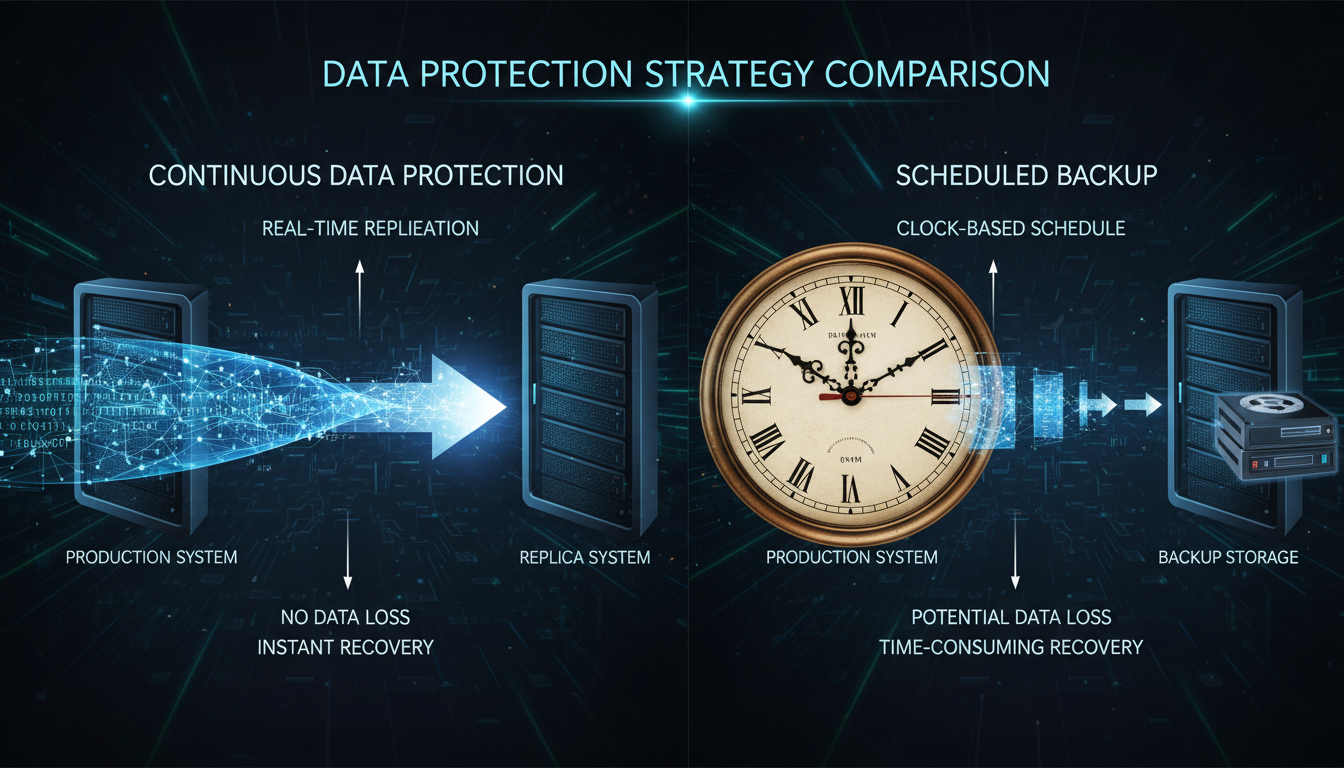
This question brings us to two fundamentally different approaches to data protection: Continuous Data Protection (CDP), which captures every change as it happens, and scheduled backups, which capture snapshots at predetermined intervals. Both have their place, and understanding the differences, advantages, and limitations of each approach is essential for designing a backup strategy that genuinely protects your business.
This guide provides a thorough comparison of both approaches, helping you determine which is right for your UK business - or whether a combination of both delivers the optimal balance of protection, performance, and cost.
Understanding the Fundamentals
What Are Scheduled Backups?
Scheduled backups are the traditional approach to data protection. Your backup system takes a snapshot of your data at regular intervals - typically once per day, though some businesses run backups every few hours. Between backups, any changes to your data are not captured. If your daily backup runs at midnight and your server fails at 5pm the following day, you lose up to 17 hours of data. This gap between the last successful backup and the point of failure is called the Recovery Point Objective (RPO).
Scheduled backups can be full (copying all data every time), incremental (copying only data that has changed since the last backup), or differential (copying all data that has changed since the last full backup). Most modern backup systems use a combination - a weekly full backup with daily incremental backups - to balance storage efficiency with recovery speed.
Despite being the older approach, scheduled backups have evolved significantly. Modern backup software such as Veeam, Acronis, and Datto offer sophisticated scheduling, deduplication, compression, and cloud integration that make scheduled backups far more capable than the simple tape-based systems of the past. For many UK businesses, these modern scheduled backup solutions offer more than sufficient protection at a reasonable price point.
What Is Continuous Data Protection?
Continuous Data Protection, or CDP, takes a fundamentally different approach. Instead of waiting for a scheduled backup window, CDP monitors your data in real time and captures every change as it occurs. Every file modification, every database transaction, every email received is immediately replicated to the backup destination. If your server fails at 5pm, you can recover to the state it was in at 4:59pm - or even 4:59:58pm - with virtually zero data loss.
True CDP captures changes at the block level, recording every write operation to disk. This creates a continuous journal of changes that allows recovery to any point in time, not just predefined backup points. Near-CDP solutions (sometimes called journal-based backup) capture changes at short intervals - every 5, 15, or 30 minutes - offering a practical middle ground between scheduled backups and true CDP.
The technology behind CDP has matured considerably in recent years. Modern CDP solutions use intelligent change tracking, efficient data deduplication, and cloud-native architectures that make continuous protection accessible even to smaller businesses. Solutions like Zerto, Veeam CDP, and Druva offer varying levels of continuous protection that can be tailored to different workloads and budgets.
When evaluating backup strategies, two metrics are critical. Recovery Point Objective (RPO) defines how much data you can afford to lose, measured in time. An RPO of 24 hours means you accept losing up to one day's data. An RPO of zero means you accept no data loss at all. Recovery Time Objective (RTO) defines how quickly you need to be back up and running after a failure. An RTO of 4 hours means your systems must be operational within 4 hours of a disaster. CDP typically delivers near-zero RPO, whilst scheduled backups deliver RPO equal to the backup interval. RTO depends more on the recovery process and infrastructure than on whether you use CDP or scheduled backups.
Continuous Data Protection
- Near-zero data loss (RPO close to 0)
- Recovery to any point in time
- No backup windows or performance impact
- Ideal for databases and transactional systems
- Captures every change automatically
- Eliminates end-of-day backup anxiety
- Supports compliance with strict data requirements
- Higher storage and licensing costs
Scheduled Backups
- Data loss up to the backup interval (RPO = hours)
- Recovery to last successful backup point only
- May impact performance during backup window
- Simpler to implement and manage
- Lower storage requirements
- More affordable for most budgets
- Proven technology with wide support
- Sufficient for many business scenarios
When CDP Is the Right Choice
Continuous Data Protection is not necessary for every business or every workload, but there are scenarios where it is clearly the superior choice.
Transaction-heavy databases. If your business runs a database that processes hundreds or thousands of transactions per hour - an e-commerce platform, a financial trading system, a busy CRM - the cost of losing even one hour of transactions can be enormous. For a Bristol-based online retailer we work with, losing one hour of orders during peak trading could mean £15,000 in lost revenue that would never be recovered.
Regulated industries. Businesses in financial services, healthcare, or legal sectors often face regulatory requirements for data integrity and recoverability. The Financial Conduct Authority (FCA) expects regulated firms to be able to recover critical data with minimal loss. The Solicitors Regulation Authority (SRA) requires law firms to protect client data to the highest standard. CDP provides the demonstrable, near-zero data loss capability these regulators expect.
Ransomware recovery. In a ransomware attack, the ability to recover to a precise point in time is invaluable. If you can identify exactly when the ransomware began encrypting your files (say, 14:23 on Tuesday), CDP allows you to restore to 14:22 - before the attack began - losing virtually nothing. With daily scheduled backups, you would have to restore to the previous night's backup, losing an entire day of work.
High-value creative and professional work. Design agencies, architecture firms, engineering consultancies, and software development teams often produce work that cannot easily be recreated. A London-based architecture practice we support had an experience where a junior team member accidentally overwrote three days of work on a major planning submission. With CDP in place, the file was restored to the version from just before the overwrite, saving an estimated 120 hours of billable work valued at over £18,000.
Real-World CDP Scenarios: UK Business Examples
Understanding the theory behind CDP and scheduled backups is important, but real-world scenarios illustrate the practical differences far more clearly. The following examples are drawn from actual situations UK businesses have faced, and they demonstrate how backup strategy choices have direct, measurable consequences.
Scenario 1: E-Commerce Platform During Peak Trading
A Manchester-based e-commerce retailer specialising in outdoor equipment processes an average of 340 orders per day, with peak periods during Black Friday and the January sales reaching over 1,200 orders daily. Their order management system, inventory database, and payment processing records are all hosted on cloud infrastructure with a combination of SQL databases and file storage. During a server failure at 11:15 on a Saturday morning - their busiest trading period - the business needed to recover quickly. Because they had implemented near-CDP with 5-minute snapshots on their order database, they lost only the transactions from the previous 4 minutes. The estimated value of those lost orders was under £200. Had they been relying on their old nightly backup schedule, they would have lost all orders since midnight - an estimated £8,400 in revenue plus the customer service cost of contacting affected buyers and reprocessing orders manually.
Scenario 2: Legal Firm Document Recovery
A Birmingham solicitors' practice with 45 staff handles sensitive client matters including property conveyancing, commercial litigation, and family law. When a ransomware attack encrypted their document management system at 09:47 on a Wednesday, the firm's CDP solution allowed them to roll back to 09:46 - one minute before the encryption began. The entire document library was restored within 90 minutes. The SRA's requirements for client data protection were fully met, and no client data was permanently compromised. The firm estimated that without CDP, restoring from their previous night's backup would have cost approximately £35,000 in recreated work and delayed case proceedings, plus potential regulatory consequences for failing to adequately protect client files.
Scenario 3: NHS-Adjacent Healthcare Provider
A private healthcare clinic in Edinburgh processing patient records, appointment data, and clinical notes implemented CDP following a near-miss incident where a database corruption went undetected for six hours. Under the UK GDPR and NHS Data Security and Protection Toolkit standards, the clinic was obligated to maintain the integrity of patient records. CDP gave them the granular recovery capability to restore individual database tables to any point in time, satisfying their compliance obligations and providing peace of mind that patient data was continuously protected.
When Scheduled Backups Are Sufficient
For many UK small businesses, well-implemented scheduled backups provide adequate protection at a significantly lower cost than CDP. Scheduled backups are typically sufficient when your data changes relatively slowly, the cost of losing a few hours of data is manageable, your budget is constrained, and your workloads are primarily file-based rather than transactional.
A 15-person accountancy firm in Leeds, for example, creates and modifies documents throughout the day but does not process high-volume transactions. Losing a maximum of four hours of work (with four-times-daily backups) would be inconvenient but not catastrophic - the documents could be recreated from drafts, notes, and memory. For this firm, hourly or four-times-daily scheduled backups provide an excellent balance of protection and cost.
Similarly, a 20-person marketing agency in Glasgow primarily works with creative files - design assets, presentation decks, copy documents, and project plans. While these files are valuable, most creative work is iterative, with teams saving frequently and maintaining their own working copies. A scheduled backup running every four hours, combined with cloud sync tools like OneDrive or SharePoint for real-time file versioning, provides more than adequate protection for this type of workload.
Small retail businesses with straightforward point-of-sale systems, professional services firms with modest data volumes, and businesses whose critical data resides primarily in cloud SaaS applications (which have their own backup mechanisms) are all candidates where scheduled backups deliver excellent value without the additional complexity and cost of CDP.
Implementation Considerations for UK Businesses
Regardless of whether you choose CDP, scheduled backups, or a hybrid approach, several implementation considerations are particularly relevant to UK businesses.
Data Sovereignty and Storage Location
Post-Brexit, UK businesses must ensure that personal data is stored and processed in compliance with the UK GDPR. If your backup destination is a cloud service, verify that data is stored in UK or adequacy-approved data centres. Major providers like Microsoft Azure, AWS, and Google Cloud all offer UK-based regions, but you must explicitly configure your backup solution to use them. A 2024 survey by the Department for Science, Innovation and Technology found that 31% of UK businesses were unsure where their backed-up data was physically stored - a compliance risk that should be addressed immediately.
Bandwidth and Connectivity
CDP solutions require reliable, high-bandwidth internet connectivity because they continuously stream data changes to the backup destination. For UK businesses in rural areas or those with limited broadband - still a reality for approximately 6% of UK premises according to Ofcom's 2024 Connected Nations report - this can be a practical barrier. If your upload speed is below 20 Mbps, discuss bandwidth requirements with your backup provider before committing to CDP. On-premise CDP appliances that replicate locally first and then sync to the cloud asynchronously can mitigate bandwidth constraints.
Backup Encryption and Security
Both CDP and scheduled backups should encrypt data both in transit and at rest. The National Cyber Security Centre (NCSC) recommends AES-256 encryption for data at rest and TLS 1.2 or above for data in transit. Ensure your backup solution supports these standards. Additionally, implement access controls on your backup systems - a backup copy of your data is just as sensitive as the original, and if an attacker gains access to your backups, they effectively have access to all your data.
Immutable Backups
One of the most important developments in backup technology is the concept of immutable backups - backup copies that cannot be modified, encrypted, or deleted, even by an administrator. This is a critical defence against ransomware, which increasingly targets backup systems alongside production data. Both CDP and scheduled backup solutions now offer immutability features, and we strongly recommend enabling them. A 2025 report by Sophos found that 94% of UK organisations hit by ransomware said attackers attempted to compromise their backups, and those with immutable backups recovered three times faster on average.
The Hybrid Approach: Best of Both Worlds
In practice, many UK businesses benefit from a hybrid approach that applies CDP to their most critical systems and scheduled backups to everything else. This tiered strategy aligns the level of protection with the value and sensitivity of the data.
| Data Tier | Examples | Protection Level | Typical Approach |
|---|---|---|---|
| Tier 1: Mission Critical | Financial databases, ERP systems, e-commerce platforms | Near-zero RPO | True CDP or near-CDP |
| Tier 2: Business Important | Email, CRM, document management | 1-4 hour RPO | Frequent scheduled backups |
| Tier 3: Standard Business | File shares, user files, general data | 4-24 hour RPO | Daily scheduled backups |
| Tier 4: Archival | Historical records, old projects, compliance archives | Weekly RPO | Weekly backups + archive |
Implementing a hybrid approach requires a thorough data classification exercise. Work with each department to identify which systems and data sets fall into each tier. This exercise often reveals surprises - systems that management assumed were non-critical may actually underpin daily operations, whilst other systems assumed to be essential may have natural redundancy or easy recreation paths.
A practical hybrid deployment for a 50-person UK business might look like this: CDP on the primary ERP or accounting database and order management system, four-hourly scheduled backups on email archives and CRM data, daily scheduled backups on shared file storage and departmental documents, and weekly archival backups on historical project data and compliance records. This tiered approach can reduce backup costs by 40 to 60 percent compared to applying CDP uniformly, whilst still protecting the most valuable data at the highest level.
Cost Comparison
Cost is inevitably a factor in the CDP versus scheduled backup decision. Here is a realistic comparison for a typical UK SME with 30 users and 2TB of data.
Scheduled backup solutions such as Veeam, Acronis, or Datto typically cost between £200 and £800 per month for a 30-user business, depending on the solution and whether backups are stored locally, in the cloud, or both. This includes the software licence, cloud storage, and monitoring.
CDP solutions are more expensive, typically ranging from £500 to £2,000 per month for a similar environment. The higher cost reflects the increased storage requirements (capturing every change generates more data than periodic snapshots), the more sophisticated software, and the higher performance demands on your infrastructure.
However, the cost of CDP must be weighed against the cost of data loss. If losing one day of data costs your business £5,000 in recreated work, lost orders, and recovery effort, and you experience one significant data loss event every two years, the effective annual cost of daily backups is £2,500 in expected data loss plus £4,800 in backup costs - totalling £7,300. CDP at £12,000 per year with near-zero data loss may actually be the more economical choice.
Beyond the direct costs, factor in the hidden expenses of data loss: staff overtime to recreate lost work, customer compensation or goodwill gestures, regulatory fines if personal data is compromised (the ICO can levy fines of up to £17.5 million under the UK GDPR), reputational damage that may reduce future revenue, and the management time consumed by incident response rather than productive business activities. When these indirect costs are included, the total cost of ownership for CDP becomes increasingly competitive, especially for businesses where data loss has regulatory or reputational consequences beyond the immediate financial impact.
Testing and Validating Your Backup Strategy
A backup that has never been tested is not a backup - it is a hope. Regardless of whether you implement CDP, scheduled backups, or a hybrid approach, regular testing is essential to ensure your backups will actually work when you need them. Yet a striking number of UK businesses fail to test adequately. Research by Databarracks in their 2024 Data Health Check found that 28% of UK organisations had never performed a full restore test, and 41% tested their backups less than once per year.
Types of Backup Tests
Verification checks are the simplest form of testing - confirming that backup jobs completed successfully and that the backup data is consistent. Most modern backup software performs these automatically, but you should review the reports regularly rather than assuming no news is good news.
File-level restore tests involve restoring individual files or folders from your backups to verify that the data is intact and usable. These tests should be performed monthly and should include files from different time periods - not just the most recent backup, but also files from backups taken weeks or months ago. This verifies both the integrity of your backup chain and your retention policy.
Full system restore tests are the gold standard. They involve restoring an entire server or system from backup to a test environment and verifying that everything works - applications start, databases are consistent, user data is accessible. These tests should be performed at least quarterly, and ideally before and after any major system changes.
Disaster recovery simulations go beyond technical testing to exercise your entire recovery process, including communication plans, staff procedures, and decision-making under pressure. The best practice is to conduct a full DR simulation annually, involving key stakeholders from IT and business leadership.
Creating a Test Schedule
For UK SMEs, we recommend the following testing cadence: daily automated verification checks on all backup jobs, monthly file-level restore tests covering a sample of critical files, quarterly full system restore tests on your most important server or application, and an annual disaster recovery simulation involving your full team. Document every test, including any failures or issues discovered, and maintain a test log that can be produced for auditors or regulators on request. Under the UK GDPR, being able to demonstrate that you regularly test your backup and recovery procedures is a powerful piece of evidence for your accountability obligations.
UK Compliance Considerations
For UK businesses, data protection compliance adds another dimension to the backup strategy decision. Under the UK GDPR, organisations must implement appropriate technical measures to protect personal data against accidental loss, destruction, or damage. Both CDP and scheduled backups can satisfy this requirement, but the definition of appropriate depends on the nature and volume of personal data you process.
The ICO has not prescribed specific backup frequencies, but their enforcement actions suggest that businesses processing large volumes of sensitive personal data should have more robust backup arrangements than those processing minimal personal data. If you handle medical records, financial data, or children's data, a more aggressive backup strategy (hourly or CDP) is prudent. For general business data with limited personal information, daily backups may suffice.
Regardless of which approach you choose, ensure your backup strategy includes regular testing (verify you can actually restore from your backups), off-site or cloud storage (protect against site-level disasters), encryption (protect backed-up data from unauthorised access), and retention policies (keep backups long enough to meet legal and regulatory requirements but not so long that you accumulate unnecessary risk).
Beyond the UK GDPR, several sector-specific regulations have implications for backup strategy. The FCA's operational resilience framework, which came into full effect in March 2025, requires regulated firms to demonstrate they can continue to deliver important business services during severe disruptions - and robust backup and recovery capability is a foundation of that resilience. The NHS Data Security and Protection Toolkit requires healthcare organisations to maintain the availability and integrity of patient data. And for businesses working with the UK government or defence sector, the Cyber Essentials and Cyber Essentials Plus certifications include requirements around data backup and recovery that must be demonstrably met.
Disaster Recovery Planning: Beyond Backups
While this guide focuses on CDP versus scheduled backups, it is important to recognise that backups are only one component of a comprehensive disaster recovery plan. A backup protects your data, but a disaster recovery plan protects your business. The distinction matters because recovering data is necessary but not sufficient - you also need to recover your applications, your configurations, your network, and your ability to operate.
Building a DR Plan Around Your Backup Strategy
Your disaster recovery plan should define clear RTOs and RPOs for each system, aligned with your backup approach. For systems protected by CDP, your RPO is near-zero but your RTO depends on how quickly you can provision replacement infrastructure and restore from CDP journals. For systems on scheduled backups, your RPO is defined by the backup interval but your RTO may be shorter if you maintain standby infrastructure.
Key elements of a DR plan include an inventory of all systems and their criticality classifications, defined RTOs and RPOs for each system, documented recovery procedures that can be followed by any qualified team member, communication plans for notifying staff, customers, and regulators during an incident, alternative working arrangements (such as cloud-based virtual desktops) to maintain operations during recovery, and clear escalation paths and decision-making authority for different severity levels.
The 3-2-1-1 Backup Rule
The traditional 3-2-1 backup rule - maintain three copies of your data, on two different types of media, with one copy off-site - has been updated for the modern threat landscape. The new 3-2-1-1 rule adds a requirement for one immutable copy that cannot be altered or deleted. This additional layer is specifically designed to counter ransomware attacks that target backup systems. Whether you use CDP or scheduled backups, implementing the 3-2-1-1 rule provides comprehensive protection against hardware failure, human error, malicious attack, and site-level disasters such as fire or flood.
Protect Your Business with the Right Backup Strategy
Choosing between Continuous Data Protection and scheduled backups is a critical decision that affects your business resilience, compliance posture, and bottom line. Cloudswitched designs and implements tailored data protection solutions for UK businesses of all sizes - from straightforward scheduled backups to enterprise-grade CDP with full disaster recovery planning. Our team assesses your data, your risk profile, and your budget to recommend the approach that delivers genuine protection without unnecessary cost.
Key Takeaways
The choice between Continuous Data Protection and scheduled backups is not binary - it is a spectrum, and the right answer depends on your data, your risk tolerance, your regulatory obligations, and your budget. For most UK SMEs, a hybrid approach that applies CDP to mission-critical systems and frequent scheduled backups to everything else delivers the optimal balance of protection and cost.
Start by classifying your data into tiers based on business value and sensitivity. Apply the highest level of protection to your most critical systems and scale down from there. Factor in not just the direct cost of each backup approach but the potential cost of data loss - including regulatory fines, reputational damage, and lost productivity. Test your backups regularly and document your testing. And remember that backups are only one part of a wider disaster recovery and business continuity plan.
Whatever approach you choose, the most important thing is that you have a tested, monitored, and regularly reviewed backup strategy in place. The businesses that survive data disasters are not the ones with the most expensive backup solutions - they are the ones whose backups actually work when needed.

CloudSwitched
London-based managed IT services provider offering support, cloud solutions and cybersecurity for SMEs.


