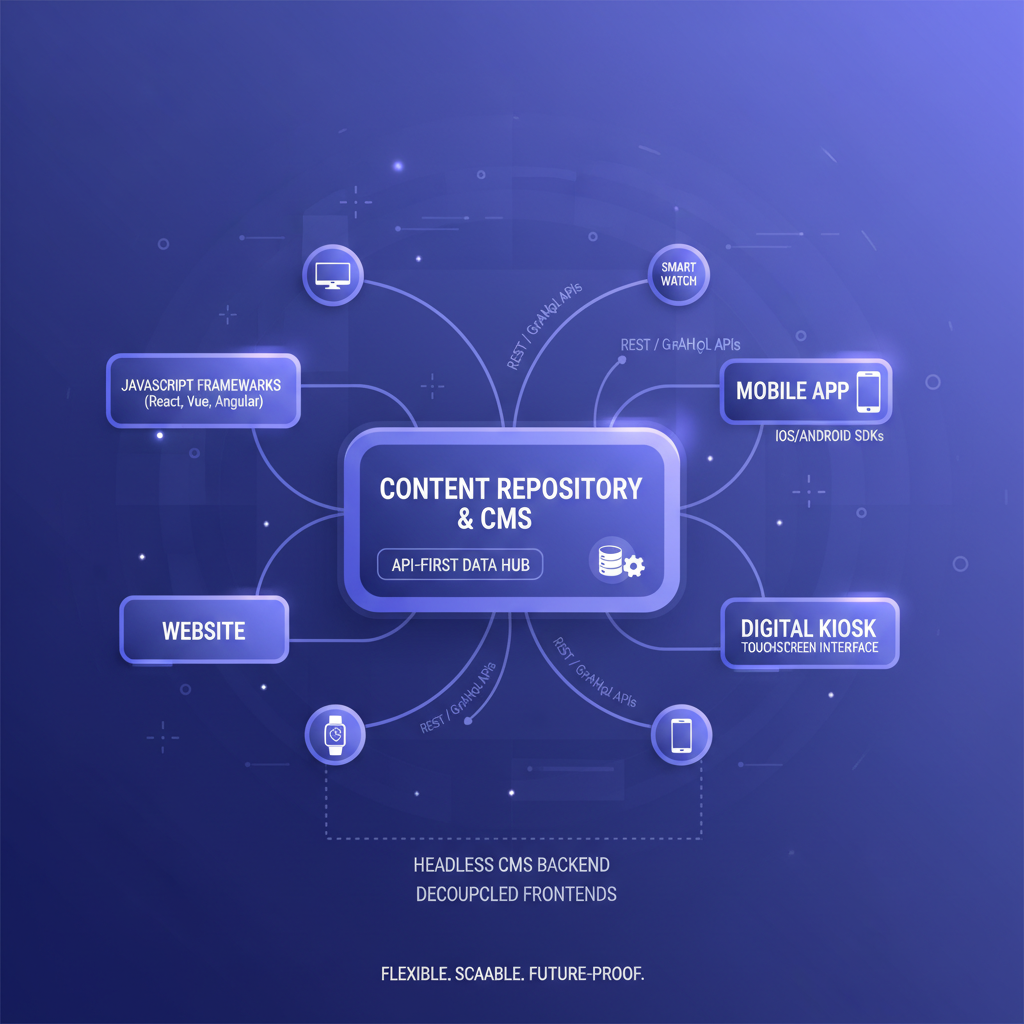
The way businesses manage and deliver digital content has changed fundamentally over the past decade. Where once a single WordPress site served as both the content management layer and the public-facing website, modern organisations now need to push content across websites, mobile apps, digital signage, voice assistants, smartwatches, and channels that haven’t been invented yet. This shift has given rise to the headless CMS - an architecture that decouples content creation from content presentation, giving businesses unprecedented flexibility in how and where their content appears.
For UK businesses evaluating their content infrastructure in 2026, the question is no longer “what is a headless CMS?” but rather “is a headless CMS right for my specific needs, budget, and technical capacity?” The answer is nuanced. Headless architecture offers transformative advantages for certain types of organisations, but it also introduces complexity and cost that can be entirely unnecessary for others. This guide examines the headless CMS landscape in depth - from architecture fundamentals and platform comparisons to migration strategies and real-world cost analysis - so you can make the right decision for your business.
Understanding CMS Architecture: Traditional vs Headless
To understand why headless CMS matters, you first need to understand the architectural difference between traditional and headless approaches - and why that difference has such profound implications for performance, flexibility, and developer experience.
Traditional (Monolithic) CMS Architecture
A traditional CMS like WordPress, Drupal, or Joomla is a monolithic system where the content management backend and the content presentation frontend are tightly coupled into a single application. When an editor publishes an article in WordPress, the system stores the content in its database and then uses PHP templates to render that content as an HTML page when a visitor requests it. The CMS controls everything: the admin interface where editors work, the database where content lives, the templating engine that generates HTML, and the web server that delivers pages to browsers.
This approach has obvious advantages. It’s simple. Everything is in one place. Non-technical users can install WordPress, pick a theme, and have a functional website running within hours. The ecosystem of themes and plugins is enormous. For straightforward websites - blogs, brochure sites, small e-commerce shops - this simplicity is genuinely valuable.
The problems emerge when businesses need to deliver content beyond a single website. A traditional CMS assumes that content will always be rendered as an HTML web page. If you want that same content on a mobile app, you need to build custom API endpoints. If you want it on a digital kiosk, you’re fighting against the system’s fundamental assumptions. The content and its presentation are intertwined in ways that make repurposing difficult, and performance is constrained by the server-rendered architecture.
Headless CMS Architecture
A headless CMS removes the “head” - the frontend presentation layer - and exposes content purely through APIs. Editors still use a rich admin interface to create and manage content, but the CMS has no opinion about how or where that content is displayed. Instead, it provides structured content via REST or GraphQL APIs, and separate frontend applications consume those APIs to render content for each channel.
Think of it this way: a traditional CMS is a restaurant where the kitchen prepares meals and serves them on its own plates at its own tables. A headless CMS is a catering kitchen that prepares food and hands it to any venue - a corporate event, a food truck, a home delivery service - to serve however they choose. The kitchen (content management) and the dining experience (content presentation) are completely independent.
Traditional CMS
Headless CMS
API-First Content Delivery
The defining characteristic of a headless CMS is its API-first approach to content delivery. Rather than generating HTML pages on the server, a headless CMS exposes structured content through well-documented APIs that any application can consume. This seemingly simple architectural shift has cascading effects on every aspect of how content is managed, delivered, and experienced.
REST vs GraphQL APIs
Most headless CMS platforms offer REST APIs, GraphQL APIs, or both. REST APIs follow a resource-based pattern - you request content from specific endpoints (e.g., /api/blog-posts/headless-cms-guide) and receive a JSON response containing the content and its metadata. REST is straightforward, widely understood, and well-supported by every programming language and framework.
GraphQL, pioneered by Facebook and adopted enthusiastically by the headless CMS community, takes a different approach. Instead of the server defining what data each endpoint returns, the client specifies exactly what data it needs in a query. This eliminates over-fetching (receiving more data than you need) and under-fetching (needing multiple requests to assemble a complete view), which makes GraphQL particularly efficient for complex content structures and mobile applications where bandwidth matters.
Content Delivery Networks and Edge Caching
Because headless CMS content is delivered as pure data (JSON), it is extraordinarily cacheable. API responses can be cached at the CDN edge - in data centres physically close to end users - meaning content loads from the nearest edge node rather than making a round trip to the origin server. Combined with static site generation (where pages are pre-built at deploy time rather than generated on each request), headless architectures routinely achieve page load times measured in milliseconds rather than seconds.
For UK businesses with international audiences, this is transformative. A WordPress site hosted on a single UK server delivers noticeably slower experiences to visitors in Australia, Singapore, or the United States. A headless site deployed to a global CDN delivers identical performance everywhere, because content is served from local edge nodes across the world.
Leading Headless CMS Platforms
The headless CMS market has matured significantly, with platforms ranging from developer-focused open-source tools to enterprise-grade SaaS offerings. Here are the four leading platforms that UK businesses should evaluate, along with their strengths, limitations, and pricing structures.
Contentful
Contentful is the market leader in headless CMS, trusted by brands including Spotify, Vodafone, and the BBC. It offers a polished cloud-hosted platform with excellent content modelling tools, a mature API, comprehensive webhooks, and strong localisation support. Contentful’s content infrastructure approach - treating content as structured data rather than pages - makes it particularly powerful for organisations managing content across multiple brands, regions, and channels.
The editor experience is clean and intuitive, with a customisable interface that can be tailored to different editorial workflows. For developers, Contentful provides SDKs for every major language, a GraphQL API alongside REST, and a robust app framework for extending the platform. The trade-off is cost: Contentful’s pricing rises steeply as you scale, and the free tier is limited to 25,000 records and 5 users.
Strapi
Strapi is the leading open-source headless CMS, offering maximum flexibility and control for organisations that want to self-host their content infrastructure. Built on Node.js, Strapi lets you define content types through an intuitive admin panel, generates REST and GraphQL APIs automatically, and supports custom controllers, middleware, and plugins for extending functionality.
The key advantage of Strapi is ownership. You host it on your own infrastructure (or any cloud provider), your content stays in your own database, and there are no per-seat or per-API-call charges. This makes Strapi particularly attractive for UK businesses with data sovereignty requirements or those who need to keep costs predictable at scale. Strapi Cloud - the managed hosting option - starts at £25 per month for teams that want the open-source flexibility without the infrastructure management overhead.
Sanity
Sanity takes a unique approach with its real-time, collaborative content platform. Content is stored in Sanity’s hosted data store and accessed via GROQ (Sanity’s custom query language) or GraphQL. What sets Sanity apart is Sanity Studio - a fully customisable, React-based editing environment that developers can tailor precisely to editorial workflows. The real-time collaboration features are exceptional, allowing multiple editors to work on the same content simultaneously with live previews.
Sanity’s “structured content” philosophy goes further than most platforms, treating content as deeply nested, richly typed data that can be queried, transformed, and combined in sophisticated ways. The Portable Text format for rich text content is particularly elegant, storing rich text as structured data rather than HTML, which makes it trivially easy to render across different channels. Pricing is usage-based, with a generous free tier that supports up to three users and 500,000 API requests per month.
Storyblok
Storyblok bridges the gap between headless and traditional CMS with its visual editor - a unique feature that lets editors see a live preview of their content as it will appear on the actual website, whilst still delivering content through APIs. This addresses one of the most common objections to headless CMS: that editors lose the ability to see what their content looks like in context.
For UK businesses where marketing teams need visual editing capabilities but development teams want the flexibility of headless architecture, Storyblok is often the best compromise. The platform supports component-based content modelling, nested content structures, and multi-language content out of the box. Pricing starts with a free tier for one user and one space, with paid plans from £7 per user per month.
| Platform | Type | Starting Price | Best For | API Type | Visual Editor |
|---|---|---|---|---|---|
| Contentful | Cloud SaaS | Free tier; paid from £300/mo | Enterprise multi-channel delivery | REST + GraphQL | No (preview only) |
| Strapi | Open Source / Cloud | Free (self-host); Cloud from £25/mo | Developer-led teams, data sovereignty | REST + GraphQL | No |
| Sanity | Cloud SaaS | Free tier; paid from £80/mo | Real-time collaboration, custom studios | GROQ + GraphQL | Customisable previews |
| Storyblok | Cloud SaaS | Free tier; paid from £7/user/mo | Marketing teams needing visual editing | REST + GraphQL | Yes (full visual editor) |
| WordPress (headless) | Self-hosted / Managed | Free (self-host); managed from £20/mo | Teams with existing WordPress expertise | REST (WP API) | Gutenberg editor |
| Hygraph | Cloud SaaS | Free tier; paid from £200/mo | Content federation across multiple sources | GraphQL-native | No |
When to Go Headless vs Staying with WordPress
The decision between headless and traditional CMS is not a binary, ideological choice - it’s a practical assessment of your business requirements, technical capacity, and growth trajectory. Here are the scenarios where each approach makes the most sense.
Go Headless When…
- You deliver content to multiple channels - if your content needs to appear on a website, a mobile app, a digital kiosk, an in-store display, or a third-party platform, headless is the natural architecture. Creating content once and distributing it everywhere via APIs is fundamentally more efficient than maintaining separate content for each channel
- Performance is a competitive advantage - for e-commerce sites, media publishers, or any business where page speed directly impacts revenue, the performance gains from headless + static generation + CDN delivery are significant and measurable
- You have (or can hire) frontend developers - headless CMS requires developers to build the frontend. If you have a capable development team that wants to use modern frameworks like React, Next.js, Vue, or Nuxt, headless architecture lets them work with the tools they know best
- You need sophisticated content modelling - if your content has complex relationships, nested structures, or needs to be assembled dynamically from reusable components, headless platforms offer far more powerful content modelling than WordPress’s post/page paradigm
- You’re building a content-driven product - if content is the core of your product (a learning platform, a media site, a documentation hub), headless CMS gives you the flexibility to evolve the product without being constrained by the CMS’s assumptions about content structure
Stay with WordPress When…
- You need a simple website managed by non-technical staff - for brochure websites, small business sites, or blogs where the primary users are marketers or business owners who need to update content without developer involvement, WordPress remains the most accessible option
- Budget is severely constrained - a WordPress site can be launched for under £500 with a premium theme and hosting. An equivalent headless build will cost £8,000–£25,000 or more, because the frontend must be custom-built
- You need rapid deployment with minimal development - WordPress’s ecosystem of themes and plugins means you can launch a fully functional site in days rather than weeks. If time-to-market matters more than architectural purity, WordPress delivers
- Content only needs to appear on one website - if you have a single website and no foreseeable need for multi-channel delivery, the added complexity of headless architecture provides little practical benefit
- Your team lacks technical resources - headless CMS requires ongoing developer involvement for frontend changes, new page templates, and infrastructure management. If you don’t have developers on staff or retainer, you’ll be dependent on external agencies for every change
Do not go headless simply because it sounds modern or because a developer advocated for it. If your business runs a single-language brochure website updated monthly by a marketing manager, switching to a headless CMS will increase your costs by 3–5x, make simple content updates dependent on developers, and deliver no meaningful business benefit. Headless architecture solves specific problems - multi-channel delivery, performance at scale, frontend flexibility - and is unnecessary overhead when those problems don’t exist. Evaluate your actual requirements, not industry hype.
Multi-Channel Content Delivery
Multi-channel delivery is the killer feature of headless architecture - the capability that justifies the additional complexity and cost for businesses that need it. Once content is stored as structured data and exposed via APIs, the possibilities for where and how it appears are essentially limitless.
Common Delivery Channels
UK businesses adopting headless CMS typically start with their website and then progressively add channels as the business demands. The most common channels include:
- Primary website - built with a modern framework (Next.js, Nuxt, Gatsby, Astro) consuming content from the CMS API. Often deployed as a static site for maximum performance
- Mobile applications - native iOS and Android apps consuming the same content API. No need to duplicate content management or build a separate backend for mobile
- Progressive web apps (PWAs) - offline-capable web experiences that pull content from the CMS and cache it locally for use without an internet connection
- Digital signage and kiosks - retail displays, office information screens, and interactive kiosks rendering CMS content in real time
- Email campaigns - marketing emails assembled from CMS content components, ensuring consistency with the website and reducing duplication
- Third-party platforms - syndicated content pushed to partner websites, marketplaces, or aggregator platforms via API
- Voice interfaces - Alexa skills or Google Assistant actions that read CMS content aloud, useful for FAQs, product information, or accessibility
- Smartwatch and wearable apps - condensed content summaries for small screens, powered by the same API
The “Create Once, Publish Everywhere” Reality
The promise of “create once, publish everywhere” (COPE) is real with headless CMS, but it requires careful content modelling. Content that works across channels cannot be written with a specific layout in mind. Instead, it must be structured as modular, presentation-agnostic data - a headline, a summary, a body, an image with alt text, metadata - that each channel can render appropriately for its medium.
This is a cultural shift for content teams accustomed to writing for a specific web page. Training editors to think in structured content rather than visual layouts is one of the most important (and most underestimated) aspects of a successful headless CMS implementation.
Developer Experience Benefits
One of the most compelling advantages of headless CMS - and a primary driver of adoption - is the dramatically improved developer experience. For development teams accustomed to wrestling with WordPress template hierarchies, PHP spaghetti, and plugin conflicts, the shift to headless architecture can feel liberating.
Framework Freedom
With a traditional CMS, developers are locked into the CMS’s technology stack. WordPress means PHP and its templating system. Drupal means PHP and Twig. With a headless CMS, the frontend is completely independent - developers can use whichever framework best suits the project. React with Next.js for complex interactive applications. Vue with Nuxt for elegant single-page experiences. Astro for blazing-fast content sites. Svelte for lightweight, performant interfaces. Even vanilla HTML and JavaScript for the simplest implementations.
This freedom has significant implications for recruitment and retention. UK businesses competing for developer talent can offer modern technology stacks rather than asking senior developers to work with ageing WordPress codebases. Developers want to work with current tools and frameworks - headless CMS enables this without sacrificing content management capabilities.
Local Development and Testing
Traditional CMS development typically requires replicating the entire CMS environment locally - installing PHP, MySQL, the CMS itself, and all its plugins - just to work on the frontend. With headless CMS, frontend development is entirely decoupled. Developers run their frontend framework locally and consume content from the CMS API (or from cached/mocked API responses). This makes the development environment simpler, faster to set up, and easier to maintain.
Version Control and CI/CD
Headless frontends are standard code projects that live in Git repositories, follow proper branching strategies, go through code review, and deploy through CI/CD pipelines. This is a dramatic improvement over traditional CMS workflows where theme customisations are often made directly in the WordPress admin, database changes are made manually, and “deployment” means uploading files via FTP. The entire frontend codebase can be tested, reviewed, and deployed with the same rigour as any other software project.
Type Safety and Developer Tooling
Most headless CMS platforms generate TypeScript types from your content models, giving developers compile-time type checking for all content. If an editor adds a new field to a blog post model, the TypeScript types update automatically, and the build process catches any frontend code that hasn’t been updated to handle the new field. This level of type safety is impossible with traditional CMS templates, where content structure changes can silently break pages.
Content Modelling Best Practices
Content modelling - defining the structure, relationships, and constraints of your content types - is the most important step in any headless CMS implementation. A well-designed content model makes content easy to create, consistent across channels, and flexible enough to evolve. A poorly designed model creates editorial friction, inconsistent output, and expensive rework when requirements change.
Think in Components, Not Pages
The most common mistake in content modelling is replicating page layouts as content types. Instead of creating a “Homepage” content type with fields for hero banner, featured products, testimonials, and call-to-action, create separate content types for each component (Hero Banner, Product Feature, Testimonial, CTA Block) and assemble pages from these components. This approach means components can be reused across multiple pages and channels, editors can rearrange page layouts without developer involvement, and new page types can be created from existing components.
Separate Content from Presentation
Content models should describe what the content is, not how it looks. A “Call to Action” component should have fields for heading, body text, button label, and link destination - not fields for background colour, font size, or layout direction. Presentation decisions belong in the frontend code, not in the CMS. This separation ensures content remains meaningful and reusable regardless of where it appears.
Design for Localisation from the Start
If your business operates (or may operate) in multiple markets, build localisation into your content model from day one. All major headless CMS platforms support localised fields - where the same content entry has different values for different locales - but retro-fitting localisation onto a content model designed for a single language is painful. Even if you only serve UK English today, structuring your content model to support additional languages costs nothing upfront and saves enormous effort later.
Start with a content audit before designing your model. Map every piece of content your organisation produces, identify common patterns and relationships, and design content types that reflect how content is actually structured - not how your current website happens to display it. Use reference fields to connect related content (e.g., a Blog Post references an Author and multiple Categories) rather than duplicating information. Keep field names descriptive and consistent across content types. And critically, involve your editorial team in the modelling process - they understand content relationships better than developers do.
Performance Advantages of Headless Architecture
Performance is one of the most tangible and measurable benefits of headless CMS architecture. The combination of API-driven content delivery, static site generation, and CDN edge caching produces websites that are significantly faster than their traditional CMS counterparts - often by an order of magnitude.
Static Site Generation (SSG)
Frameworks like Next.js, Gatsby, and Astro can fetch content from the headless CMS at build time and generate static HTML pages. These pages are pre-built, fully rendered HTML files that require no server-side processing when a visitor requests them. A CDN simply serves the pre-built file, which is as fast as serving a static image. For content-heavy sites with thousands of pages, this approach delivers consistent sub-second page loads regardless of traffic volume.
Incremental Static Regeneration (ISR)
For sites where content changes frequently and full rebuilds would be impractical, Next.js offers Incremental Static Regeneration - a hybrid approach where pages are statically generated but automatically regenerated in the background when content changes. This combines the performance of static sites with the freshness of dynamic sites, making it ideal for e-commerce catalogues, news sites, and frequently updated content portals.
Core Web Vitals Impact
Google’s Core Web Vitals - Largest Contentful Paint (LCP), Interaction to Next Paint (INP), and Cumulative Layout Shift (CLS) - directly influence search rankings. Headless architectures consistently outperform traditional CMS on these metrics. A typical WordPress site with plugins scores LCP of 2.5–4.5 seconds. An equivalent headless site with static generation and CDN delivery scores LCP of 0.5–1.2 seconds. For UK businesses investing in SEO, this performance advantage translates directly into higher rankings and more organic traffic.
Scalability Without Infrastructure Complexity
Traditional CMS sites under heavy traffic require careful server scaling - load balancers, multiple application servers, database replicas, and caching layers. A headless site served from a CDN scales automatically to handle virtually unlimited traffic without any infrastructure changes. The BBC’s website, built on headless architecture, handles tens of millions of daily visitors without breaking a sweat, because static pages served from edge nodes require no origin server processing.
Migration Strategies: Moving from Traditional to Headless
Migrating from a traditional CMS to a headless architecture is a significant undertaking that requires careful planning. A poorly executed migration can disrupt content workflows, break existing SEO rankings, and create months of editorial frustration. Here are the proven strategies for managing the transition.
Strategy 1: The Big Bang (Complete Replacement)
Replace the entire CMS and frontend simultaneously. All content is migrated to the new headless CMS, a new frontend is built from scratch, and the old site is switched off when the new one goes live. This approach is clean and avoids the complexity of running two systems, but carries higher risk - if something goes wrong, there’s no fallback. Best suited for smaller sites (under 500 pages) where the migration can be completed within 8–12 weeks.
Strategy 2: The Strangler Fig (Gradual Migration)
Named after the strangler fig tree that gradually envelops its host, this strategy involves migrating one section of the site at a time. You might start by moving the blog to headless while keeping the rest of the site on WordPress, then migrate the product pages, then the landing pages, and finally the homepage. A reverse proxy routes requests to the appropriate system based on the URL path. This approach is lower risk and allows the team to learn as they go, but the operational complexity of maintaining two systems in parallel can be significant.
Strategy 3: WordPress as Headless CMS
If your team is deeply invested in WordPress workflows and your content library is extensive, you can use WordPress itself as a headless CMS. WordPress’s REST API exposes all content as structured JSON, which a modern frontend framework can consume. This preserves the familiar WordPress editing experience whilst gaining the performance and flexibility benefits of a decoupled frontend. The trade-off is that you retain WordPress’s limitations in content modelling and don’t gain the more sophisticated features of purpose-built headless platforms.
Content Migration Checklist
- Content audit: catalogue every content type, field, relationship, and media asset in the existing CMS
- URL mapping: create a comprehensive map of existing URLs to new URLs, and set up 301 redirects for any that change (critical for preserving SEO rankings)
- Content transformation: convert content from the old format to the new content model, cleaning up inconsistencies and enriching metadata in the process
- Media migration: transfer all images, documents, and media files to the new asset storage, updating references within content
- SEO preservation: verify that all meta titles, descriptions, canonical URLs, structured data, and Open Graph tags are correctly migrated
- Editorial training: train content editors on the new CMS before the migration goes live, not after
- Testing: test every page template, every content type, every URL redirect, and every editorial workflow before launch
Cost Comparison for UK Businesses
Understanding the true cost of headless CMS requires looking beyond platform licence fees to include development, hosting, and ongoing maintenance. Here is a realistic cost comparison for UK businesses, broken down by business size and complexity.
Small Business (Under 50 Employees, Simple Website)
WordPress route: A professional WordPress site with a premium theme, essential plugins, and managed hosting typically costs £2,000–£5,000 to build and £200–£500 per year to maintain. Non-technical staff can manage content independently after initial training.
Headless route: A headless CMS build with a custom frontend requires £8,000–£20,000 in initial development, plus £50–£300 per month for the CMS platform, £20–£100 per month for frontend hosting, and £1,000–£3,000 per year for ongoing developer support. Content changes that affect the frontend structure require developer involvement.
Verdict: For small businesses with simple websites, WordPress is significantly more cost-effective. The headless premium of 3–5x is not justified when content only appears on a single website.
Mid-Size Business (50–500 Employees, Multi-Channel Needs)
WordPress route: A complex WordPress site with custom development, WooCommerce, and multiple integrations costs £15,000–£40,000 to build and £5,000–£15,000 per year to maintain. Performance optimisation, security patching, and plugin management create ongoing overhead.
Headless route: A headless CMS implementation for mid-size businesses typically costs £25,000–£60,000 for the initial build, including content modelling, frontend development, and integrations. Platform costs range from £1,200–£6,000 per year depending on the platform and usage. However, multi-channel content delivery, better performance, and reduced content duplication often generate measurable ROI within 12–18 months.
Verdict: For mid-size businesses with multi-channel requirements, headless CMS typically delivers positive ROI within two years, particularly when factoring in developer productivity gains and content team efficiency.
Enterprise (500+ Employees, Complex Digital Ecosystem)
WordPress route: Enterprise WordPress implementations (WordPress VIP or heavily customised self-hosted setups) cost £50,000–£150,000+ to build and £20,000–£60,000 per year to maintain, including WordPress VIP hosting at £20,000–£50,000 per year. At this scale, WordPress’s architectural limitations create increasing technical debt.
Headless route: Enterprise headless implementations range from £60,000–£200,000 for the initial build, with platform costs of £6,000–£36,000 per year for enterprise-tier plans. The investment is justified by the ability to serve content to unlimited channels, achieve superior performance at scale, and empower development teams with modern tools. Total cost of ownership over five years is typically comparable to or lower than enterprise WordPress.
Verdict: For enterprise organisations, headless CMS is almost always the better long-term investment. The architectural flexibility, performance at scale, and developer productivity gains compound over time, making headless increasingly cost-effective as the business grows.
Making the Right Decision for Your Business
The headless CMS landscape in 2026 offers UK businesses genuine choice - from open-source self-hosted platforms that cost nothing beyond hosting, to enterprise SaaS offerings with global edge delivery and real-time collaboration. The technology is mature, the tooling is excellent, and the performance advantages are indisputable.
But technology decisions should always be driven by business requirements, not industry trends. If your business publishes content to a single website managed by a small marketing team, a well-built WordPress site remains the most practical and cost-effective solution. If your business needs to deliver content across multiple channels, demands exceptional performance, or has a development team eager to work with modern frameworks, headless CMS will transform how you create and deliver digital content.
The most important step is an honest assessment of where you are today and where you need to be in three to five years. If multi-channel delivery, performance at scale, or developer experience are on your roadmap, starting with headless architecture now - even for a single channel - saves you from a costly migration later. If those needs are genuinely unlikely, there is no shame in choosing the simpler path.
Whatever you decide, the content itself remains paramount. The most sophisticated content infrastructure in the world cannot compensate for poorly written, inconsistent, or out-of-date content. Invest in your content strategy and editorial processes first, and let the technology serve those goals - not the other way around.

CloudSwitched
London-based managed IT services provider offering support, cloud solutions and cybersecurity for SMEs.


