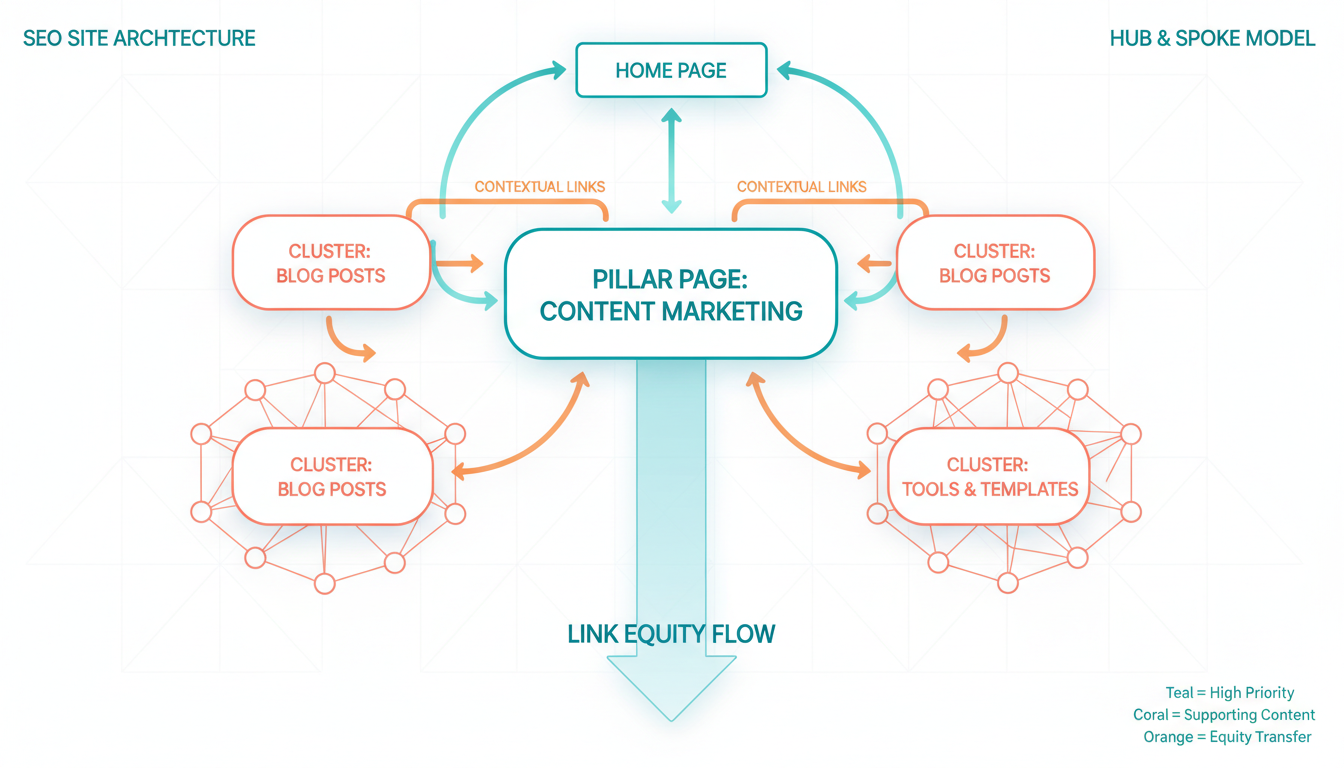
Internal linking is one of the most powerful yet underutilised SEO techniques available to UK businesses. Whilst most website owners spend considerable time and money building external backlinks, they often neglect the links within their own site - missing out on significant ranking improvements that are entirely within their control. A well-planned internal linking strategy can boost your search rankings, improve user experience, and help Google understand the structure and hierarchy of your content.
An internal link is simply a hyperlink that points from one page on your website to another page on the same website. Your main navigation menu, footer links, sidebar widgets, and in-content links all count as internal links. However, it is the strategic, contextual links placed within your body content that have the greatest impact on SEO performance.
Why Internal Links Matter for SEO
Google uses internal links to discover new pages on your website, understand the relationships between different pages, and distribute ranking power (often called "link equity" or "link juice") throughout your site. Without adequate internal linking, some of your pages may be effectively invisible to search engines, regardless of how good their content is.
When Google's crawler arrives at your website, it follows links to move from page to page. If a page has no internal links pointing to it, the crawler may never find it - or may consider it unimportant. Conversely, a page that receives many internal links from other relevant pages signals to Google that it is a key piece of content that deserves attention.
Internal links also pass authority. Your homepage typically has the most backlinks and therefore the most authority. By linking strategically from your homepage and other high-authority pages to deeper content, you distribute that authority where it is needed most, helping lower-level pages rank better.
The data speaks for itself when it comes to the impact of internal linking. Research from major SEO studies consistently shows that websites with well-structured internal link networks outperform those without, often by significant margins. Understanding these benchmarks can help you appreciate why investing time in your internal link strategy delivers measurable returns for your overall organic visibility.
How Internal Linking Differs From External Linking
External links (backlinks) are links from other websites pointing to your site. They are widely recognised as one of the strongest ranking factors in Google's algorithm. Internal links, by contrast, are links you create yourself within your own website. Whilst they do not carry the same weight as external backlinks in terms of raw authority, they offer several advantages that make them indispensable.
First, you have complete control over your internal links. You can add, modify, or remove them at any time without needing to negotiate with another website owner. Second, you control the anchor text - the clickable text of the link - which helps Google understand what the linked page is about. Third, internal links directly improve user experience by guiding visitors to related content, keeping them on your site longer and reducing bounce rates.
The most effective SEO strategies use both internal and external links in harmony. External backlinks build your site's overall authority, whilst internal links distribute that authority to the pages that need it most and help Google understand your site's topical structure.
Types of Internal Links
Not all internal links are created equal. Understanding the different types and their respective values will help you build a more effective linking strategy.
Navigational links appear in your site's header, footer, and sidebar menus. These provide site-wide linking and help users and search engines find your main pages. Whilst important for usability, they carry less SEO weight than contextual links because they appear on every page and are not directly relevant to the surrounding content.
Contextual links are placed within the body content of a page and link to related content on your site. These are the most valuable type of internal link because they are surrounded by relevant text, helping Google understand the context and relevance of the link. When someone is reading about cyber security and encounters a link to your phishing prevention guide, that contextual relationship strengthens both pages.
Breadcrumb links show users their location within your site hierarchy (e.g., Home > Services > IT Support). These help both users and search engines understand your site structure and can appear as rich results in Google.
Related content links typically appear at the bottom of blog posts or articles, suggesting other content the reader might find interesting. These keep users engaged with your site and provide additional crawl paths for search engines.
Google treats the first link to a page as the most important one. If you link to the same page multiple times from a single article, the anchor text of the first link carries the most weight. Plan your internal links so that the first occurrence uses your most important anchor text.
Building an Internal Linking Strategy
Random internal linking is better than no internal linking, but a strategic approach delivers far superior results. Here is how to build an internal linking strategy that systematically improves your SEO performance.
Step 1: Audit Your Existing Internal Links
Before you can improve your internal linking, you need to understand your current state. Use a crawling tool like Screaming Frog, Sitebulb, or Ahrefs Site Audit to map your site's internal link structure. Pay particular attention to orphan pages (pages with few or no internal links), your most-linked pages, and any broken internal links.
Create a spreadsheet listing your key pages, the number of internal links pointing to each, and the anchor text used. This baseline data will help you identify gaps and prioritise your linking efforts.
Step 2: Identify Your Pillar Pages
Pillar pages are the most important pages on your website - the ones you most want to rank in search results. These are typically your main service pages, product pages, and comprehensive guide-style content. Every other page on your site should ultimately support these pillar pages through strategic internal linking.
For a UK IT services company, pillar pages might include the main pages for IT support, cyber security, cloud services, and managed services. For an accounting firm, they might be pages for tax services, audit services, bookkeeping, and business advisory. Identify your five to ten most important pages and mark them as link targets.
Step 3: Create Topic Clusters
Organise your content into topic clusters, with each cluster centred around a pillar page. All content within a cluster should link to the pillar page, and the pillar page should link to the most important cluster content. This creates a clear topical hierarchy that helps Google understand your site's expertise areas.
For example, a cyber security pillar page might have cluster content covering phishing, ransomware, password security, employee training, compliance, and incident response. Each of these articles links back to the main cyber security page, reinforcing its authority on the broader topic.
Step 4: Use Descriptive Anchor Text
Anchor text - the clickable text in a hyperlink - tells Google what the linked page is about. Using descriptive, keyword-rich anchor text for your internal links helps search engines understand the content and context of your pages.
Instead of generic anchor text like "click here" or "read more," use descriptive phrases that include relevant keywords. For example, link with "our comprehensive guide to cyber security for small businesses" rather than "click here to learn more." This provides clear signals to Google about the linked page's topic.
However, avoid over-optimisation. Using the exact same keyword-rich anchor text for every internal link to a page can appear manipulative. Vary your anchor text naturally, using a mix of exact-match keywords, partial-match phrases, and natural language variations.
Step 5: Link Deep
Many websites concentrate their internal links on top-level pages - the homepage, main category pages, and contact page. Whilst these pages deserve links, the pages that benefit most from additional internal linking are often deeper in your site structure. Blog posts, detailed guides, case studies, and specific service sub-pages frequently lack adequate internal links despite having strong content.
Make a conscious effort to link to these deeper pages from your newer content. When you publish a new blog post, identify three to five existing pages that are thematically related and add internal links to them. Also go back to those existing pages and add links to your new content where relevant.
| Internal Linking Best Practice | Why It Matters | Implementation Difficulty |
|---|---|---|
| Use descriptive anchor text | Helps Google understand page context | Easy |
| Link to deep pages, not just top-level | Distributes authority to content that needs it | Easy |
| Create topic clusters | Builds topical authority for key subjects | Moderate |
| Fix orphan pages | Ensures all content is discoverable | Easy |
| Update old content with new links | Keeps link structure current and comprehensive | Moderate |
| Implement breadcrumbs | Clarifies site hierarchy for users and Google | Moderate |
| Audit and remove broken links | Prevents wasted crawl budget and poor UX | Easy |
| Limit links per page to reasonable numbers | Maintains link value and readability | Easy |
How Many Internal Links Should You Use?
There is no hard rule about the maximum number of internal links per page, but common sense and readability should guide your decisions. Google has stated that it can follow hundreds of links per page, so technical limits are rarely a concern. The practical limit is usually determined by user experience.
For a standard blog post of 1,500 to 2,500 words, three to eight contextual internal links is typically appropriate. For longer pillar content of 3,000 words or more, ten to fifteen internal links may be warranted. The key is that every link should be genuinely useful to the reader - if it does not add value or context, do not include it.
Your homepage and main navigation pages will naturally have more internal links, as they serve as hub pages that connect visitors to all areas of your site. These pages are expected to be link-heavy, so do not worry about having too many links in your navigation structure.
Internal Linking for New Content
Every time you publish a new piece of content, you should take three internal linking actions. First, include three to five internal links within the new content, pointing to existing pages that are topically relevant. Second, go back to existing content and add links to your new page from at least two to three relevant articles. Third, ensure your new page is accessible from your site's navigation or from a category page that is itself well-linked.
This two-way linking approach is crucial. New content that only links to existing pages receives some benefit, but the real power comes when existing, authoritative pages link back to the new content. This sends a clear signal to Google that the new page is part of your site's topical structure and deserves to be crawled and indexed promptly.
Many UK businesses publish blog posts regularly but never go back to update older content with links to newer articles. This means that new content relies entirely on external signals to gain authority, which is much slower than leveraging your existing internal link equity. Spending ten minutes adding internal links from old content to new content can accelerate your indexing and ranking timelines significantly.
Strategic vs Ad Hoc Internal Linking
Many businesses add internal links as an afterthought, inserting them randomly whenever they happen to remember. This ad hoc approach delivers some benefit, but it pales in comparison to a deliberate, strategic linking methodology. The difference between the two approaches is stark, and understanding why structured internal linking outperforms casual linking can help you prioritise this work within your broader SEO programme.
A strategic approach begins with a site-wide audit, identifies pillar pages and topic clusters, and then systematically creates links that reinforce topical relationships and distribute authority where it is most needed. An ad hoc approach, by contrast, relies on individual content creators remembering to add links, which results in inconsistent anchor text, missed linking opportunities, and an uneven distribution of link equity across the site. The cumulative effect of these missed opportunities can be substantial, particularly for larger websites with hundreds or thousands of pages that all compete for search engine attention.
Strategic Internal Linking
Ad Hoc Internal Linking
The results of a strategic approach compound over time. As you build more content and link it systematically to your topic clusters, each new piece strengthens the entire network. Sites that adopt a strategic internal linking methodology typically see measurable improvements in organic traffic within four to eight weeks, with continued gains as the approach matures and the link network becomes increasingly comprehensive across the full breadth of the website.
Common Internal Linking Mistakes
Understanding what not to do is just as important as knowing best practices. Here are the most common internal linking mistakes that UK businesses make.
Using generic anchor text: "Click here," "read more," and "learn more" tell Google nothing about the linked page. Always use descriptive anchor text that includes relevant keywords or phrases.
Linking only from navigation: Navigational links are important but insufficient. The most valuable internal links are contextual - placed within body content where they are surrounded by relevant text. A site that relies solely on navigation links is missing the most powerful form of internal linking.
Creating orphan pages: An orphan page has no internal links pointing to it (or only one from a sitemap). These pages are difficult for Google to discover and rank. Every page on your site should have at least two to three internal links from other relevant pages.
Over-optimising anchor text: Using the exact same keyword phrase as anchor text every time you link to a page can trigger over-optimisation penalties. Vary your anchor text naturally to avoid this issue.
Broken internal links: Links that point to pages that no longer exist (returning 404 errors) waste link equity and create a poor user experience. Audit your internal links regularly and fix or redirect any broken links.
Ignoring link depth: If users need to click more than three times from your homepage to reach a page, that page is probably too deep in your site structure. Important content should be accessible within two to three clicks from the homepage.
Measuring Internal Link Performance
Tracking the impact of your internal linking efforts helps you refine your strategy over time. Several metrics and tools can help you assess performance.
Google Search Console's Links report shows your top internally linked pages and the total number of internal links your site contains. Use this to verify that your most important pages are receiving the most internal links and to identify any pages that might be under-linked.
Monitor your crawl stats in Google Search Console to see how efficiently Googlebot is crawling your site. A well-linked site should show consistent crawling across all important pages. If certain pages are rarely crawled, they may need additional internal links to improve their discoverability.
Track the ranking positions of key pages before and after implementing internal linking changes. You should see gradual improvements in rankings for pages that receive new, relevant internal links, typically within four to eight weeks of the changes being crawled and indexed.
User engagement metrics also matter. Monitor bounce rate, pages per session, and average session duration to assess whether your internal links are successfully guiding users through your content. A well-linked site should show higher pages per session and longer session durations than a poorly-linked one.
Internal Linking Health Benchmarks
To help you gauge where your website stands, here are the key benchmarks that SEO professionals use to assess internal linking health. These scores represent typical targets for a well-optimised UK business website. Scoring below these thresholds indicates areas where your internal linking strategy needs immediate attention and where improvements are likely to yield the greatest returns in terms of organic traffic growth.
Most websites score poorly on orphan page ratio and topic cluster coverage. These two metrics represent the areas where the biggest gains can typically be made. Reducing your orphan page ratio from 40% to under 15% can unlock significant organic traffic growth, as pages that were previously invisible to Google suddenly become discoverable and start ranking for relevant queries. Similarly, building out your topic clusters with comprehensive supporting content and systematic internal links demonstrates topical authority to search engines in a way that isolated, unconnected pages simply cannot achieve on their own.
Advanced Internal Linking Techniques
Once you have mastered the fundamentals, several advanced techniques can take your internal linking to the next level.
Hub and spoke model: Create comprehensive hub pages that link to all related content on a topic, whilst every spoke page links back to the hub. This creates a tightly knit topical cluster that demonstrates expertise to Google.
Strategic link placement: Links placed higher in the body content (within the first few paragraphs) tend to carry more weight than links placed at the bottom. Place your most important internal links early in the content where both users and search engines are most likely to encounter them.
Contextual relevance scoring: Not all internal links are equally valuable. A link from a highly relevant page on the same topic carries more weight than a link from an unrelated page. Prioritise linking between pages that share genuine topical relevance.
Link reclamation: When you delete, move, or restructure pages, the internal links pointing to those pages break. Regularly audit your site for broken internal links and either fix them or implement redirects to preserve the link equity.
Internal linking is a fundamental SEO practice that every UK business should master. Unlike external link building, which depends on the actions of others, internal linking is entirely within your control. By implementing a thoughtful, strategic approach to internal linking, you can dramatically improve how search engines understand and rank your content, delivering more organic traffic without spending a penny on additional tools or services.
Want Us to Optimise Your Internal Link Structure?
Our SEO team conducts thorough internal link audits and implements strategic linking structures that help your most important pages rank higher. We have helped UK businesses significantly improve their organic visibility through smarter internal linking.
Explore Our SEO Services
CloudSwitched
London-based managed IT services provider offering support, cloud solutions and cybersecurity for SMEs.


