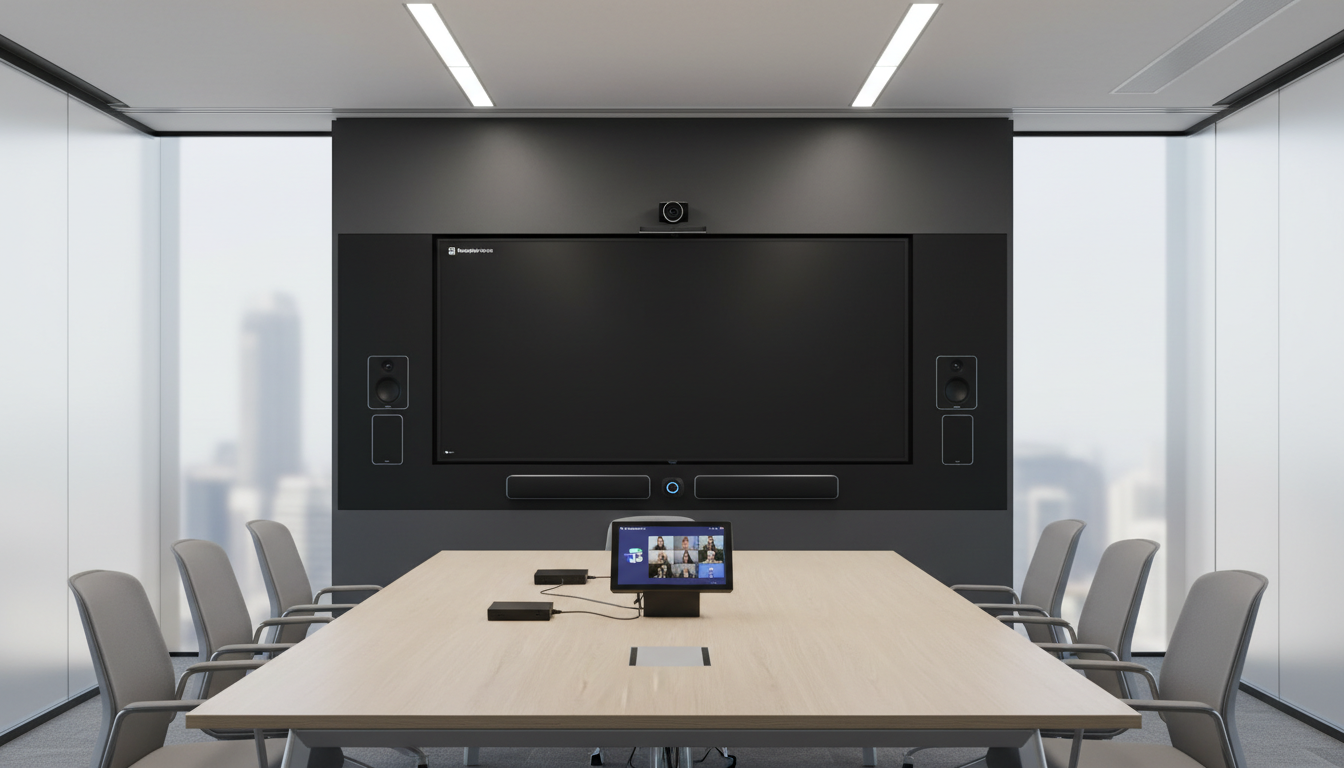
Moving into a new office is a milestone for any UK business, and one of the most important yet frequently underestimated aspects of the transition is setting up your meeting room technology. In an era where hybrid working has become the established norm across Britain, meeting rooms are no longer just physical spaces with chairs and a whiteboard - they are critical collaboration hubs that must seamlessly connect in-office participants with remote colleagues, clients, and partners across different locations and time zones.
Poorly configured meeting rooms lead to significant wasted time, frustrated employees, and a distinctly poor impression on clients and prospects. Research from Barco found that the average UK office worker wastes approximately 15 minutes per meeting dealing with technology issues - connecting laptops, adjusting audio levels, troubleshooting display connections, and waiting for software to load. Over a year, that adds up to dozens of hours of lost productivity per employee. This comprehensive guide walks you through every aspect of meeting room technology planning and setup, from audio-visual equipment selection and network requirements to booking systems, room standardisation, and ongoing management.
Assessing Your Meeting Room Requirements
Before purchasing any equipment, invest time in thoroughly assessing how your organisation actually uses meeting spaces. Not every room needs identical technology - a two-person huddle space has fundamentally different requirements from a twelve-person boardroom or a training room designed to seat twenty participants. Understanding your specific patterns of use ensures you invest wisely rather than over-specifying small rooms or under-equipping critical spaces.
Start by categorising your meeting spaces into tiers based on capacity and primary use case. Small huddle rooms accommodating two to four people typically need a modest display, a simple USB camera, and a compact speakerphone. Medium meeting rooms for five to eight people require a larger display or short-throw projector, a wide-angle conferencing camera, ceiling microphones or a premium conference speakerphone, and wireless presentation capability. Large boardrooms seating ten or more participants benefit from dual displays, multiple cameras or an intelligent tracking camera, distributed ceiling microphone arrays with echo cancellation, and professional audio processing to ensure crystal-clear communication.
Survey your staff before specifying equipment for any room. Ask them what currently frustrates them about meeting rooms, how often they conduct hybrid meetings with remote participants versus fully in-person meetings, and which conferencing platforms they use most frequently - Microsoft Teams, Zoom, or Google Meet. This real-world usage data ensures you invest in the right technology stack rather than guessing or defaulting to whatever the vendor recommends.
Choosing the Right Display Technology
The display is the visual centrepiece of any meeting room and the component that most visibly defines the room's capability. For rooms seating up to eight people, a high-quality commercial LED or OLED display between 55 and 75 inches is typically sufficient for both content sharing and video conferencing. For larger rooms, consider either a larger commercial display at 85 inches or above, or a short-throw laser projector with a fixed ambient-light-rejecting screen.
Commercial-grade displays from manufacturers such as Samsung, LG, and Philips are specifically designed for continuous daily use in business environments. They include features tailored to meeting rooms, including built-in scheduling displays that show room availability on the screen when not in a meeting, auto-power management that turns the display on and off according to room bookings, extended operating warranties of three to five years, and professional mounting options with cable management. Consumer televisions may appear cheaper on paper, but they lack the durability, management features, and warranty coverage needed in a professional environment where the display runs eight to twelve hours daily.
Audio: The Single Most Critical Component
If there is one area where you should never compromise on quality, it is audio. Audio quality makes or breaks a hybrid meeting experience. Poor audio is consistently identified as the single most common and most frustrating complaint from remote meeting participants, and it is far more disruptive to productive communication than poor video quality. You can have a perfectly productive meeting with mediocre video, but terrible audio renders any meeting useless. Investing in excellent audio equipment is therefore absolutely non-negotiable for any meeting room that will host hybrid calls.
For small huddle rooms, an all-in-one USB speakerphone such as the Jabra Speak 750 or Poly Sync 40 provides adequate audio pickup and output for two to four people sitting in close proximity. For medium meeting rooms, a ceiling-mounted microphone array or a table-mounted conference speakerphone with extended pickup range is essential to capture voices from all seats around a larger table. For large boardrooms and training rooms, distributed ceiling microphone pods with professional digital signal processing provide the best possible experience, ensuring that every participant is heard clearly and naturally regardless of where they sit in the room.
| Room Size | Recommended Audio Solution | Approx. Cost |
|---|---|---|
| Huddle Room (2-4 people) | USB tabletop speakerphone | £150 – £350 |
| Medium Room (5-8 people) | Conference speakerphone or ceiling mic pod | £400 – £1,200 |
| Large Boardroom (10+ people) | Distributed ceiling mic array with DSP | £2,000 – £5,000 |
| Training Room (15-30 people) | Multi-zone ceiling array with reinforcement speakers | £4,000 – £8,000 |
Camera Selection for Hybrid Meetings
Video conferencing cameras for meeting rooms have advanced considerably in recent years, with artificial intelligence playing an increasingly central role. Modern meeting room cameras offer sophisticated features like automatic framing that dynamically adjusts the camera view to focus on the people in the room, speaker tracking that smoothly follows whoever is currently speaking, intelligent zoom that provides close-up views of active speakers, and even whiteboard detection that captures and enhances whiteboard content in real time for remote viewers.
For huddle rooms, a compact USB camera mounted on or near the display is sufficient. Popular options in this category include the Logitech Rally Bar Mini and Jabra PanaCast 50. For medium and large rooms, consider the full-size Logitech Rally Bar, Poly Studio X50, or Neat Bar Pro. Many of these devices combine camera, microphone array, and speaker system in a single integrated soundbar unit, simplifying both installation and ongoing management whilst delivering excellent performance.
Wireless Presentation and Content Sharing
The days of fumbling with HDMI cables, display adapters, and dongles should be firmly behind us. Wireless presentation technology allows anyone in the room to share their screen - from a laptop, tablet, or smartphone - without leaving their seat or hunting for the correct cable. This is especially important in hybrid meetings where remote participants need to share content seamlessly alongside in-room participants using the same conferencing platform.
Microsoft Teams Rooms and Zoom Rooms both offer native wireless content sharing capabilities within their respective platforms that work reliably when all participants use the same ecosystem. For a platform-agnostic wireless sharing experience that accommodates guests and visitors, dedicated devices like Barco ClickShare, Mersive Solstice, and ScreenBeam allow users to share from any device regardless of the meeting platform in use. Budget approximately £500 to £1,500 per room for a reliable wireless presentation solution, depending on the sophistication required.
Network Infrastructure Requirements
Meeting room technology is only as reliable as the network infrastructure supporting it. Video conferencing demands consistent, low-latency bandwidth with minimal packet loss and jitter. A single Microsoft Teams or Zoom meeting running in high-definition quality consumes approximately 2 to 4 Mbps of bandwidth in each direction. If your office runs ten simultaneous video meetings during a busy morning, that alone represents 20 to 40 Mbps dedicated exclusively to video conferencing, before accounting for all other internet traffic including file downloads, cloud application access, and web browsing.
Every meeting room should have a dedicated wired Ethernet connection for the primary conferencing system. Whilst modern Wi-Fi can technically support video conferencing, a wired connection provides markedly more consistent performance and eliminates the congestion, interference, and roaming issues that plague wireless networks in busy multi-room office environments. Ensure your network switches support Quality of Service tagging and configuration so that video and voice traffic is automatically prioritised over general data traffic during periods of network contention.
Room Booking and Scheduling Systems
A proper room booking system prevents the twin frustrations of double bookings and ghost bookings - rooms that show as reserved but sit empty because the original booker forgot to cancel. Both Microsoft 365 and Google Workspace include room resource scheduling functionality that integrates directly with Outlook or Google Calendar, allowing employees to book meeting rooms as part of their standard meeting invitation workflow.
For added visibility and convenience, consider installing a small tablet display panel outside each meeting room entrance that shows real-time room availability at a glance. Products like the Logitech Tap Scheduler and Crestron Room Scheduling Touch Panel mount neatly beside the door and display whether the room is currently free, occupied, or has an upcoming booking. Many also support walk-up booking, allowing someone to reserve the room on the spot if it is available. These scheduling panels typically cost £400 to £800 each plus mounting hardware and installation.
Acoustic Treatment and Room Design Considerations
Even the best audio equipment will perform poorly in a room with terrible acoustics. Hard surfaces - glass walls, concrete ceilings, wooden tables, and uncarpeted floors - reflect sound and create echo and reverberation that microphones pick up and amplify, making the audio experience miserable for remote participants. Before investing in premium conferencing hardware, assess the acoustic properties of your meeting rooms and address any obvious issues.
Simple acoustic treatments can dramatically improve meeting room audio quality without major renovation work. Acoustic panels mounted on walls absorb reflections and reduce reverberation. Acoustic ceiling tiles or suspended baffles address overhead reflections. Carpeted or rugged flooring reduces floor reflections. Soft furnishings - upholstered chairs, curtains, and even strategically placed plants - all contribute to a more acoustically favourable environment. For glass-walled meeting rooms, which have become popular in modern UK office fitouts but are acoustically challenging, acoustic film or treatments applied to glass surfaces can reduce reflections whilst maintaining the visual openness of the design.
Room dimensions and layout also affect meeting technology performance. Long, narrow rooms create audio challenges for camera framing and microphone pickup, as participants at the far end of the table may be difficult to see and hear clearly. Square or modestly rectangular rooms provide the best geometry for conferencing equipment. Position the camera and display at one end of the table facing the majority of seats, and ensure that the primary seating positions are within the optimal pickup range of the microphone system you have chosen.
Standardisation: The Key to User Satisfaction
One of the most important principles in meeting room technology design is absolute consistency of experience across all rooms. If every room works differently - one requires an HDMI cable, another uses ClickShare, a third needs you to log into Teams on a dedicated room PC, and a fourth has a completely different touch panel interface - your employees will waste time, become frustrated, and eventually avoid booking the rooms they find confusing.
Standardise the experience across every meeting room in your office so that anyone who knows how to use one room can immediately walk into any other room and start a meeting without assistance. This means choosing a single conferencing platform such as Microsoft Teams Rooms or Zoom Rooms as your standard, using the same or very similar hardware across all rooms scaled appropriately by room size, and providing identical clear instructions displayed in each space. When an employee walks into any meeting room, the process of starting or joining a meeting should be identical regardless of which room they have booked.
Standardised Room Technology
- One-touch meeting join works identically everywhere
- Consistent intuitive user experience
- Simplified IT support and streamlined maintenance
- Bulk hardware purchasing reduces costs by 15-20%
- Faster onboarding for new team members
- Higher employee and client satisfaction
Ad-Hoc Room Technology
- Different setup process and interface per room
- Higher IT support ticket volume and costs
- Complex spare parts inventory to maintain
- Training is harder with multiple systems
- Meeting delays frustrate staff and embarrass with clients
- Technology becomes a barrier rather than enabler
Budgeting for Meeting Room Technology
Meeting room technology investment varies significantly depending on the size and number of rooms, the level of sophistication required, and whether you are equipping a new office from scratch or upgrading existing rooms. For UK businesses, the following approximate budget ranges per room provide useful planning guidance. A basic huddle room with a display, USB camera, and speakerphone can be equipped for £1,200 to £2,500. A fully equipped medium meeting room with a Teams Room or Zoom Room system, display, quality camera, speakerphone, and wireless sharing typically costs £3,000 to £6,000. A large boardroom with dual displays, an intelligent camera system, distributed ceiling microphones, DSP audio processing, and a touch panel controller can range from £8,000 to £20,000 depending on specification.
Beyond the initial capital expenditure, factor in ongoing costs including software licencing for room systems - Microsoft Teams Rooms requires a Teams Rooms licence at approximately £30 to £40 per room per month - maintenance and warranty extensions, and professional support for troubleshooting and firmware management. Many UK businesses find that rolling meeting room technology into their managed IT support agreement provides the most cost-effective ongoing management model, as the IT provider can remotely monitor room systems, apply updates proactively, and resolve issues rapidly without requiring specialist AV knowledge in-house.
Understanding how your meeting room technology budget is typically distributed across different components helps you prioritise spending and identify areas where investment delivers the greatest return. Based on analysis of UK office fitout projects completed over the past two years, audio equipment consistently commands the largest share of the overall technology budget. This reflects its critical importance to meeting quality and hybrid collaboration success, with organisations that allocate at least a quarter of their room technology budget to audio reporting significantly higher user satisfaction scores from both in-room and remote participants.
Typical meeting room technology budget allocation by component category, based on UK office fitout data.
Ongoing Management and Professional Support
Meeting room technology is not a set-and-forget investment. It requires consistent ongoing management to maintain reliability and performance. Firmware updates for cameras, microphones, displays, and conferencing appliances must be applied regularly to address bugs, security vulnerabilities, and compatibility issues. Conferencing platform updates from Microsoft, Zoom, or Google can occasionally introduce changes that affect room system behaviour. Room PCs or dedicated appliances need proactive monitoring to ensure they remain online, responsive, and correctly configured at all times.
Most managed IT providers in the UK now offer meeting room technology management as a standard part of their service offering, including remote monitoring of all room systems via cloud dashboards, proactive firmware and software management, rapid remote and on-site response to reported issues, and periodic reviews of room performance and utilisation data. Having a dedicated IT partner who can remotely diagnose why a room camera has gone offline, a display is showing the wrong input source, or a microphone has stopped picking up audio saves enormous amounts of time compared to ad-hoc in-house troubleshooting by non-specialist staff.
Need Expert Help With Your Meeting Room Setup?
Cloudswitched designs, implements, and manages meeting room technology for offices across the UK - from small huddle spaces to executive boardrooms. We ensure your AV technology works flawlessly every time, so your team can focus on productive meetings rather than technical troubleshooting. Contact us for a consultation.
Get a Meeting Room Technology Quote
CloudSwitched
London-based managed IT services provider offering support, cloud solutions and cybersecurity for SMEs.


