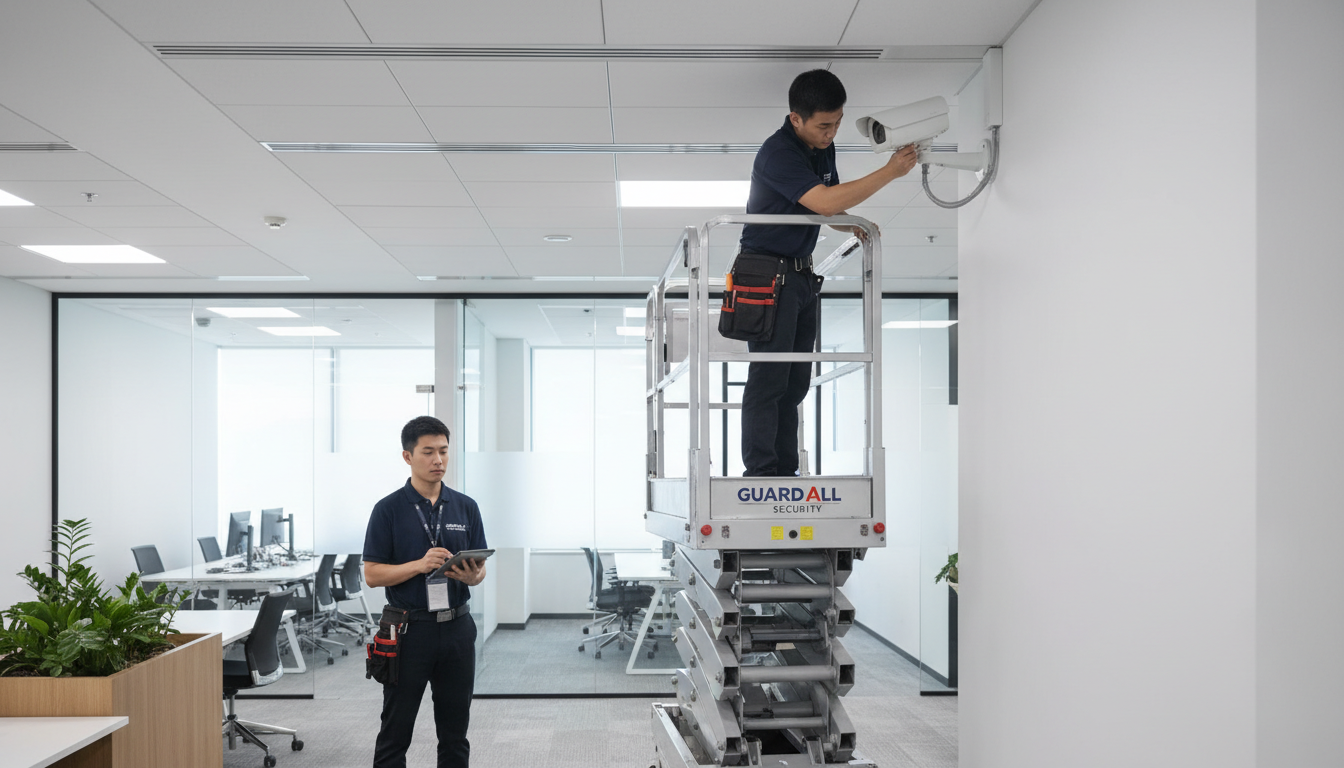
Relocating your business to a new office is a complex undertaking that demands meticulous planning across every department. Among the many technology systems that need to be moved, your CCTV and security infrastructure requires particular attention. Unlike a laptop or a desk phone that can simply be unplugged and carried to the new location, a CCTV system is deeply integrated into the building's physical infrastructure - cabled through walls and ceilings, mounted at specific vantage points, and configured to cover the unique layout of your current premises.
Moving a CCTV system to a new office is not simply a matter of unbolting cameras and reinstalling them elsewhere. The new building will have a different layout, different entry points, different lighting conditions, and potentially different security requirements. In many cases, you will need to conduct a complete security survey of the new premises, design a camera placement plan from scratch, and install new cabling - while also deciding which components from your existing system can be reused and which need replacing.
This guide walks you through the entire process, from initial planning through to final commissioning at your new premises, ensuring your business remains protected throughout the transition.
The challenge is compounded by the fact that CCTV systems have evolved dramatically over the past decade. What was once a simple arrangement of analogue cameras feeding into a standalone recorder has become a sophisticated networked system, often integrated with access control, intruder alarms, and building management platforms. Modern IP-based CCTV systems sit on your corporate network alongside every other device, which means that moving them is as much a networking project as it is a physical installation project. Your IT team and your security installer need to work in lockstep to ensure the new system functions correctly within the new network environment.
There is also the question of continuity. Your business has legal and regulatory obligations to maintain certain security measures, and your insurance policy almost certainly stipulates minimum security requirements. A gap in CCTV coverage during the move could expose you to liability, void elements of your insurance, and leave your staff and assets unprotected at the most vulnerable time - when boxes are being loaded onto vans and doors are propped open for the movers.
Audit Your Existing CCTV System
Before you begin planning the move, you need a complete inventory of your current CCTV system. This audit serves two purposes: it tells you exactly what equipment you have, and it helps you assess which components are worth moving and which should be replaced as part of the relocation.
Your audit should document every component of the existing system. Record the make, model, and age of each camera, noting whether they are analogue or IP cameras, their resolution capabilities, and whether they have features such as infrared night vision, pan-tilt-zoom functionality, or wide dynamic range. Document the network video recorder or digital video recorder, including its storage capacity, the number of channels in use, and the current retention period for footage. Record the cabling infrastructure - the type of cable used (Cat5e, Cat6, coaxial), approximate cable runs, and the condition of existing cabling. Finally, document any associated infrastructure such as PoE switches, mounting brackets, junction boxes, and monitor displays.
| Component | Details to Record | Reuse Potential |
|---|---|---|
| IP cameras (less than 3 years old) | Make, model, resolution, features, firmware version | High - typically worth relocating |
| Analogue cameras | Type, resolution, condition, connector type | Low - consider upgrading to IP |
| NVR / DVR | Channels, storage, age, software version | High if under 5 years old |
| PoE switches | Port count, power budget, managed/unmanaged | High - easily relocated |
| Cabling (Cat5e/Cat6) | Length of runs, condition, labelling | Very low - new runs usually required |
| Mounting hardware | Bracket type, wall/ceiling mount, condition | Medium - depends on new building structure |
Deciding What to Keep and What to Replace
As a general rule, cameras less than three years old with a resolution of 2MP or higher are worth relocating. Older cameras, particularly analogue models, are often better replaced with modern IP cameras that offer superior image quality, easier integration, and lower long-term maintenance costs. The NVR is almost always worth keeping if it is in good condition and has sufficient capacity for the new layout's camera count.
Cabling is rarely worth salvaging. Removing cables from walls and ceilings is time-consuming, and the cables themselves are often damaged during removal. New Cat6 cable is relatively inexpensive, and fresh installations are more reliable and easier to certify. The cost of new cabling is almost always less than the labour cost of carefully extracting and testing old cable.
Firmware and Software Considerations
Beyond the physical hardware, your audit should also encompass the software and firmware running on each device. Record the firmware version on every camera and the NVR, as well as the version of any video management software installed on workstations used for live viewing or playback. Manufacturers regularly release firmware updates that address security vulnerabilities, improve performance, and add new features. An office move is the ideal time to bring every device up to the latest firmware, as cameras will already be taken offline for relocation.
If your system uses a VMS rather than the NVR's built-in interface, check compatibility with the new office's network configuration. Some VMS platforms require specific network ports to be open, and if your new office uses a more restrictive firewall configuration, you may need to coordinate with your IT team to ensure the necessary ports are permitted. Document any custom settings in your VMS, including camera names, view layouts, user permissions, and alert rules, so these can be accurately recreated on the new system.
Before removing any CCTV equipment from your current premises, check your lease agreement. Some commercial leases require tenants to leave certain fixtures and fittings in place - and CCTV cameras mounted to walls or ceilings may qualify as fixtures under UK property law. Conversely, some landlords require you to remove all installations and make good the premises. Clarify this early to avoid disputes and unexpected costs at the end of your current lease.
Survey the New Premises
A professional security survey of your new office is the foundation of an effective CCTV installation. This survey should be conducted well in advance of the move - ideally six to eight weeks before - to allow time for system design, equipment ordering, and pre-installation of cabling.
The survey should assess every aspect of the new building that affects camera placement and system design. This includes the building's entry and exit points (main entrance, fire exits, loading bays, car park access), internal areas that require monitoring (reception, server room, stockroom, corridors), external areas such as car parks and building perimeters, lighting conditions in each area (both natural and artificial), ceiling heights and construction materials that affect mounting options, and the location of the server room or comms cabinet where the NVR will be housed.
Pay particular attention to environmental factors that affect image quality. South-facing windows can cause severe backlighting that renders camera footage unusable without cameras that feature wide dynamic range. Long corridors benefit from cameras with corridor mode capability. Car parks and external areas require weatherproof cameras rated to at least IP66 and equipped with infrared illumination for night-time coverage.
Engaging with Building Management
If your new premises are within a managed building or business park, engage with the building management company or landlord early in the process. Many commercial buildings have restrictions on where external cameras can be mounted, particularly on shared facades or in communal areas. Some buildings have their own CCTV systems covering common areas such as lobbies, corridors, and car parks, which may reduce the number of cameras you need to install within your own demise.
Obtain floor plans and building services drawings if available. These are invaluable for planning cable routes and identifying where existing containment such as cable trays, trunking, and risers can be used. Running CCTV cabling through a building's existing containment is far less disruptive and costly than installing new routes, and it avoids the need to penetrate fire compartment walls, which introduces additional regulatory requirements around fire stopping.
Ask the landlord whether planning permission or building control approval is needed for external camera installations. In conservation areas or on listed buildings, the installation of visible external cameras may require consent, and failure to obtain it can result in enforcement action requiring removal of the equipment at your expense.
Design the New Camera Layout
With the survey complete, you can design the camera layout for the new premises. This is a critical step that requires balancing comprehensive coverage with practical constraints such as budget, cabling routes, and building regulations.
The primary objectives of your camera layout should be to cover all entry and exit points without exception, monitor high-value areas such as server rooms and stock areas, provide coverage of reception and visitor areas, ensure car park coverage if applicable, and eliminate blind spots in corridors and communal areas. Each camera should be positioned to capture clear, identifiable images of anyone entering its field of view, with particular attention to face-capture positions at entry points.
Resolution, Storage, and Analytics Planning
When designing your new layout, give careful thought to camera resolution requirements at each position. Not every camera needs to be the highest resolution available. Cameras covering wide areas such as car parks may benefit from higher resolutions of 4MP or above to maintain useful detail across a broad field of view, whilst cameras in corridors or at door entry points may perform perfectly well at 2MP. Using appropriate resolutions rather than defaulting to the highest available reduces storage requirements and network bandwidth consumption, which can translate to meaningful cost savings on your NVR and network infrastructure.
Calculate your storage requirements based on the number of cameras, their resolutions, frame rates, and your required retention period. As a rough guide, a single 4MP camera recording continuously at 15 frames per second will consume approximately 20 to 30 gigabytes of storage per day, depending on the complexity of the scene. Multiply this across your entire camera count and retention period to determine the NVR storage capacity you need. Many businesses find that their existing NVR's storage is insufficient when moving to higher-resolution cameras at the new premises, so budget for additional hard drives or a replacement unit if necessary.
Consider whether you want to take advantage of intelligent video analytics at the new site. Modern IP cameras offer features such as line-crossing detection, intrusion detection, people counting, and automatic number plate recognition. These features can significantly enhance your security posture but require cameras to be positioned and configured specifically for the analytics to work reliably. Factor this into your camera placement design from the outset rather than trying to retrofit analytics onto cameras positioned purely for general surveillance.
IP Camera System (Recommended)
- High resolution (2MP to 8MP) for detailed identification
- Power over Ethernet - single cable for power and data
- Remote access and monitoring from any device
- Intelligent analytics: motion detection, line crossing, facial recognition
- Easy to scale - add cameras without new cabling infrastructure
- Cloud backup options for footage redundancy
- Integration with access control and alarm systems
Legacy Analogue System
- Lower resolution limits identification at distance
- Separate power and video cables required
- Limited or no remote viewing capability
- Basic motion detection only, no intelligent analytics
- Adding cameras may require new DVR with more channels
- No cloud backup - footage on local drive only
- Limited integration with other security systems
Plan the Cabling Infrastructure
Cabling is the backbone of any CCTV system, and it needs to be planned carefully. For IP camera systems, the standard is Cat6 Ethernet cable, which supports both data transmission and Power over Ethernet up to a maximum run length of 100 metres. If any camera location exceeds this distance from the nearest network switch, you will need to plan for intermediate PoE extenders or additional network switches.
Ideally, CCTV cabling should be installed before you move in - or at least before furniture and equipment are in place. Running cables through occupied offices is disruptive, more expensive, and often results in compromised cable routes. Coordinate with your office fit-out contractor to ensure cable routes are planned alongside other building services such as power, data networking, and fire alarm cabling.
All cabling should be installed in compliance with BS 7671 (the IET Wiring Regulations) and should be tested and certified upon completion. Proper labelling at both ends of every cable run is essential for future maintenance and troubleshooting.
Power over Ethernet Budgeting
For IP camera systems using Power over Ethernet, calculate your total PoE power budget carefully. Each camera draws a specific wattage - typically between 12 and 25 watts for standard cameras, but potentially up to 60 watts or more for PTZ cameras with heaters. Your PoE switch or switches must have sufficient total power budget to supply every connected camera simultaneously, with headroom for future expansion. A common mistake is to install a switch with enough ports for all cameras but insufficient PoE power budget, resulting in cameras intermittently losing power or failing to start up.
If your new office has a dedicated server room or comms cabinet, plan for the PoE switches to be rack-mounted alongside your other network equipment. Ensure the cabinet has adequate ventilation, as PoE switches generate considerable heat when driving multiple cameras at full power. If cameras are distributed across a large building, you may need multiple switches in different locations to stay within the 100-metre cable length limit, each with its own PoE power budget calculation.
GDPR and Legal Considerations
CCTV systems in the UK are subject to strict legal requirements under GDPR and the Data Protection Act 2018. When installing CCTV at your new premises, you must ensure compliance from day one. This means conducting a Data Protection Impact Assessment before installation, displaying clear signage informing people they are being recorded, defining and documenting your lawful basis for processing CCTV footage, setting appropriate retention periods (typically 30 days for general business use), implementing access controls to restrict who can view footage, and having procedures in place for responding to Subject Access Requests within the statutory 30-day timeframe.
If your cameras cover any public areas - including the pavement outside your building or a shared car park - additional obligations apply. You should seek legal advice if your system captures footage beyond the boundary of your premises, as the requirements for proportionality and necessity become more stringent.
Employee Consultation and Internal Policies
When installing CCTV at a new premises, it is good practice - and in many cases a legal requirement - to consult with employees about the proposed surveillance arrangements. Under UK employment law, employers must balance their legitimate interest in security against employees' reasonable expectation of privacy. This means that cameras should not be placed in areas where employees have a heightened expectation of privacy, such as toilets, changing rooms, or break rooms used for rest and relaxation.
Develop or update your internal CCTV policy before the new system goes live. This policy should explain the purpose of the CCTV system, the areas covered by cameras, who has access to footage and under what circumstances, how long footage is retained, and how employees can raise concerns or submit access requests. Communicate this policy clearly to all staff as part of the office move process. Transparency builds trust and demonstrates compliance with the accountability principle under GDPR, which requires organisations to show they have considered data protection implications and taken steps to mitigate risks.
If your organisation has a recognised trade union or employee representative body, formal consultation may be required before implementing new surveillance measures. Even where this is not legally mandated, involving employees in the process reduces resistance and can yield practical insights about camera placement that improve the system's effectiveness.
Maintaining Security During the Transition
One of the biggest risks during an office move is the gap in security coverage between decommissioning your old system and commissioning the new one. During this transition period, your business may be vulnerable - particularly if the old office still contains equipment and the new office is in the process of being fitted out.
To mitigate this risk, plan for the new system to be operational before the old system is decommissioned. Install cameras and cabling at the new premises while your existing system continues to operate at the old location. Only remove cameras from the old office as the final step, once the new system is fully tested and recording. If there is an unavoidable gap, consider temporary measures such as battery-powered wireless cameras or a mobile CCTV unit, security guard patrols during the transition period, enhanced alarm monitoring with automatic police response, and temporary access control measures at both sites.
Coordinate closely with your insurance provider throughout the move. Many commercial property insurance policies have specific requirements regarding security systems, and a gap in CCTV coverage could potentially void your cover or affect a claim made during the transition period.
Interim Monitoring Procedures
During the transition period, establish clear interim monitoring procedures so that security responsibilities do not fall through the cracks. Assign specific individuals to be responsible for security at each site - the old premises, the new premises, and any temporary storage locations. Ensure these individuals have the authority and means to respond to security incidents, including contact details for local police, your alarm monitoring company, and your insurance provider.
If your new CCTV system will be commissioned before the main move takes place, consider enabling remote monitoring capabilities so that the system can be observed from your current office. Most modern NVR systems and VMS platforms support remote viewing via desktop applications or mobile apps, and having eyes on the new premises during the fit-out period provides valuable security coverage at a time when contractors and delivery drivers are regularly accessing the building. Keep a log of all access to both sites during the transition, as this can be invaluable if a security incident occurs and you need to identify who was present at the time.
Commissioning and Handover
Once the new CCTV system is installed, a thorough commissioning process ensures everything works correctly before the system goes live. Each camera should be individually tested for image quality during both day and night conditions, correct field of view and focus, motion detection zones and sensitivity, recording to the NVR with correct timestamps, and remote viewing via the management software.
The NVR should be verified for correct storage allocation and retention settings, recording schedule configuration, alert and notification settings, user access permissions, and backup functionality. A complete system test should simulate realistic scenarios - someone walking through each camera's field of view at different times of day - and the resulting footage should be reviewed for quality and completeness.
Upon successful commissioning, you should receive a handover pack that includes as-built drawings showing all camera positions and cable routes, system configuration documentation, user credentials and access procedures, maintenance schedule and warranty information, and compliance documentation including the Data Protection Impact Assessment. This documentation is essential for ongoing maintenance and for any future changes or expansions to the system.
Ongoing Maintenance and System Evolution
Once your CCTV system is operational at the new premises, establish a regular maintenance schedule to keep it performing at its best. At minimum, cameras should be cleaned and checked quarterly, with firmware updates applied as they become available. The NVR's hard drives should be monitored for health and replaced proactively when SMART diagnostics indicate potential failure, rather than waiting for a drive to fail and discovering that weeks of footage have been lost.
Think of the move as a starting point rather than a finished project. As you settle into your new office, you may identify additional areas that would benefit from camera coverage, or find that certain camera positions need adjustment now that the space is occupied and you can observe actual traffic patterns. Most IP camera systems are straightforward to expand - adding a camera is typically a matter of running a cable, mounting the unit, and adding it to the NVR - so do not hesitate to refine the system over the first few months.
Keep your security survey documentation up to date as you make changes, and review your overall security posture annually or whenever there is a significant change to your premises or operations. Technology evolves rapidly, and features that were cutting-edge when your system was installed may become standard expectations within a few years. Regular reviews ensure your system continues to meet your business's needs and remains compliant with current legislation and best practice standards.
Moving Office? We Handle Your CCTV
Cloudswitched manages complete CCTV relocations for businesses across the United Kingdom. From initial survey through to installation, configuration, and compliance documentation, we ensure your security system is operational from day one at your new premises.
Explore IT Office Move Services
CloudSwitched
London-based managed IT services provider offering support, cloud solutions and cybersecurity for SMEs.


