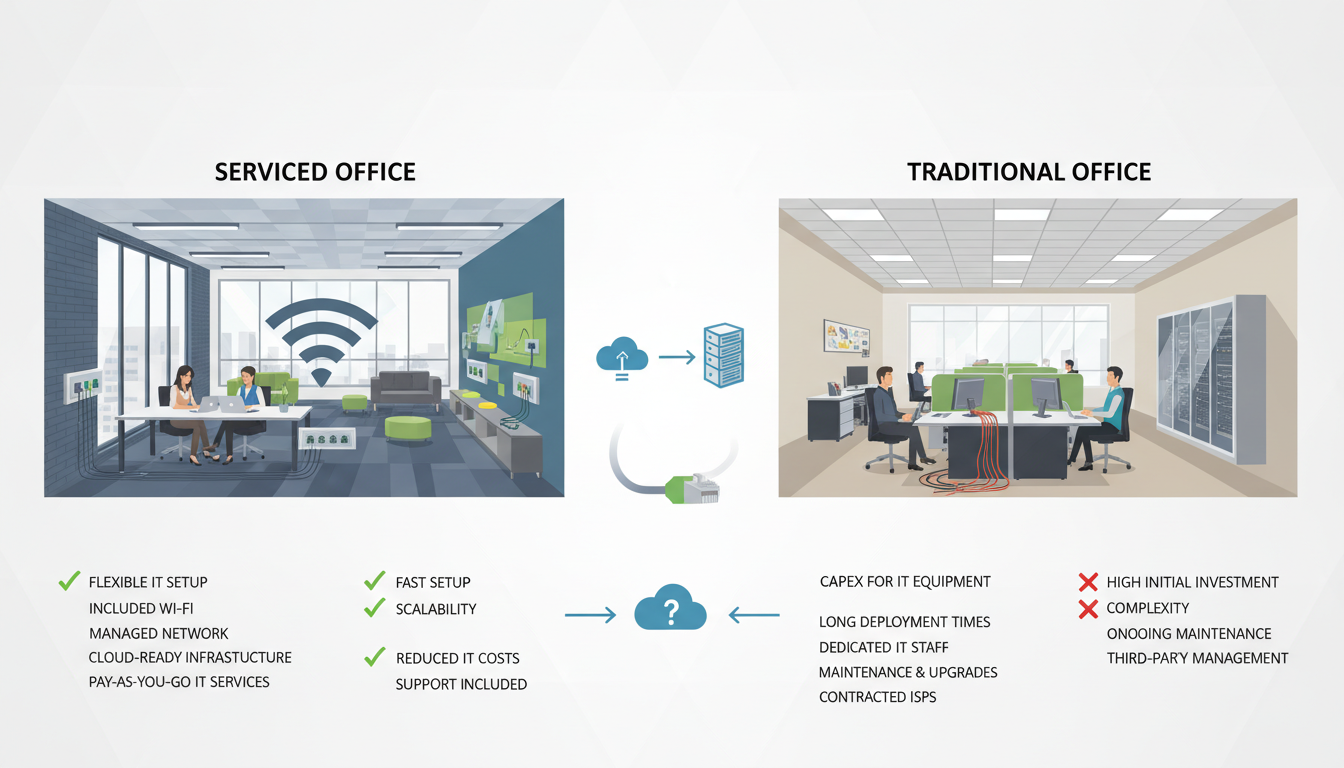
Choosing between a serviced office and a traditional lease is one of the most consequential infrastructure decisions a growing UK business will face. While most decision-makers focus on rent, location, and square footage, the IT implications of each model are frequently overlooked - and they can have a dramatic impact on productivity, security, costs, and scalability. The right choice depends not only on your current size but on where you plan to be in two, five, or ten years.
In this comprehensive guide, we examine the IT considerations behind both options. We will compare costs, evaluate flexibility, assess security implications, and help you determine which model best aligns with your technology strategy. Whether you are a startup looking for agility or an established firm seeking long-term stability, the information here will help you make a fully informed decision.
Understanding the Two Models
A serviced office (sometimes called a managed office or flexible workspace) provides a fully fitted-out environment with shared infrastructure. Providers such as Regus, WeWork, and independent operators across the UK supply desks, meeting rooms, internet connectivity, reception services, and often basic IT equipment as part of a monthly fee. The typical commitment ranges from one month to two years.
A traditional lease, by contrast, gives you a bare shell or cat-A/cat-B fitted space on a longer-term basis - usually three to ten years in the UK market. You are responsible for fitting out the space, provisioning all IT infrastructure, and maintaining everything from cabling to firewalls.
The fundamental difference from an IT perspective is ownership and control. In a serviced office, you share infrastructure and rely on the provider's technology stack. In a traditional lease, you build and own everything, giving you complete control but also complete responsibility.
Cost Comparison: The IT Dimension
The headline cost of a serviced office looks higher per desk per month, but the IT savings can be substantial when you account for everything a traditional lease requires you to provision independently.
When you take a traditional lease, the upfront IT capital expenditure alone can be eye-watering. You will need structured cabling, a server room or comms cabinet, switches, access points, a firewall, UPS power protection, and potentially a phone system. For a 20-person office in a UK city, this commonly runs between £15,000 and £50,000 before you even consider ongoing support contracts and software licensing.
Serviced offices absorb these costs into the monthly fee. You typically get business-grade internet, Wi-Fi, and basic telephony included. However, the trade-off is that you have less control over the specification and performance of these systems.
Internet Connectivity and Network Performance
Internet quality is perhaps the single most important IT factor when evaluating workspace options. In a serviced office, connectivity is shared among all tenants. While reputable providers invest in high-capacity leased lines and enterprise-grade networking, the reality is that bandwidth is contended. During peak hours, you may experience slower speeds or higher latency, particularly if neighbouring tenants are running bandwidth-intensive operations.
In a traditional lease, you procure your own dedicated line. This means guaranteed bandwidth, lower latency, and the ability to specify exactly what you need. A 1Gbps leased line from a provider such as BT, Virgin Media Business, or CityFibre gives you symmetric speeds with SLA-backed uptime guarantees - typically 99.9% or higher.
If you choose a serviced office, ask the provider for a dedicated VLAN and inquire whether they offer a private internet breakout. Some premium providers will install a separate connection for your suite, giving you the best of both worlds.
For businesses that rely on cloud platforms such as Microsoft 365, Azure, or AWS, or that use bandwidth-heavy tools like video conferencing, VoIP, and large file transfers, connectivity quality is non-negotiable. Test the connection at various times of day before committing to a serviced office - not just during the tour when the building is half-empty.
The table below summarises the key connectivity differences between the two workspace models. Understanding these distinctions is essential for any organisation that depends on reliable, high-performance network access for daily operations, particularly those running latency-sensitive applications such as VoIP, video conferencing, and cloud-based enterprise software.
| Connectivity Factor | Serviced Office | Traditional Lease |
|---|---|---|
| Bandwidth Type | Shared / contended | Dedicated leased line |
| Typical Speed | 100–500 Mbps shared | 1 Gbps symmetric dedicated |
| SLA Uptime Guarantee | Rarely offered | 99.9% or higher |
| Latency Consistency | Variable at peak times | Consistent and predictable |
| Quality of Service (QoS) | Provider-managed | Fully customisable |
| Failover / Redundancy | Provider-dependent | Your choice of backup links |
| VPN Performance | May be restricted | Full control and optimisation |
Security and Compliance Considerations
Security is where the differences between the two models become most stark. In a traditional lease, you have complete control over your security posture. You decide which firewall to deploy, how to segment your network, what endpoint protection to run, and how to manage access control. For businesses subject to regulatory requirements - financial services firms regulated by the FCA, healthcare organisations bound by NHS data standards, or any company handling personal data under UK GDPR - this control is often essential.
In a serviced office, your data travels over shared infrastructure. While the provider should implement basic security measures, you are relying on their competence and diligence. Key questions to ask include:
- Is each tenant on a segregated VLAN with proper firewall rules between segments?
- What intrusion detection or prevention systems are in place?
- Who has physical access to the network infrastructure and comms rooms?
- Does the provider hold Cyber Essentials or ISO 27001 certification?
- How are Wi-Fi networks secured, and is WPA3-Enterprise available?
- What happens to your data when you leave - is there a documented data destruction process?
Traditional Lease
Serviced Office
Many UK businesses in regulated sectors find that the compliance requirements alone make a traditional lease the safer choice. However, modern serviced office providers are increasingly addressing these concerns. Some now offer dedicated network cabinets, private VLANs with managed firewalls, and compliance documentation that satisfies most auditors.
Scalability and Flexibility
Growth is where serviced offices genuinely shine. If you need to add ten desks next month, most providers can accommodate this with minimal notice. If you need to downsize, you can release space without the financial penalty of breaking a long-term lease. This elasticity is invaluable for startups, project-based businesses, and companies in volatile markets.
From an IT perspective, scaling in a serviced office is straightforward. Each new desk simply needs a laptop and credentials for your cloud services. There is no additional network infrastructure to provision, no cabling to install, and no switches to upgrade.
Scaling in a traditional lease is more complex and expensive. Adding staff may require additional network ports, upgraded switch capacity, more wireless access points, and potentially a more powerful firewall. If you outgrow the space entirely, you face the considerable disruption and cost of relocating - including decommissioning and recommissioning your entire IT environment.
That said, traditional leases offer a different kind of flexibility: you can build exactly the IT environment you need, optimised for your specific workflows. If you require a dedicated server room, specialist hardware, or a particular network topology, you have the freedom to implement it without negotiating with a building operator.
Telephony and Communications
The evolution of business communications has significantly narrowed the gap between the two models. Modern VoIP and UCaaS platforms such as Microsoft Teams, Zoom, and RingCentral operate entirely over the internet and work identically in both environments. You no longer need a physical PBX or dedicated phone lines in most cases.
However, call quality depends heavily on network performance. In a serviced office with contended bandwidth, voice and video calls may suffer from jitter and packet loss during peak periods. In a traditional lease with a dedicated connection and properly configured Quality of Service (QoS) rules, you can guarantee crystal-clear communications.
For call centres or businesses where telephony is mission-critical, a traditional lease with a dedicated SIP trunk and managed QoS is almost always the better choice. For typical office communications where Teams calls are supplementary rather than core, a serviced office will serve perfectly well.
IT Support and Management
In a serviced office, the provider handles the physical infrastructure - internet connectivity, Wi-Fi access points, and building systems. You are responsible for your own devices, software, and cloud services. This creates a split-responsibility model that can sometimes lead to finger-pointing when things go wrong. If your internet is slow, is it the provider's network or your VPN configuration? If printing does not work, is it the shared printer or your device drivers?
In a traditional lease, your IT support provider (whether in-house or outsourced) owns the entire stack from the internet connection to the end-user devices. This single point of accountability makes troubleshooting faster and more effective.
Before signing a serviced office agreement, clarify exactly what IT support is included. Some providers offer only basic connectivity troubleshooting, while others provide comprehensive helpdesk support. Understand the boundaries to avoid being left without cover when you need it most.
Case Study: A London Fintech's Journey
Consider the experience of a London-based fintech firm that started with eight people in a serviced office in Shoreditch. The all-inclusive model was perfect for their first eighteen months: low commitment, predictable costs, and no capital expenditure on IT infrastructure. Each team member worked from a company laptop with cloud-based development tools, Microsoft 365 for collaboration, and Slack for communication.
As the team grew to thirty-five, problems emerged. The shared internet connection could not handle their CI/CD pipelines, large code repositories, and constant video calls simultaneously. Compliance requirements from the FCA meant they needed better network segmentation and audit trails. The provider could not accommodate their request for a dedicated server cabinet.
The firm moved to a traditional lease in a nearby building, invested £38,000 in IT infrastructure, and engaged a managed IT support provider. Within three months, their development velocity increased by 40%, compliance audits became straightforward, and they had a platform that could scale to one hundred users without further major investment.
The lesson is not that one model is universally better than the other, but that the right choice depends on your stage of growth, your industry requirements, and your technology needs.
Making the Decision: A Framework
To help you evaluate which model suits your business, consider the following framework. Score each factor based on your specific circumstances and weigh them according to your priorities.
To quantify these considerations, the following readiness scores illustrate how each factor typically favours one model over the other for a mid-sized UK business. A higher score indicates stronger alignment with a serviced office model, while a lower score suggests a traditional lease may be more appropriate.
These scores highlight the inherent trade-offs between the two approaches. Serviced offices excel in cost predictability and scalability, whilst traditional leases offer significantly greater control over security, network performance, and regulatory compliance. Most organisations will find that certain factors carry more weight than others depending on their industry, size, and growth plans. Use these benchmarks as a starting point and adjust the weighting based on your specific priorities and circumstances.
Choose a serviced office if:
- Your team is under 20 people and growing unpredictably
- You operate primarily in the cloud with minimal on-premises requirements
- You are not in a heavily regulated industry
- Cash flow preservation and low upfront costs are critical
- You need presence in multiple locations
- Your lease commitment horizon is under two years
Choose a traditional lease if:
- Your team is over 20 people with predictable growth
- You need dedicated, high-performance network infrastructure
- Regulatory compliance demands full control of your security environment
- You run on-premises servers, specialist hardware, or custom network configurations
- Telephony and video conferencing are business-critical
- You want a single point of IT accountability
Hybrid Approaches
Increasingly, UK businesses are adopting hybrid models that combine elements of both. A common approach is to maintain a traditional leased headquarters for core operations whilst using serviced offices for satellite locations, project teams, or overflow capacity. This provides the control and performance of owned infrastructure where it matters most, with the flexibility of serviced space where agility is the priority.
From an IT perspective, hybrid models work well when you have a robust cloud strategy. If your core applications, data, and collaboration tools are cloud-based, users in serviced offices can access everything they need over any decent internet connection. The leased headquarters then serves as the hub for any on-premises systems, the primary internet breakout, and the security perimeter.
Another hybrid option is a managed office - a traditional lease where a specialist operator fits out and manages the space on your behalf, including IT infrastructure. This gives you the control of a lease with some of the convenience of a serviced office, though typically at a premium price point.
Future-Proofing Your Choice
The UK workspace market is evolving rapidly. The post-pandemic shift to hybrid working has changed the equation for many businesses. If a significant portion of your team works remotely, you may need less physical space but better cloud infrastructure. In this scenario, a smaller serviced office combined with robust cloud services and a managed IT support provider may be more cost-effective than a large traditional lease.
Technology trends are also reshaping the landscape. The move to cloud-native applications, the rise of SD-WAN for multi-site connectivity, and the increasing availability of 5G business broadband are all reducing the IT advantages that traditional leases have historically held. As connectivity becomes more reliable and ubiquitous, the infrastructure advantages of owning your own network diminish.
Conversely, the growing threat landscape and tightening regulatory environment mean that security and compliance requirements are only increasing. For businesses handling sensitive data, the control offered by a traditional lease may become more rather than less important over time.
Practical IT Checklist Before You Commit
Regardless of which model you choose, work through these IT considerations before signing anything:
- Audit your current IT estate - document every system, service, and connection you rely on
- Map your compliance requirements - identify every regulation that affects your IT environment
- Forecast your growth - model your staffing and technology needs over the lease term
- Test the connectivity - run speed tests at different times, check latency to your cloud services
- Review the provider's SLA - understand uptime guarantees, response times, and compensation
- Plan for disaster recovery - ensure your business continuity plan works in the chosen environment
- Budget the full cost - include all IT costs, not just the headline rent
- Engage your IT provider early - get expert input before committing to a space
Need Expert IT Guidance for Your Office Move?
Whether you are evaluating serviced offices or planning a traditional lease fit-out, our team can help you make the right IT decisions. We provide independent advice on connectivity, security, infrastructure design, and ongoing support for UK businesses of all sizes.
Explore IT Office Move ServicesConclusion
The choice between a serviced office and a traditional lease is not purely a property decision - it is fundamentally an IT and business strategy decision. The right answer depends on your size, growth trajectory, regulatory environment, technology requirements, and budget. By evaluating the IT implications alongside the real estate considerations, you can make a choice that supports your business objectives today and positions you for success in the future.
Take the time to assess your needs thoroughly, engage the right experts, and test your assumptions before committing. The cost of getting it wrong - in terms of lost productivity, security incidents, or premature relocation - far outweighs the investment in proper due diligence upfront.

CloudSwitched
London-based managed IT services provider offering support, cloud solutions and cybersecurity for SMEs.


