When a business application slows to a crawl during peak hours or goes down entirely because a single server fails, the consequences ripple across the entire organisation. Orders are lost, customers become frustrated, staff cannot work, and revenue evaporates. For UK businesses running critical applications in Microsoft Azure, load balancing is the technology that prevents these scenarios - distributing traffic intelligently across multiple servers to ensure your applications remain fast, responsive, and available even under heavy load or partial failure.
Yet despite its critical importance, load balancing remains one of the most misunderstood aspects of cloud architecture. Many UK businesses either do not use load balancing at all (leaving their applications vulnerable to single points of failure) or use it incorrectly (creating complexity without genuine benefit). This guide demystifies Azure load balancing, explaining what it is, how it works, which Azure load balancing service is right for your scenario, and how to implement it effectively for your business applications.
What Is Load Balancing?
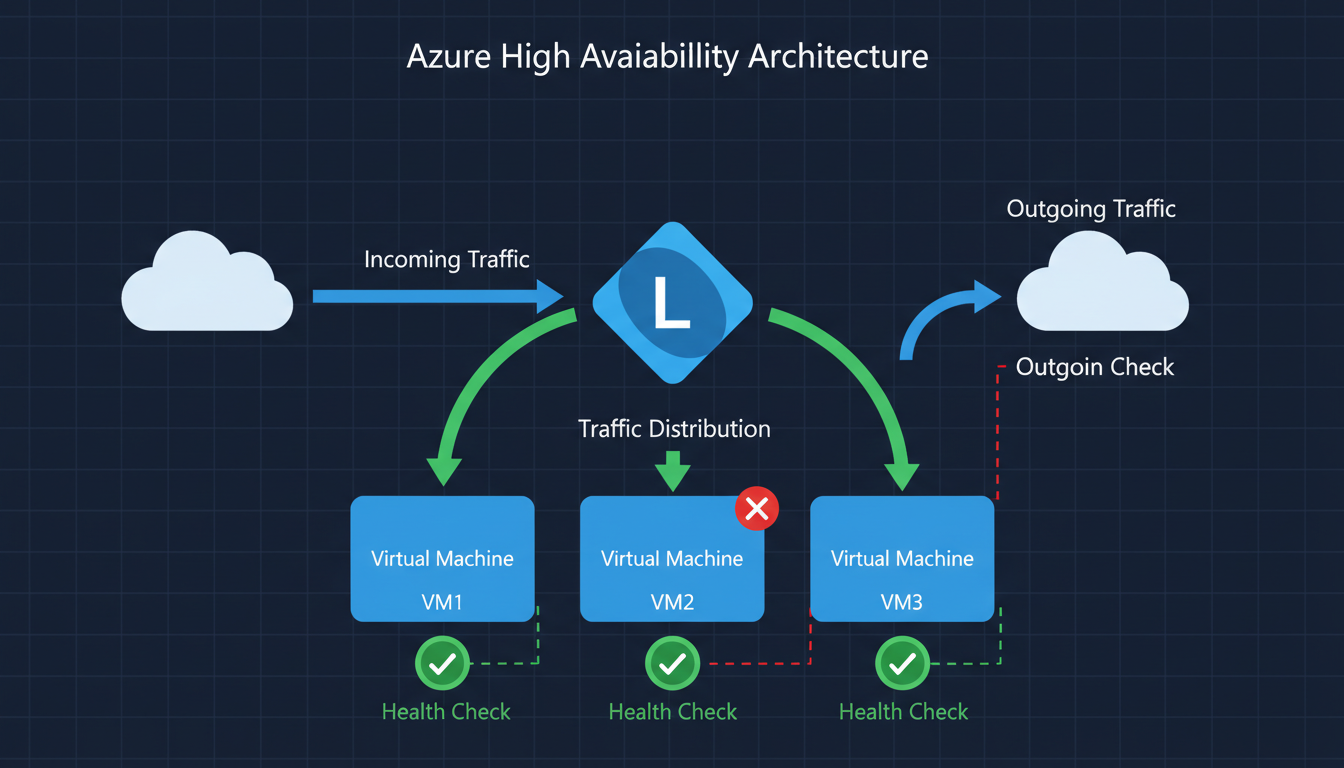
At its simplest, load balancing is the process of distributing incoming network traffic across multiple servers (called a backend pool) so that no single server bears too much demand. If one server in the pool fails, the load balancer automatically redirects traffic to the remaining healthy servers, ensuring your application stays available.
Think of it like a restaurant with multiple chefs. If only one chef works the kitchen, a rush of orders causes long waits and mistakes. Add more chefs and a head waiter who distributes orders evenly, and the kitchen handles peak times smoothly. If one chef calls in sick, the others cover the workload. The head waiter is your load balancer.
Load balancing and high availability are related but distinct concepts. Load balancing distributes traffic to optimise performance and prevent overload. High availability ensures that your application remains accessible even when individual components fail. Load balancing is one of the key mechanisms for achieving high availability, but true high availability also requires redundant infrastructure, health monitoring, automatic failover, and data replication. Azure load balancing services provide both traffic distribution and health monitoring, making them central to any high availability architecture.
How Load Balancing Works Under the Hood
When a user sends a request to your application, that request first arrives at the load balancer rather than directly at a backend server. The load balancer evaluates the request against its configured distribution algorithm and forwards it to the most appropriate server. The most common algorithms include round-robin (distributing requests evenly in sequence), least connections (sending requests to the server currently handling the fewest active connections), and weighted distribution (sending more traffic to more powerful servers). Azure load balancers also support hash-based distribution, which routes requests from the same source IP to the same backend server - useful for applications that benefit from session consistency.
Critically, the load balancer continuously monitors the health of each backend server through configurable health probes. If a server fails a health check - perhaps its application process has crashed or it has run out of memory - the load balancer immediately stops sending traffic to that server and redistributes the load among the remaining healthy servers. When the failed server recovers and starts passing health checks again, the load balancer gradually reintroduces it to the pool. This entire process happens automatically and transparently, without any user awareness or manual intervention. From the perspective of your customers, the application simply continues to work - they never see the failure or the recovery behind the scenes.
Azure Load Balancing Services Explained
Azure provides four distinct load balancing services, each designed for different scenarios. Understanding which service to use - and when to combine them - is crucial for building an effective architecture.
| Service | Layer | Scope | Best For | Starting Cost |
|---|---|---|---|---|
| Azure Load Balancer | Layer 4 (TCP/UDP) | Regional | Internal and external network traffic distribution | £15/month + data |
| Application Gateway | Layer 7 (HTTP/HTTPS) | Regional | Web applications needing URL routing, SSL offload, WAF | £50/month + data |
| Azure Front Door | Layer 7 (HTTP/HTTPS) | Global | Global web apps, CDN, global failover | £25/month + requests |
| Traffic Manager | DNS-based | Global | DNS-level routing across regions, multi-cloud | £0.50/million queries |
Azure Load Balancer
Azure Load Balancer operates at Layer 4 of the OSI model, meaning it works with TCP and UDP traffic without inspecting the content of the packets. It is the fastest and most cost-effective option, capable of handling millions of requests per second with ultra-low latency. Use Azure Load Balancer when you need to distribute traffic between virtual machines running any protocol - not just HTTP. Common use cases include distributing traffic to backend application servers, load balancing database connections, and internal load balancing between application tiers.
Application Gateway
Application Gateway operates at Layer 7, meaning it understands HTTP and HTTPS traffic. This awareness allows it to make intelligent routing decisions based on URLs, headers, and other request attributes. It can route requests to different backend pools based on the URL path - for example, sending /api requests to your API servers and /images requests to your media servers. Application Gateway also includes built-in SSL termination (offloading encryption work from your backend servers), cookie-based session affinity, and an optional Web Application Firewall (WAF) that protects against common attacks like SQL injection and cross-site scripting.
Azure Front Door
Azure Front Door is a global load balancer and content delivery network (CDN) combined. It operates at the edge of Microsoft's global network, with points of presence in over 100 locations worldwide including multiple UK cities. Front Door routes users to the nearest healthy backend, providing the lowest possible latency. It is ideal for global web applications, e-commerce platforms, and any scenario where users access your application from multiple geographic regions.
Traffic Manager
Traffic Manager is a DNS-based traffic routing service. Unlike the other options, it does not sit in the data path - it simply resolves DNS queries to point users at the most appropriate endpoint. This makes it useful for routing between Azure regions, between Azure and on-premises, or between Azure and other cloud providers. It is often used in combination with other load balancing services rather than as a standalone solution.
Combining Multiple Services
In practice, many Azure architectures use multiple load balancing services in combination. A common pattern for global web applications is to use Azure Front Door as the global entry point, routing users to the nearest Azure region, with Application Gateway in each region handling Layer 7 routing and WAF protection, and Azure Load Balancer distributing traffic between the virtual machines in each backend pool. This layered approach provides global performance optimisation, regional application-aware routing, and efficient server-level distribution all working together.
For disaster recovery scenarios, Traffic Manager is frequently combined with regional load balancers. Traffic Manager handles the DNS-level routing between a primary region (UK South) and a secondary region (UK West or North Europe), whilst Azure Load Balancer or Application Gateway handles the traffic distribution within each region. If the primary region experiences an outage, Traffic Manager detects the health probe failure and redirects all DNS resolution to the secondary region, achieving automatic regional failover without manual intervention. Understanding these combination patterns is essential for designing architectures that genuinely deliver the availability and performance your business requires rather than merely ticking a compliance checkbox.
Choosing the Right Service for Your Business
For most UK SMEs running business applications in Azure, the decision comes down to two primary options: Azure Load Balancer for non-HTTP workloads and internal traffic, and Application Gateway for web applications. Here is a practical decision framework.
Choose Azure Load Balancer if your application uses protocols other than HTTP/HTTPS, you need internal load balancing between application tiers, performance and cost are the primary concerns, or you do not need URL-based routing or WAF capabilities.
Choose Application Gateway if your application is web-based (HTTP/HTTPS), you want a Web Application Firewall, you need URL-based routing to different backends, you want SSL offloading to reduce load on your servers, or you need cookie-based session affinity for stateful applications.
Choose Azure Front Door if your users are geographically distributed, you need a global CDN alongside load balancing, you have backends in multiple Azure regions, or you need the fastest possible performance worldwide.
When You Need Load Balancing
- Application is business-critical with no tolerance for downtime
- Traffic varies significantly throughout the day
- You run multiple instances of the same application
- Users in different locations need low latency
- You need automatic failover when servers fail
- Application handles sensitive data (WAF protection)
- You are scaling to handle growing demand
- Compliance requires high availability architecture
When Simple Hosting Suffices
- Application used by small internal team only
- Brief downtime is acceptable (non-critical tool)
- Traffic is consistently low and predictable
- Single server handles load comfortably
- Budget is extremely constrained
- Application is in development or testing
- No compliance requirements for availability
- Manual recovery after failure is acceptable
Building the Business Case
Presenting a load balancing investment to non-technical stakeholders requires translating infrastructure concepts into business language. Frame the conversation around risk and cost rather than technical specifications. Calculate the hourly cost of application downtime for your specific business - include lost revenue, lost productivity, customer compensation, regulatory penalties, and reputational damage. Multiply this by the realistic frequency and duration of outages without load balancing, and you have the annual cost of the current risk. Compare this against the annual cost of load balancing, and the return on investment typically becomes self-evident.
For businesses subject to regulatory availability requirements, the business case is even more straightforward. Non-compliance carries financial penalties and reputational consequences that far exceed the cost of implementing proper load balancing. The FCA, SRA, and ICO have all demonstrated willingness to take enforcement action against organisations whose technical infrastructure fails to meet regulatory expectations. A load-balanced architecture with documented availability targets and monitoring provides tangible evidence of compliance that regulators expect to see during audits and assessments. When framed correctly, load balancing is not an IT cost - it is a risk mitigation investment that protects revenue, reputation, and regulatory standing simultaneously.
Azure Load Balancing for UK Industry Sectors
Different UK industries have distinct requirements for application availability, performance, and compliance. Understanding how load balancing applies to your specific sector helps you make informed architectural decisions and build a compelling business case for the investment.
Retail and E-Commerce
UK online retail continues to grow, with the Office for National Statistics reporting that internet sales accounted for over 26% of total retail sales in 2024. For e-commerce platforms hosted in Azure, load balancing is not optional - it is a survival requirement. Peak trading periods such as Black Friday, Boxing Day sales, and seasonal promotions can increase traffic by 500 to 800% above normal levels. Without load balancing and auto-scaling, these traffic spikes overwhelm individual servers, causing slow page loads or complete outages at precisely the moment when revenue potential is highest.
Application Gateway is typically the right choice for UK e-commerce platforms. Its Layer 7 awareness enables URL-based routing - sending product catalogue requests to one backend pool, checkout transactions to another with higher resources, and API calls to a dedicated pool. The Web Application Firewall protects against the automated attacks that plague retail sites, including credential stuffing, inventory scraping, and card testing. According to the British Retail Consortium, UK retailers face an average of 206 cyber attacks per week, making WAF protection essential for any online storefront.
Financial Services and Fintech
UK financial services firms operate under stringent requirements from the Financial Conduct Authority (FCA) and the Prudential Regulation Authority (PRA). The FCA's operational resilience framework, which came into full effect in March 2025, requires firms to identify their important business services and set impact tolerances for disruption. For any business service delivered through Azure-hosted applications, load balancing directly supports compliance by providing automatic failover, health monitoring, and traffic distribution that keeps services within their defined impact tolerances.
Financial services workloads often require end-to-end encryption, meaning SSL passthrough rather than SSL termination at the load balancer. Azure Application Gateway supports both modes - SSL offloading for performance and SSL passthrough for compliance. The choice depends on your specific regulatory requirements and risk appetite. For PCI DSS compliance, ensure that the load balancer configuration maintains the integrity of the cardholder data environment and that health probe traffic is appropriately secured.
Healthcare and NHS Supply Chain
Organisations working within or supplying the NHS face requirements under the Data Security and Protection Toolkit (DSPT). High availability of patient-facing systems and clinical applications is not merely a business concern - it can directly impact patient safety. Azure load balancing with availability zones ensures that clinical applications remain accessible even during data centre-level failures. For organisations processing NHS data, the load balancer must be deployed within UK data regions (UK South and UK West) to comply with data residency requirements.
The NHS Digital technology standards recommend that critical clinical systems achieve 99.99% availability, which is only achievable through load-balanced, zone-redundant architectures. Azure Application Gateway with the WAF tier adds essential protection for healthcare web applications handling sensitive patient data, guarding against the OWASP Top 10 vulnerabilities that are frequently exploited in healthcare-targeted attacks.
Professional Services and Legal
UK law firms, accountancy practices, and consultancies increasingly rely on cloud-hosted practice management, document management, and client portal systems. The Solicitors Regulation Authority (SRA) requires law firms to maintain adequate systems for the storage and retrieval of client information, and prolonged system outages can breach these regulatory obligations. Load balancing ensures that practice management applications remain available during peak usage periods - such as month-end billing runs, regulatory filing deadlines, and major transaction completions that generate heavy simultaneous access to shared resources.
Manufacturing and Logistics
UK manufacturing and logistics businesses increasingly depend on cloud-hosted systems for production planning, inventory management, warehouse management, and supply chain coordination. Downtime in these systems does not merely inconvenience office workers - it can halt production lines, delay shipments, and disrupt entire supply chains. For manufacturers operating just-in-time production models, even brief application outages can cascade into missed delivery deadlines, contractual penalties, and damaged relationships with key customers throughout the supply network.
Azure Load Balancer is typically the appropriate choice for manufacturing workloads, as many industrial applications use proprietary protocols beyond HTTP that require Layer 4 distribution. For manufacturers with multiple factory sites across the United Kingdom, Traffic Manager can route each site to the nearest Azure region, ensuring the lowest possible latency for time-sensitive production systems. The combination of load balancing with availability zones provided by Azure delivers the resilience necessary to meet the contractual uptime commitments that major retailers and automotive manufacturers demand from their supply chain partners. As Industry 4.0 adoption accelerates and more operational technology converges with cloud-hosted IT systems, the reliability of the underlying infrastructure becomes a competitive differentiator rather than a background concern.
Implementation Best Practices
Successfully implementing load balancing in Azure requires more than simply deploying a load balancer in front of your servers. Several best practices ensure you get genuine value from the investment.
Design for statelessness. Load balancing works best when your application servers are stateless - meaning any server can handle any request without relying on data stored locally from a previous request. Store session data in a shared service like Azure Redis Cache or Azure SQL Database rather than on the individual server. This allows the load balancer to route requests to any available server, maximising efficiency and resilience.
Configure health probes properly. Health probes are how the load balancer determines whether a backend server is healthy and able to accept traffic. Configure probes that test your application's actual functionality, not just whether the server is responding to pings. A server might respond to a ping but have a crashed application process. Use HTTP health probes that hit a specific health check endpoint in your application.
Use availability zones. Deploy your backend servers across Azure availability zones within the UK South or UK West region. This protects against data centre-level failures and, combined with a zone-redundant load balancer, provides 99.99% availability SLA from Microsoft.
Implement auto-scaling. Combine load balancing with Azure Virtual Machine Scale Sets or App Service auto-scaling. This allows your backend pool to grow automatically when demand increases and shrink when it decreases, ensuring performance during peaks without paying for unused capacity during quiet periods.
Monitoring and Observability
Deploying a load balancer without comprehensive monitoring is like flying an aircraft without instruments. Azure Monitor and Azure Network Watcher provide detailed metrics for all load balancing services, including request rates, latency percentiles, backend health status, connection counts, and data throughput. Configure alerts for critical thresholds - for example, alert when backend health drops below fifty per cent, when latency exceeds your acceptable threshold, or when connection failures spike above normal levels. These alerts enable your operations team to respond to emerging issues before they impact users, rather than learning about problems from frustrated customer complaints.
Security Considerations
Load balancers occupy a critical position in your network architecture, sitting between the public internet and your application servers. Ensure that your load balancing configuration follows the principle of least privilege - only expose the ports and protocols that your application requires, restrict management access to authorised personnel, and use network security groups to limit traffic between the load balancer and backend servers to only the necessary communication paths. For Application Gateway deployments, enable the Web Application Firewall in prevention mode rather than detection mode to actively block malicious requests rather than merely logging them. Regularly review WAF logs and tune the ruleset to minimise false positives whilst maintaining robust protection against genuine threats. A well-configured WAF can stop the vast majority of automated attacks before they reach your application code.
Cost Considerations for UK Businesses
Azure load balancing costs vary by service and usage. Azure Load Balancer Standard costs approximately £15 per month for the base fee plus £0.004 per GB of data processed. For a typical UK SME processing 500 GB per month, the total cost would be around £17 per month. Application Gateway costs approximately £50 per month for the base fee (v2 Standard) plus £0.006 per GB of data processed and additional charges for WAF processing. A typical monthly cost for an SME would be £60-£150.
These costs are trivial compared to the cost of application downtime. If your application generates £5,000 per hour in revenue or productivity, even one hour of prevented downtime per year pays for years of load balancing costs.
Optimising Your Load Balancing Spend
Several strategies can help UK businesses manage load balancing costs without compromising availability. Right-sizing your deployment is the most effective approach - use Azure Load Balancer for workloads that do not require Layer 7 features rather than defaulting to the more expensive Application Gateway. Review your backend pool sizing to ensure you are not running more instances than your traffic patterns require, and implement auto-scaling to match capacity to demand dynamically rather than provisioning for peak load at all times.
For Application Gateway, the v2 SKU includes auto-scaling capabilities that can reduce costs during low-traffic periods by scaling down the number of gateway instances automatically. Consider using reserved capacity pricing if your load balancing requirements are consistent and predictable - Microsoft offers significant discounts for one-year and three-year commitments on many Azure services. Regularly review your Azure Advisor recommendations, which often identify opportunities to right-size or consolidate load balancing resources. Finally, ensure that your health probe intervals are appropriately configured - overly aggressive probe intervals generate unnecessary traffic and can increase data processing costs, whilst overly relaxed intervals delay failure detection and extend the window during which unhealthy servers receive user traffic.
Strengthen Your Azure Application Architecture
Cloudswitched designs and implements resilient Azure load balancing architectures for UK businesses. Our Azure-certified engineers assess your current infrastructure, recommend the optimal load balancing strategy, and handle the full implementation - ensuring your applications deliver the performance and availability your business demands.
Conclusion
Azure load balancing transforms your business applications from fragile, single-server deployments into resilient, high-performance systems that handle demand gracefully and recover from failures automatically. For UK businesses running critical applications in Azure, load balancing is not a luxury - it is a fundamental requirement for reliability, performance, and business continuity. Choose the right service for your scenario, implement it with best practices, and your applications will deliver the performance and availability your business depends upon.

CloudSwitched
London-based managed IT services provider offering support, cloud solutions and cybersecurity for SMEs.


