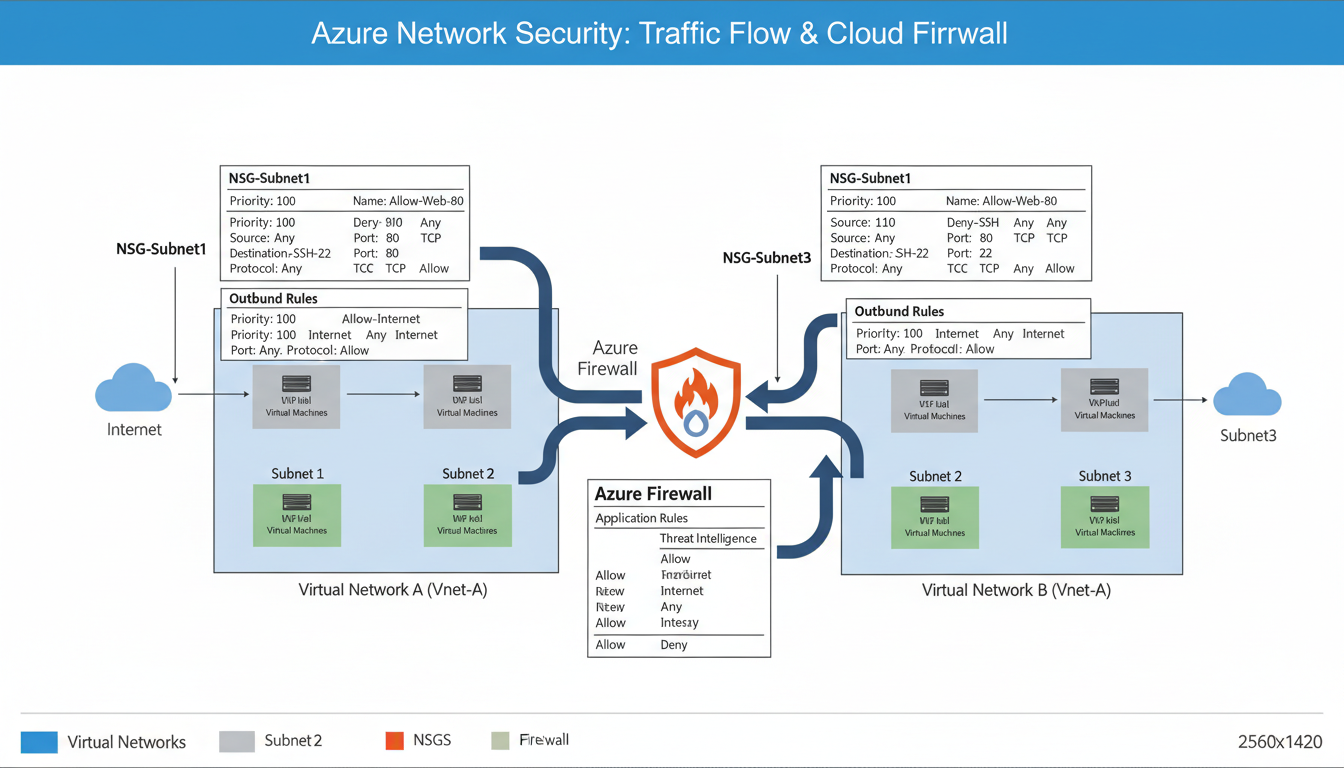
In any Azure cloud environment, controlling the flow of network traffic is fundamental to maintaining security. Just as a physical office uses locked doors, access badges, and reception desks to control who enters which areas, Azure uses Network Security Groups (NSGs) to control which network traffic is permitted to reach your cloud resources and which is blocked. Without properly configured NSGs, your Azure virtual machines, databases, and applications are exposed to the entire internet - a security posture that no responsible UK business should accept.
Network Security Groups are one of the most important security controls available in Microsoft Azure, yet they are also one of the most frequently misconfigured. A common pattern we see in Azure environments belonging to UK businesses is NSGs that were configured hastily during initial deployment, with overly permissive rules that allow far more traffic than necessary. Rules allowing inbound traffic from "Any" source to "Any" destination on "Any" port are unfortunately widespread - effectively negating the purpose of having an NSG at all.
This guide provides a comprehensive explanation of how Azure Network Security Groups work, how to design effective security rules, common mistakes to avoid, and best practices for maintaining secure, well-governed network traffic control in your Azure environment. Whether you are running a single virtual machine or a complex multi-tier application, the principles covered here will help you implement NSGs that genuinely protect your workloads.
It is essential to understand that NSGs are part of Azure's shared responsibility model. Microsoft secures the underlying infrastructure - the physical data centres, hypervisors, and network fabric - but the customer is responsible for securing their own workloads within Azure. This includes configuring NSGs correctly, maintaining them as the environment evolves, and monitoring them for policy violations. The £0 cost of NSGs listed below is somewhat misleading: while there is no direct charge for the service itself, the operational cost of designing, implementing, and maintaining effective NSG rules requires time, expertise, and ongoing attention from qualified personnel. Neglecting this investment is effectively choosing to leave your cloud resources inadequately protected against threats that are growing in both volume and sophistication.
What Are Network Security Groups?
A Network Security Group is a set of security rules that filter network traffic to and from Azure resources within an Azure Virtual Network. Each rule specifies a source, destination, port, protocol, and action (allow or deny). When network traffic reaches a resource protected by an NSG, the rules are evaluated in priority order - lowest number first - and the first matching rule determines whether the traffic is permitted or blocked.
NSGs can be associated with two types of Azure resources: subnets and network interfaces. When associated with a subnet, the NSG rules apply to all resources within that subnet. When associated with a network interface, the rules apply only to the specific virtual machine attached to that interface. You can use both simultaneously - a subnet-level NSG for broad rules and a network interface-level NSG for granular, per-VM rules - though this layered approach adds complexity and should be used carefully.
Every NSG includes a set of default rules that cannot be deleted but can be overridden by higher-priority custom rules. Understanding these defaults thoroughly is the foundation of effective NSG configuration, because any custom rule you create interacts with them. The default inbound rules allow traffic from within the virtual network and from Azure load balancers, and deny all other inbound traffic. The default outbound rules allow traffic to the virtual network and to the internet, and deny all other outbound traffic. These defaults provide a reasonable starting point but almost always need to be supplemented with custom rules tailored to your specific requirements.
Stateful Traffic Filtering
An important characteristic of NSGs that simplifies rule creation is that they are stateful. This means that if you create an inbound rule allowing traffic on port 443, the return traffic for established connections is automatically permitted without requiring a separate outbound rule. The NSG tracks connection state internally and recognises that outbound packets on a dynamic high port are response traffic for an inbound HTTPS session. This stateful behaviour mirrors how traditional hardware firewalls operate and means you generally only need to create rules for the initiating direction of traffic - inbound rules for services your VMs host, and outbound rules for external services your VMs need to reach.
However, statefulness has limits. If an NSG is associated with both a subnet and a network interface, both NSGs must independently allow the traffic. The subnet NSG is evaluated first for inbound traffic and last for outbound traffic, whilst the NIC NSG is evaluated last for inbound and first for outbound. This double evaluation can produce unexpected denials if the rules are not carefully coordinated across both NSG levels, which is one reason many experienced Azure architects prefer to use subnet-level NSGs exclusively unless there is a specific requirement for per-VM granularity.
NSG rules are processed in priority order, from the lowest number (highest priority) to the highest number (lowest priority). The first rule that matches the traffic is applied, and all subsequent rules are ignored. This means that a "Deny All" rule with a priority of 100 will override an "Allow" rule with a priority of 200. Always plan your rule priorities carefully, using increments of 10 or 100 to leave room for inserting additional rules later without re-numbering. The default rules use priorities of 65000, 65001, and 65500 - you cannot create rules with these priorities.
Designing Effective NSG Rules
The fundamental principle of NSG rule design is the principle of least privilege: allow only the specific traffic that is required for your application to function, and deny everything else. This means being as specific as possible in your rules - specifying exact source IP ranges rather than "Any," exact destination ports rather than "Any," and exact protocols rather than "Any." Every "Any" in an NSG rule represents a potential attack surface that you are leaving unnecessarily exposed.
Consider a typical two-tier web application running in Azure: a front-end web server and a back-end database server. The NSG rules for the web server should allow inbound HTTPS traffic (port 443) from the internet, allow inbound SSH or RDP traffic from your office IP address for management, and deny all other inbound traffic. The NSG rules for the database server should allow inbound database traffic (for example, port 1433 for SQL Server) only from the web server's subnet, allow inbound management traffic from your office IP, and deny all other inbound traffic - including traffic from the internet, which should never reach your database directly.
This tiered approach ensures that even if an attacker compromises the web server, they cannot directly access the database from the internet. The concept is known as defence in depth, and it is a cornerstone of sound network security architecture. They would need to first compromise the web server and then pivot through the internal network - a significantly more difficult attack that gives you additional time and opportunities to detect and respond to the intrusion.
| Priority | Name | Source | Destination | Port | Action |
|---|---|---|---|---|---|
| 100 | Allow-HTTPS-Inbound | Internet | WebSubnet | 443 | Allow |
| 110 | Allow-HTTP-Redirect | Internet | WebSubnet | 80 | Allow |
| 200 | Allow-RDP-Management | Office IP Range | WebSubnet | 3389 | Allow |
| 300 | Allow-SQL-FromWeb | WebSubnet | DBSubnet | 1433 | Allow |
| 4000 | Deny-All-Inbound | Any | Any | Any | Deny |
Common NSG Mistakes and How to Avoid Them
Mistake 1: Allowing RDP or SSH from the Internet. This is perhaps the most dangerous and most common NSG misconfiguration. Remote Desktop Protocol (port 3389) and SSH (port 22) are prime targets for brute-force attacks. If these ports are open to the internet, your virtual machines will be subjected to thousands of login attempts per day from automated attack tools. Instead, restrict management access to specific IP addresses (your office or VPN), or better yet, use Azure Bastion - a fully managed PaaS service that provides secure RDP and SSH access to your VMs without exposing any management ports to the internet.
Mistake 2: Using "Any" as the source for application rules. If your web application should only be accessed from the United Kingdom, restrict the source to UK IP ranges. If it serves only internal users, restrict the source to your corporate network. Even for genuinely public-facing applications, consider using Azure Front Door or Application Gateway with Web Application Firewall (WAF) in front of your VMs, and restricting the NSG to allow traffic only from the Front Door or Application Gateway IP addresses.
Mistake 3: Forgetting about outbound rules. Many administrators focus exclusively on inbound rules and neglect outbound traffic filtering. This is a mistake because it means that if a virtual machine is compromised, it can freely communicate with command-and-control servers, exfiltrate data, and participate in attacks against other targets. Good practice is to restrict outbound traffic to only the destinations required for the application to function - for example, allowing outbound HTTPS to specific API endpoints and Azure services, and denying outbound traffic to the internet on all other ports.
Mistake 4: Not using Application Security Groups (ASGs). Application Security Groups allow you to group virtual machines and define NSG rules based on those groups rather than specific IP addresses. This dramatically simplifies rule management in environments with many VMs, because you can write rules like "Allow traffic from WebServers ASG to DatabaseServers ASG on port 1433" rather than maintaining lists of individual IP addresses that change every time you add or remove a VM.
NSG Flow Logs and Monitoring
Configuring NSG rules is only half the battle - you also need to monitor how those rules are being applied in practice. Azure NSG Flow Logs capture information about every connection attempt that passes through an NSG, including the source and destination IP addresses, ports, protocol, whether the traffic was allowed or denied, and the volume of data transferred. This data is invaluable for security monitoring, troubleshooting connectivity issues, and verifying that your rules are working as intended.
NSG Flow Logs can be stored in an Azure Storage Account and analysed using Azure Traffic Analytics, which provides visual dashboards showing traffic patterns, top communicating hosts, blocked traffic attempts, and geographic distribution of traffic sources. For UK businesses concerned about compliance, flow logs provide an audit trail demonstrating that network access controls are in place and functioning correctly - useful evidence for Cyber Essentials certification, ISO 27001 audits, and GDPR compliance assessments.
Enable NSG Flow Logs for all NSGs in your environment, and configure retention periods appropriate to your compliance requirements. A minimum of 90 days is recommended for most UK businesses, though specific regulations or contractual obligations may require longer retention. Review flow log data regularly - at least monthly - to identify unusual traffic patterns, verify rule effectiveness, and detect potential security incidents.
NSG Best Practices
- Apply NSGs at subnet level for consistent enforcement
- Use Application Security Groups for dynamic environments
- Enable NSG Flow Logs for audit and monitoring
- Restrict management ports to specific IPs or use Bastion
- Implement both inbound and outbound rules
- Review and audit rules quarterly
- Use descriptive names and comments for every rule
Common Anti-Patterns
- Allowing Any/Any/Any as a troubleshooting shortcut
- Opening RDP (3389) or SSH (22) to the internet
- No outbound traffic filtering
- Applying NSGs at NIC level only (inconsistent coverage)
- No flow logs or monitoring
- Using IP addresses instead of service tags or ASGs
- Never reviewing or auditing existing rules
Azure Service Tags and Simplifying Rules
Azure Service Tags are predefined groups of IP addresses for Azure services, managed by Microsoft and updated automatically as service IP ranges change. Using service tags in your NSG rules eliminates the need to track and update individual IP addresses for Azure services, significantly simplifying rule management and reducing the risk of rules becoming stale.
Common service tags include Internet (all public internet IP addresses), VirtualNetwork (all address space within the virtual network, including peered networks), AzureLoadBalancer (the Azure infrastructure load balancer), Storage (Azure Storage service IP ranges), Sql (Azure SQL Database IP ranges), and AzureActiveDirectory (Azure AD IP ranges). Region-specific variants are also available - for example, Storage.UKSouth for Azure Storage in the UK South region.
Using service tags is strongly recommended over hardcoding IP addresses. Microsoft publishes the full list of service tags and their constituent IP ranges weekly, and this list is available for download as a JSON file for organisations that need to reference the ranges in external firewall configurations. Microsoft updates service tag IP ranges as infrastructure changes, and your NSG rules automatically reflect these updates without any action on your part. This is particularly important for services like Azure Storage and Azure SQL, whose IP ranges change periodically as Microsoft expands its infrastructure.
NSGs and UK Compliance Requirements
For UK businesses subject to regulatory requirements, NSGs play an important role in demonstrating compliance with network segmentation and access control obligations. Under GDPR, businesses must implement appropriate technical measures to protect personal data - and network security controls such as NSGs are a fundamental component of those measures. The ICO expects organisations processing personal data to demonstrate that network access is restricted to authorised traffic and that monitoring is in place to detect unauthorised access attempts.
For businesses pursuing Cyber Essentials or Cyber Essentials Plus certification, NSGs help satisfy the "Firewalls" control requirement by providing boundary protection between the internet and your Azure resources. Ensure that your NSG rules deny all inbound traffic by default and explicitly allow only the specific traffic required, with no management ports open to the internet.
For businesses pursuing ISO 27001 certification, NSGs contribute to several controls within Annex A, including A.13.1 (Network Security Management) and A.13.2 (Security of Network Services). Auditors will want to see documented NSG rules, evidence of regular review, and flow log data demonstrating that rules are enforced in practice.
Ongoing NSG Governance and Audit Readiness
For UK businesses that accept payment cards, the Payment Card Industry Data Security Standard (PCI DSS) imposes specific network segmentation requirements that NSGs can help satisfy. PCI DSS Requirement 1 mandates the installation and maintenance of network security controls to protect cardholder data environments. NSGs provide the segmentation necessary to isolate cardholder data processing resources from the rest of your Azure environment, reducing the scope of PCI DSS assessments and simplifying compliance. Your QSA (Qualified Security Assessor) will expect to see documented NSG rules that restrict traffic to and from the cardholder data environment to only what is strictly necessary for business operations.
Regardless of which compliance framework applies to your organisation, establishing a regular NSG governance cadence is essential for long-term security. Conduct quarterly reviews of all NSG rules to identify stale or overly permissive entries that have accumulated over time as staff have created temporary rules and forgotten to remove them. Perform monthly analysis of flow log data to verify that rules are operating as intended and that no unexpected traffic patterns have emerged. Carry out an annual comprehensive audit of your entire network security architecture against your compliance obligations and evolving business requirements. Document every review with its findings, decisions made, and any changes implemented. This documentation demonstrates to auditors, regulators, and customers alike that your network security controls are actively managed and continuously improved rather than deployed once and subsequently neglected.
Azure Policy provides a powerful mechanism for enforcing NSG governance at scale across your entire Azure estate. Create policies that audit or deny NSG configurations violating your security standards - for example, a policy that prevents any rule from allowing inbound RDP or SSH access from the internet, or a policy requiring all NSGs to have flow logs enabled with a minimum retention period. These policies operate continuously, catching misconfigurations at the moment they are created rather than relying on periodic manual reviews to discover them after the damage has been done. For UK businesses operating multiple Azure subscriptions or managing Azure environments on behalf of clients, Azure Policy is an indispensable tool for maintaining consistent, auditable security standards across the entire estate.
Need Help Securing Your Azure Environment?
Cloudswitched provides expert Azure cloud management for UK businesses, including network security design, NSG configuration, monitoring, and compliance. Let us audit your Azure network security and ensure your cloud workloads are properly protected.
Explore Azure Cloud Solutions
CloudSwitched
London-based managed IT services provider offering support, cloud solutions and cybersecurity for SMEs.


