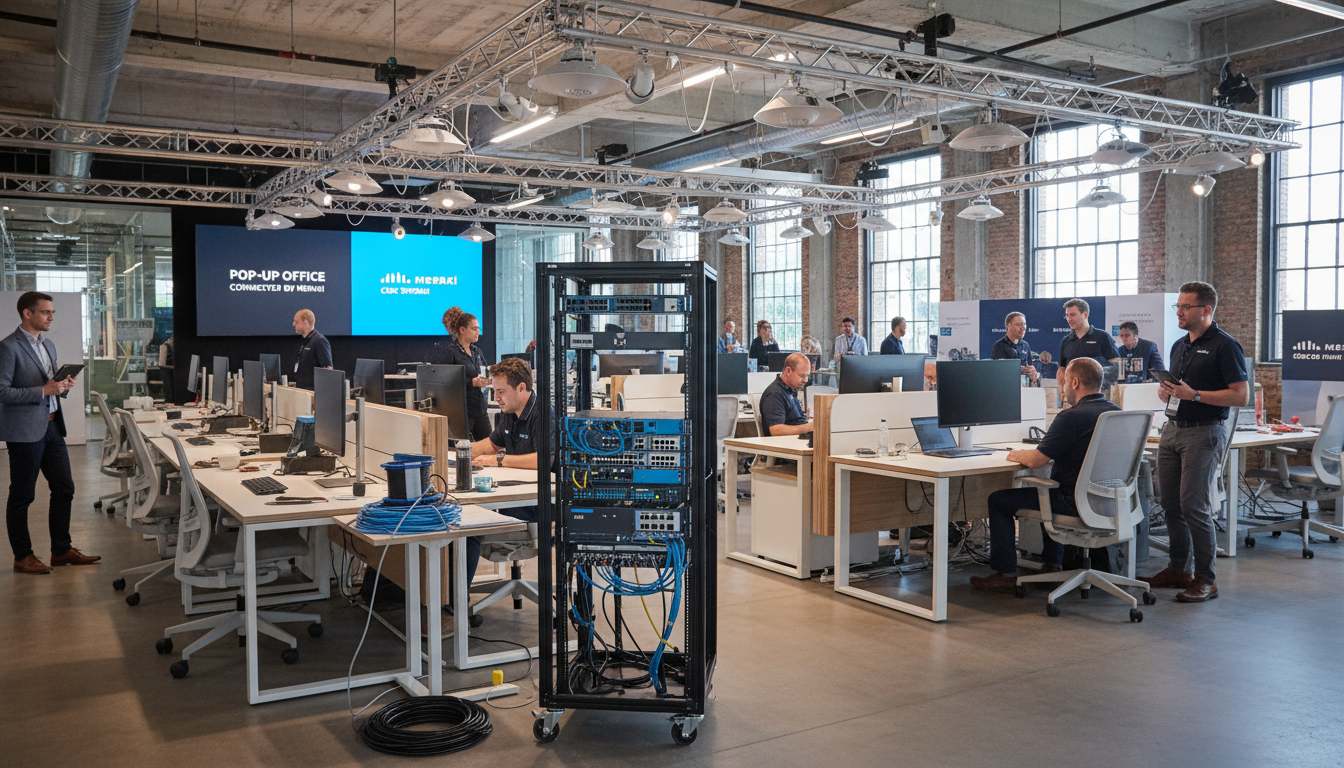
The modern UK business landscape demands flexibility. Whether you are setting up a temporary project office for a construction site in Manchester, networking a three-day industry conference in London's ExCeL Centre, equipping a pop-up retail space in Edinburgh's Christmas markets, or establishing a disaster recovery workspace in Birmingham, the ability to deploy reliable, secure, and manageable network infrastructure quickly and temporarily has become a critical business capability.
Cisco Meraki's cloud-managed networking platform is uniquely suited to these temporary deployment scenarios. Unlike traditional networking equipment that requires on-site configuration, specialist knowledge, and manual management, Meraki devices are configured entirely through a cloud dashboard, can be pre-staged before they arrive on site, and provide full visibility and control from anywhere with an internet connection. This makes it possible to deploy enterprise-grade networking at a temporary location in hours rather than days, and to manage it remotely without needing an IT engineer permanently on site.
This guide provides a practical, step-by-step approach to planning and deploying Meraki networking for pop-up offices, temporary workspaces, and events - drawing on our experience supporting numerous temporary deployments for UK businesses.
Planning Your Temporary Network Deployment
Successful temporary network deployments depend far more on planning than on the technology itself. The most common cause of problems at pop-up offices and events is inadequate preparation - arriving on site to discover that the internet connection is insufficient, the venue's power supply is limited, or the physical space does not accommodate the wireless coverage needed.
Internet Connectivity
Every Meraki deployment depends on internet connectivity, both for the cloud management plane and for providing network access to users. For temporary locations, you have several options. If the venue has existing broadband, confirm the bandwidth, reliability, and whether the provider permits connecting your own network equipment. For events and construction sites without fixed broadband, 4G/5G mobile broadband routers from providers like Three Business, Vodafone Business, or EE provide a practical solution. For larger deployments requiring guaranteed bandwidth, consider a temporary leased line or dedicated wireless link from a specialist provider.
Always plan for redundancy. A single internet connection at a critical event is a single point of failure. Meraki's MX security appliances support dual-WAN connectivity, allowing you to connect two separate internet sources with automatic failover. For a conference with 500 attendees, the cost of a backup 5G connection is trivial compared to the reputational damage of a complete network outage.
Site Survey and Coverage Planning
Before deploying wireless access points, assess the physical environment. Large open spaces like conference halls require fewer access points but with wider coverage patterns. Spaces with many walls, partitions, or metallic structures require more access points to overcome signal attenuation. For outdoor events, weatherproof access points (such as the Meraki MR86) are essential, and coverage patterns differ significantly from indoor deployments.
For business-critical pop-up offices where staff are using video conferencing, cloud applications, and VPN connections, plan for 5-10 Mbps per concurrent user. For events where attendees primarily need web browsing and email, 1-2 Mbps per concurrent user is typically sufficient. For events with live streaming, interactive demonstrations, or exhibitor requirements, plan for 15-20 Mbps per concurrent user. Always assume that 60-70% of total attendees will be connected simultaneously at peak times.
Pre-Staging Your Meraki Equipment
One of Meraki's greatest advantages for temporary deployments is the ability to fully configure every device before it arrives on site. Through the Meraki cloud dashboard, you can create your network, add devices by serial number, configure SSIDs, set up VLANs, apply security policies, configure VPN tunnels back to your main office, and establish all access controls - all before the equipment leaves your IT storeroom.
When the pre-configured devices arrive at the temporary location and are connected to power and internet, they automatically contact the Meraki cloud, download their configuration, and begin operating. This zero-touch provisioning means that non-technical staff can physically deploy the equipment - they simply need to plug in the devices and mount the access points. No command-line configuration, no manual IP addressing, no on-site engineering expertise required.
Recommended Equipment for Common Scenarios
| Scenario | Users | Security Appliance | Switch | Access Points | Estimated Kit Cost |
|---|---|---|---|---|---|
| Small pop-up office (1 room) | 5-15 | MX68 | MS120-8 | 1x MR36 | £1,500-2,500 |
| Medium temporary workspace | 15-50 | MX75 | MS125-24 | 2-3x MR46 | £4,000-7,000 |
| Conference / exhibition hall | 100-500 | MX95 | MS250-48 | 6-12x MR56 | £15,000-25,000 |
| Outdoor event / festival | 200-1000 | MX105 | MS350-24 | 8-20x MR86 (outdoor) | £25,000-45,000 |
Deployment Time: Meraki vs Traditional Approaches
One of the most compelling reasons UK businesses choose Meraki for temporary deployments is the dramatic reduction in setup time. Traditional networking equipment requires extensive on-site configuration, specialist engineering time, and manual testing - often consuming days of preparation that is simply not available for pop-up offices and events. According to a 2024 survey by the UK networking trade body, the average temporary network deployment using traditional equipment takes between 16 and 48 hours of engineering time, whereas cloud-managed platforms reduce this to under four hours in most cases.
These figures are based on deploying a medium-sized temporary network for 15 to 50 users, including security appliance, switching, and wireless coverage. The Meraki advantage compounds with each additional deployment, as pre-staged configurations can be templated and reused across venues - a capability that traditional networking equipment simply cannot match.
Network Configuration Best Practices
Temporary networks require slightly different configuration approaches than permanent office networks. Security is paramount - you are deploying in an environment you do not fully control, potentially with untrusted users connecting alongside your staff.
SSID Design
Create separate SSIDs for different user groups. For a pop-up office, you might have a corporate SSID using WPA3 Enterprise authentication (linked to your Active Directory or Entra ID via RADIUS) for staff, and a guest SSID with a captive portal for visitors. For events, create an exhibitor SSID with higher bandwidth allocations and a separate attendee SSID with appropriate rate limiting to prevent individual users from consuming excessive bandwidth.
Security Policies
Apply security policies appropriate to the deployment type. For corporate pop-up offices, configure the Meraki MX appliance with auto-VPN to establish a secure tunnel back to your main office, allowing staff to access internal resources as if they were in the office. Enable content filtering and threat protection. For event networks, enable client isolation (preventing devices from communicating with each other on the network), apply bandwidth limits per client, and configure the firewall to block common threats.
Monitoring and Alerts
Configure dashboard alerts for critical events - device offline, high client count thresholds, WAN failover, and security events. Since you may not have IT staff physically present at the temporary location, remote visibility is essential. The Meraki dashboard and mobile app provide real-time status information from anywhere, and alerts can be sent via email or SMS to ensure rapid response to any issues.
Meraki Pop-Up Advantages
- Full pre-configuration before arriving on site
- Zero-touch deployment by non-technical staff
- Remote management from anywhere via dashboard
- Auto-VPN for secure office connectivity
- Built-in security appliance and threat protection
- Real-time analytics on connected users
- Equipment reusable across multiple deployments
- Consistent corporate network experience
Common Pop-Up Network Mistakes
- Relying on a single internet connection
- Underestimating concurrent user counts
- No bandwidth management or rate limiting
- Using consumer-grade routers for business use
- No VPN for secure access to office resources
- Forgetting power requirements and cable runs
- No guest network isolation from corporate traffic
- Failing to test equipment before the event day
Day-of-Event Deployment Checklist
Even with thorough preparation, the physical deployment on event day requires a systematic approach. Arrive early - at least two to three hours before the network needs to be operational. Verify that the internet connection is active and performing at the expected speed. Connect the MX security appliance and confirm it registers on the dashboard and establishes WAN connectivity. Deploy switches and connect access points, verifying each one appears on the dashboard as it comes online.
Test the network thoroughly before users arrive. Connect test devices to each SSID, verify internet access, test VPN connectivity to the main office if applicable, confirm that client isolation is working on guest networks, and check that bandwidth limits are functioning correctly. Run a speed test from multiple locations within the coverage area to identify any dead spots or weak signal areas that need additional access points or repositioning.
Document the physical location of every device. If an access point goes offline during the event, you need to know exactly where it is to troubleshoot. Take photographs of cable runs, power connections, and mounting positions - this documentation is also invaluable for future deployments at the same venue.
Regulatory Compliance and Data Protection for Temporary UK Networks
Any UK business deploying temporary network infrastructure must consider its obligations under the UK General Data Protection Regulation (UK GDPR) and the Data Protection Act 2018. Temporary networks are not exempt from data protection requirements simply because they are short-lived. If personal data traverses the network - and in almost every business scenario, it will - the same standards of protection apply as for permanent office infrastructure.
UK GDPR Considerations for Pop-Up Networks
When employees connect to a temporary network and access cloud applications, customer databases, or email systems, personal data is being processed over that network. The organisation operating the pop-up office remains the data controller and is responsible for ensuring appropriate technical and organisational measures are in place to protect that data. According to the Information Commissioner's Office (ICO), over 38% of reportable data breaches in 2024 involved inadequate network security controls - a risk that is heightened in temporary deployment environments where shortcuts are tempting.
Meraki's cloud-managed architecture provides several built-in capabilities that support compliance. The MX security appliances include stateful firewall inspection, intrusion detection and prevention, and content filtering - all configured through the cloud dashboard and active from the moment the device connects. For organisations handling particularly sensitive data, such as legal firms running temporary case offices or healthcare providers operating pop-up clinics, the auto-VPN feature ensures that all traffic is encrypted through a secure tunnel back to the main office, preventing sensitive data from traversing the temporary network's local internet connection in plaintext.
Guest Network Isolation and Consent
Events and conferences that provide guest Wi-Fi access must also consider their obligations. Under the Privacy and Electronic Communications Regulations (PECR), businesses providing public Wi-Fi services must inform users about any data collection, including the capture of device MAC addresses or browsing metadata. Meraki's captive portal functionality allows you to present a terms-of-service or privacy notice page that users must accept before gaining network access - providing a clear audit trail of consent. This is particularly important for events attracting attendees from multiple organisations, where the network operator has no prior relationship with the individuals connecting.
Network segmentation through VLANs ensures that guest traffic is completely isolated from corporate traffic, preventing any possibility of guest users accessing internal resources. This segmentation can be configured entirely during the pre-staging phase and requires no on-site adjustments, reducing the risk of misconfiguration under the time pressures of event setup.
Industry-Specific Deployment Scenarios Across the United Kingdom
The flexibility of Meraki cloud-managed networking makes it suitable for temporary deployments across a wide range of UK industries. Each sector has specific requirements and challenges that influence the network design, security configuration, and equipment selection.
Construction and Infrastructure Projects
The UK construction industry is undergoing rapid digital transformation, with Building Information Modelling (BIM), drone surveys, and IoT-connected site monitoring becoming standard practice on major projects. The Construction Leadership Council reported that 67% of large construction firms now require reliable on-site wireless connectivity for project management, safety monitoring, and real-time collaboration tools. Temporary site offices need robust, weatherproof networking that can operate in dusty, exposed environments and be relocated as the project evolves. Meraki's outdoor-rated access points, combined with 4G/5G uplinks, provide the resilience these environments demand. A typical construction site deployment might include an MX68 security appliance with dual 5G WAN connections for redundancy, an MS120 switch for wired connections to site office workstations, and two to three MR86 outdoor access points providing coverage across the site compound and welfare facilities.
Retail and Hospitality Pop-Ups
The UK retail sector has embraced pop-up shops and experiential retail as a core strategy for reaching new customers, testing markets, and creating buzz around product launches. According to the British Retail Consortium, pop-up retail generated an estimated £2.3 billion in UK sales revenue in 2024, with the average pop-up lasting between two and twelve weeks. These temporary retail environments require reliable Wi-Fi for point-of-sale systems, inventory management, and customer-facing services such as guest Wi-Fi and digital signage. Payment Card Industry Data Security Standard (PCI DSS) compliance is mandatory for any network carrying card payment data, and Meraki's built-in security features - including network segmentation, encrypted management, and access control lists - support PCI DSS compliance out of the box.
Healthcare and Emergency Services
NHS trusts and private healthcare providers increasingly deploy temporary clinical facilities - vaccination centres, screening programmes, and emergency field hospitals. These environments carry some of the most stringent data protection requirements of any sector, as they process special category health data under UK GDPR Article 9. Network security is not optional; it is a legal requirement. Meraki deployments for healthcare pop-ups typically employ the highest security configuration: WPA3 Enterprise authentication linked to the NHS Spine or equivalent directory service, mandatory VPN tunnelling for all clinical traffic, client isolation on any guest or patient networks, and comprehensive logging via the Meraki dashboard for audit and incident response purposes. The ability to pre-configure these complex security policies remotely and deploy them through zero-touch provisioning is invaluable in healthcare scenarios, where clinical staff are focused on patient care rather than IT infrastructure.
Measuring Return on Investment for Temporary Meraki Deployments
UK businesses considering Meraki for temporary network deployments naturally want to understand the cost-benefit equation. While the equipment costs are higher than consumer-grade alternatives, the total cost of ownership tells a markedly different story when engineering time, deployment risk, and reusability are factored in.
Direct Cost Savings
The most significant saving comes from reduced engineering time. A specialist network engineer in the UK typically charges between £450 and £800 per day. A traditional temporary network deployment requiring three to five days of on-site engineering time costs £1,350 to £4,000 in labour alone - before equipment costs. A Meraki deployment requiring two to four hours of on-site work by non-specialist staff effectively eliminates this expense. Over multiple deployments per year, the accumulated savings frequently exceed the premium paid for Meraki equipment within the first twelve months.
Risk Reduction and Reputational Value
The indirect value is harder to quantify but often more significant. A network failure at a major conference, a product launch event, or a critical project office has consequences that extend far beyond the immediate technical problem. Lost productivity, missed deadlines, damaged client relationships, and reputational harm to the organisation all carry real costs. The Chartered Institute of IT estimated that the average cost of a significant IT failure at a UK business event exceeds £12,000 when all consequential losses are included. Meraki's combination of enterprise-grade reliability, automatic failover, remote monitoring, and real-time alerting reduces this risk to a level that consumer-grade equipment simply cannot approach.
Equipment Reusability and Lifecycle
Unlike single-purpose equipment or hired solutions, Meraki hardware purchased for temporary deployments retains its full value between uses. The same access points, switches, and security appliances can be reconfigured through the cloud dashboard and redeployed at entirely different venues and for entirely different purposes. A set of equipment used for a summer conference season can be reconfigured for a winter pop-up retail deployment, then repurposed again for a spring construction site office - all without physical modifications or additional licensing costs. The typical Meraki hardware lifecycle of five to seven years means that businesses deploying equipment across multiple temporary scenarios each year achieve a cost per deployment that decreases substantially over time.
Post-Event Recovery and Reuse
After the event or temporary deployment ends, the equipment can be recovered, factory-reset if desired, and stored for future use. One of Meraki's advantages is that the same equipment can be reconfigured through the cloud dashboard for completely different deployments. The access points you used for a conference in London this month can be reconfigured for a construction site office in Glasgow next month - all without touching the physical devices.
Review the dashboard analytics after each deployment to identify lessons learned. How many clients connected at peak? Were there any coverage gaps? Did the internet bandwidth prove sufficient? This data directly informs planning for future temporary deployments, making each one smoother and more reliable than the last.
Need Networking for a Pop-Up Office or Event?
Cloudswitched provides Meraki-based temporary networking solutions for UK businesses. From small project offices to large-scale conferences and events, we handle planning, pre-staging, deployment, remote management, and recovery - delivering enterprise-grade connectivity wherever and whenever you need it.

CloudSwitched
London-based managed IT services provider offering support, cloud solutions and cybersecurity for SMEs.


