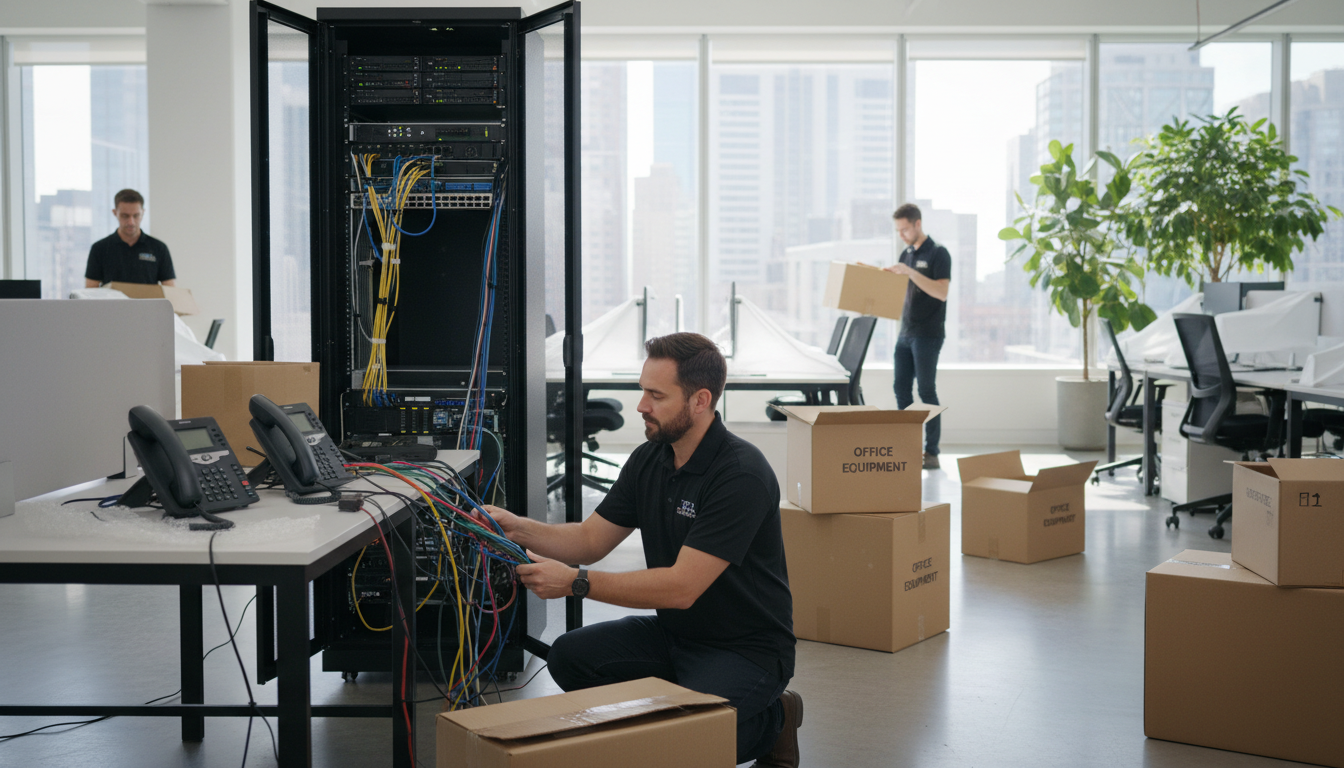
Relocating your business to a new office is one of the most complex operational projects any UK SME will undertake. Amidst the chaos of packing boxes, coordinating removals, updating addresses, and keeping clients informed, one critical task often receives insufficient attention until far too late: moving your phone system. Whether you rely on a traditional PBX, a hosted VoIP platform, or a hybrid arrangement, getting your telephony right during an office move is essential for maintaining business continuity.
A poorly planned phone system migration can result in missed calls, lost customers, communication blackouts, and significant revenue loss during the transition period. Conversely, a well-planned move can be an opportunity to upgrade your telephony infrastructure, reduce costs, and improve call quality - turning a logistical challenge into a strategic advantage.
This comprehensive guide walks UK businesses through every aspect of moving their phone system to a new office, from initial assessment through to post-move optimisation.
Understanding Your Current Phone System
Before planning your move, you need a thorough understanding of your existing telephony setup. The type of system you currently use will largely determine the complexity and cost of your migration.
Traditional PBX Systems
If your business uses a traditional Private Branch Exchange (PBX), your phone system is a physical piece of hardware located on your premises, connected to the public telephone network via ISDN or analogue lines. Moving a traditional PBX involves physically relocating the hardware, arranging new telephone lines at the new premises, and reconfiguring the system for the new environment. This is the most complex and time-consuming type of phone system to move, often requiring specialist engineers and coordination with BT Openreach or your line provider.
Hosted VoIP Systems
Hosted Voice over IP (VoIP) systems run in the cloud, with calls routed over the internet rather than traditional phone lines. If you are already using a hosted VoIP solution such as Microsoft Teams Phone, 3CX, or RingCentral, your move is considerably simpler. The phone system itself does not need to move at all - you simply need a reliable internet connection at the new office and your existing desk phones or softphone applications will work immediately once connected to the network.
Hybrid Systems
Some businesses operate hybrid systems that combine on-premises hardware with cloud-based services. These require careful planning to ensure both components are migrated and reconnected correctly. The on-premises elements need physical relocation, whilst the cloud elements need reconfiguration to work with the new network infrastructure.
SIP Trunking: The Middle Ground
Businesses that have invested heavily in on-premises PBX hardware may also wish to consider SIP trunking as an intermediate step. A SIP trunk replaces traditional ISDN lines with an internet-based connection to the public telephone network, allowing your existing PBX to make and receive calls over your broadband connection. This can simplify a move because you no longer depend on BT Openreach installing new ISDN circuits at the new premises - you simply need a reliable internet connection. SIP trunking also typically reduces call costs by 20 to 40 percent compared with ISDN, making it a worthwhile consideration even if a full VoIP migration is not yet on your agenda.
The PSTN Switch-Off: A Critical Context
Any discussion of phone system relocation in the UK must acknowledge the PSTN switch-off. BT Openreach is permanently retiring the Public Switched Telephone Network and all ISDN services by January 2027. After that date, every telephone call in the UK will be carried over IP-based infrastructure. If your current office move timeline falls within the next twelve to eighteen months, investing time and money in relocating a traditional PBX to a new premises makes very little sense when that same system will need to be replaced entirely in the near future. For businesses still reliant on ISDN, an office move is the ideal catalyst to transition to VoIP and avoid the inevitable rush as the 2027 deadline approaches.
VoIP: Easy to Move
- No physical hardware to relocate
- Works anywhere with internet access
- Numbers transfer automatically
- Minimal downtime during transition
- Staff can work from home during move
- Simple to scale up or down
Traditional PBX: Complex to Move
- Heavy hardware must be physically relocated
- New phone lines required at new premises
- Number porting can take 2-4 weeks
- Significant downtime risk during cutover
- Requires specialist engineering on-site
- Often more expensive than upgrading to VoIP
Planning Your Phone System Move: A Step-by-Step Timeline
Successful phone system migration requires careful planning that begins well before your physical move date. Here is a detailed timeline that UK businesses should follow.
12 Weeks Before the Move
Begin by conducting a complete audit of your current telephony infrastructure. Document every phone line, extension, direct dial number, hunt group, auto-attendant menu, voicemail box, and call routing rule. Identify any special configurations such as call recording, interactive voice response (IVR) systems, or integrations with your CRM software. This audit forms the foundation of your migration plan and ensures nothing is overlooked during the transition.
At this stage, you should also assess the new premises for telephony readiness. Check the availability and quality of broadband connectivity - for VoIP systems, you need a reliable connection with sufficient bandwidth and low latency. Verify the structured cabling infrastructure, ensuring there are enough network points in the right locations for desk phones. If the new office requires cabling work, arrange this early as it can take several weeks to schedule and complete.
8 Weeks Before the Move
If you are keeping your existing phone numbers - which most businesses rightly consider essential for continuity - initiate the number porting process now. Porting geographic numbers (those beginning with 01 or 02) between providers in the UK is managed through Ofcom's number portability regulations, but the process can take anywhere from one to four weeks depending on the providers involved. Starting early gives you a buffer for any delays or complications.
This is also the ideal time to decide whether to upgrade your phone system as part of the move. If you are currently running a traditional PBX, the cost of relocating it may exceed the cost of migrating to a modern VoIP platform. Many UK businesses find that an office move provides the perfect catalyst for a telephony upgrade, avoiding the disruption of two separate projects.
4 Weeks Before the Move
Confirm all connectivity arrangements at the new premises. Your broadband and any dedicated voice circuits should be installed and tested well before the move date. If you are using a VoIP system, conduct quality-of-service testing to ensure the internet connection can handle your expected call volume without degradation. Configure Quality of Service (QoS) settings on your network equipment to prioritise voice traffic over data.
Order any new hardware required - desk phones, headsets, network switches with PoE (Power over Ethernet) for powering IP phones, and any additional access points needed for wireless handsets. Allow sufficient lead time for delivery and pre-configuration. Every handset should be configured and tested before the move day to minimise on-site setup time.
1 Week Before the Move
Conduct final testing of the new office telephony infrastructure. Make test calls to and from the new location, verify voicemail recording and retrieval, test call transfers between extensions, and confirm that any auto-attendant menus play correctly. Brief your staff on any changes to the phone system, including new extension numbers, updated dial plans, or new handset features. Prepare a communication plan for customers, suppliers, and partners, informing them of any temporary changes during the transition.
Move Day Execution
On the day of the move itself, having a dedicated team member responsible for telephony ensures nothing falls through the cracks. This individual should arrive at the new premises early to verify that broadband connectivity is live and performing as expected, that network switches and routers are powered on and correctly configured, and that any pre-configured handsets are in their designated positions. A simple checklist covering each extension, including the user's name, desk location, direct dial number, and any special configurations such as call groups or recording requirements, is invaluable for keeping the process organised.
If you are running a parallel system during the transition - keeping the old office phones operational whilst bringing the new ones online - designate a specific cutover time and communicate it clearly to all staff. A staggered approach where departments move in phases rather than all at once can significantly reduce the risk of widespread disruption. Ensure that someone monitors incoming calls throughout the day to catch any routing issues immediately, and have your telephony provider's support contact details readily available should you encounter unexpected problems.
Non-geographic numbers (0800, 0345, 0330, etc.) are ported separately from geographic numbers and may involve different providers and timescales. If your business uses freephone or local-rate numbers for customer service, ensure these are included in your porting plan with appropriate lead times. Missing these numbers during a move can result in customers being unable to reach you even after your geographic lines are operational.
Internet Connectivity: The Foundation of Modern Telephony
For any business using VoIP - or planning to upgrade to VoIP as part of their move - internet connectivity at the new premises is the single most critical factor in telephony quality. A poor internet connection will result in dropped calls, choppy audio, echo, and frustrated customers regardless of how excellent your phone system hardware might be.
Bandwidth Requirements
Each concurrent VoIP call requires approximately 100 Kbps of bandwidth in each direction when using standard codecs. A business with 20 employees who might have 10 simultaneous calls during peak periods would therefore need at least 1 Mbps of dedicated upstream and downstream bandwidth for voice alone, on top of their regular data requirements. In practice, you should provision significantly more than the bare minimum to account for network overhead and ensure headroom for growth.
Connection Types
For UK businesses, several connectivity options are available at most commercial premises. FTTP (Fibre to the Premises) delivers the best performance for VoIP with symmetrical speeds and low latency. FTTC (Fibre to the Cabinet) is widely available and adequate for most SMEs, though upload speeds are limited. Leased lines provide guaranteed bandwidth with service level agreements (SLAs) and are recommended for businesses where telephony is mission-critical. Ensure you understand what connectivity is available at your new address before signing the lease.
Quality of Service Configuration
Raw bandwidth alone does not guarantee good call quality. Voice traffic is uniquely sensitive to latency, jitter, and packet loss - issues that barely affect web browsing or email but make phone conversations unintelligible. Quality of Service (QoS) configuration on your network equipment ensures that voice packets are prioritised over less time-sensitive data traffic. Without QoS, a large file download or a cloud backup running in the background can starve your VoIP calls of the bandwidth they need, resulting in choppy audio, dropped words, or calls that cut out entirely.
When evaluating the new premises, request a broadband line test during business hours rather than relying on headline speeds. Ask your internet service provider about contention ratios - the number of businesses sharing the same backhaul capacity - and enquire about any traffic management policies that might throttle VoIP traffic. If your business handles a high volume of calls, consider a dedicated internet circuit exclusively for voice traffic, separate from your general data connection. The incremental cost of a second line is trivial compared with the business impact of poor call quality.
The Office Move as an Upgrade Opportunity
If you are still running a traditional PBX or an ageing VoIP system, your office move represents an ideal opportunity to upgrade. The disruption of a move is happening anyway - layering a telephony upgrade on top adds minimal additional disruption whilst delivering significant long-term benefits.
Modern cloud-hosted phone systems offer capabilities that were previously available only to large enterprises: auto-attendant menus, call queuing, call recording, CRM integration, mobile applications for working remotely, video conferencing, voicemail-to-email transcription, and detailed call analytics. These features can transform how your business communicates with customers and collaborates internally.
The cost argument is equally compelling. Traditional PBX maintenance contracts, ISDN line rental, and call charges typically cost significantly more than equivalent VoIP services. UK businesses switching from traditional telephony to cloud VoIP commonly report savings of 30-50% on their monthly communications costs. When you factor in the avoided cost of physically relocating PBX hardware, the upgrade often pays for itself during the move.
Choosing the Right VoIP Provider
If your move prompts an upgrade to cloud VoIP, selecting the right provider is a decision that will shape your communications for years to come. The UK hosted telephony market includes dozens of providers, ranging from large international platforms to specialist UK-based companies. Key criteria for evaluation include call quality and uptime guarantees, UK-based support with guaranteed response times, integration with your existing tools (particularly Microsoft 365 and your CRM), flexible licensing that allows you to add or remove users as your business changes, and transparent pricing without hidden charges for features like call recording or auto-attendants.
Ask potential providers for references from businesses of a similar size and industry to yours, and request a trial period so your team can evaluate the platform before committing. Pay particular attention to the onboarding process - a good provider will handle number porting, system configuration, and staff training as part of the implementation, rather than leaving you to manage these complex tasks yourself. The cheapest per-user price is rarely the best value if it comes with poor support and limited features.
| Feature | Traditional PBX | Cloud VoIP |
|---|---|---|
| Monthly cost (20 users) | £800 - £1,200 | £300 - £500 |
| Relocation cost | £2,000 - £5,000 | £0 - £500 |
| Remote working support | Limited | Full mobile and desktop apps |
| Scalability | Hardware-limited | Instantly scalable |
| Disaster recovery | Single point of failure | Cloud-based redundancy |
| Integration with Microsoft 365 | Limited or none | Native integration available |
Common Pitfalls to Avoid
Having supported hundreds of UK businesses through office relocations, we have seen the same mistakes repeated time and again. Here are the most common pitfalls and how to avoid them.
Starting too late. Phone system migration requires significantly more lead time than most businesses expect. Number porting alone can take up to four weeks, and broadband installation at a new premises often requires six to eight weeks. Begin planning your telephony migration as soon as you sign the lease on your new office.
Overlooking the internet connection. Many businesses focus entirely on the phone system itself and neglect to verify that the new premises has adequate internet connectivity for VoIP. Test your connection thoroughly before the move, including during peak hours when neighbouring businesses are also using shared infrastructure.
Forgetting about fax machines and alarm lines. Traditional fax machines and intruder alarm systems that dial out over phone lines are easily overlooked during a VoIP migration. Identify any analogue devices that still require traditional phone lines and make arrangements accordingly - either retaining analogue lines for these devices or replacing them with IP-compatible alternatives.
Not having a fallback plan. Despite the best planning, things can go wrong. Have a contingency plan that ensures your business can receive calls even if the primary phone system is not operational on move day. Options include temporary call diverts to mobile phones, a hosted auto-attendant that provides callers with alternative contact methods, or a staggered move that maintains the old office phone system until the new one is fully operational.
Neglecting staff training. A new phone system is only as effective as the people using it. Even a straightforward handset change can cause confusion and lost productivity if staff are not properly briefed. Schedule training sessions before the move, provide quick-reference guides for common tasks like transferring calls and setting up voicemail, and designate internal champions who can help colleagues with questions during the first few weeks. Remote workers in particular may need guidance on configuring softphone applications on their laptops and mobile devices.
Ignoring the door entry and lift systems. Many commercial premises have intercom and door entry systems that connect via telephone lines. If your new office has a door entry system that dials an internal extension when visitors press the buzzer, this must be configured to work with your new phone system. Similarly, lift emergency telephones are required by regulation to connect to an external monitoring service - confirm that these connections are in place and tested before you occupy the premises.
Failing to update published contact numbers. After the move, audit every location where your phone numbers appear: your website, Google Business Profile, social media accounts, email signatures, business cards, directory listings, and any printed marketing materials. Even if your numbers have not changed, verifying that they are correctly listed everywhere prevents potential customer confusion and ensures that your search engine optimisation is not affected by inconsistent contact information across the web.
Post-Move Optimisation
Once your phone system is operational at the new office, take time to optimise its performance and make the most of any new features. Review call quality metrics over the first two weeks, looking for patterns of poor audio quality that might indicate network issues. Update your auto-attendant greetings with the new address. Ensure all staff are comfortable with any new handsets or software. Review your call routing to ensure it reflects your team's new seating arrangements and any departmental changes that accompanied the move.
This is also an excellent time to review your overall telecommunications spend. Compare your new monthly costs against your pre-move expenditure and verify that any projected savings from upgrading are being realised. Check that old services at the previous premises have been properly cancelled to avoid paying for lines and services you no longer use - a surprisingly common and costly oversight.
Ongoing Monitoring and Maintenance
A phone system is not a set-and-forget piece of infrastructure. Schedule regular reviews - quarterly at minimum - to examine call quality metrics, review usage patterns, and identify opportunities for improvement. Most modern VoIP platforms provide detailed analytics dashboards that show call volumes by time of day, average call duration, missed call rates, and queue wait times. These insights can inform staffing decisions, identify training needs, and highlight potential issues before they affect customers.
Planning for Growth
One of the greatest advantages of cloud-based telephony is its ability to scale seamlessly with your business. As you settle into the new office and your team grows, adding new users should be as simple as provisioning a licence and plugging in a handset. Discuss your growth plans with your telephony provider to ensure your system can accommodate additional users, new departments, and potentially additional office locations without requiring a further migration. If your business is likely to adopt a multi-site model in the future, ensure your platform supports unified communications across locations with shared directories, seamless call transfers between offices, and centralised management of all sites from a single administration portal.
Finally, keep your disaster recovery plans current. An office move is an opportunity to reassess your business continuity arrangements for communications. Ensure that call forwarding rules are configured to redirect incoming calls to mobile phones or an alternative site in the event of an internet outage, power failure, or other disruption at your new premises. Test these failover arrangements regularly - the worst time to discover that your backup plan does not work is during an actual emergency.
Moving Office? Let Us Handle Your Phone System
Cloudswitched has managed phone system migrations for hundreds of UK businesses. From planning and number porting to installation and post-move support, we ensure your communications remain uninterrupted throughout your relocation. Contact us today to discuss your upcoming move.
Explore VoIP Solutions
CloudSwitched
London-based managed IT services provider offering support, cloud solutions and cybersecurity for SMEs.


