Designing network infrastructure for a multi-floor office is a fundamentally different challenge from setting up a single-floor space. The addition of vertical connectivity, the increased number of users and devices, the need for consistent performance across all floors, and the complexity of managing multiple distribution points all require careful planning and professional execution. Get it right, and your team enjoys seamless, fast, reliable connectivity regardless of where they sit. Get it wrong, and you face a frustrating cycle of dead spots, slow connections, intermittent failures, and costly remediation.
For UK businesses moving into or expanding within a multi-floor premises, the network infrastructure is the single most important technology investment you will make. Everything else - telephony, cloud services, security systems, collaboration tools - depends on the network functioning flawlessly. This guide provides a comprehensive framework for planning, designing, and implementing network infrastructure across multiple floors, drawing on established best practices and real-world experience from deployments across offices in London, Manchester, Birmingham, Bristol, Leeds, and Edinburgh.
The complexity of a multi-floor network scales non-linearly with the number of floors. Adding a second floor does not merely double the work - it introduces entirely new categories of challenge including vertical cabling pathways, inter-floor traffic management, consistent wireless coverage across multiple levels, and the coordination of separate distribution points that must work together seamlessly as a single unified network. Businesses that attempt to extend a single-floor network design vertically, simply running additional cables to the next floor, invariably encounter performance bottlenecks, coverage gaps, and management headaches that a purpose-designed multi-floor architecture would have prevented.
The principles outlined in this guide apply whether you occupy two floors or twenty, though the specific implementation details will vary with scale. For smaller multi-floor offices of two to three floors, the design can be relatively straightforward with a single main comms room and simple fibre links between floors. Larger buildings with four or more floors, particularly those accommodating different departments or tenants on each level, require more sophisticated design with greater attention to redundancy, traffic engineering, and security segmentation. Regardless of scale, the fundamental architecture remains the same: a high-speed fibre backbone connecting floor-level distribution points, each providing structured copper cabling to end-user devices.
Understanding the Multi-Floor Network Architecture
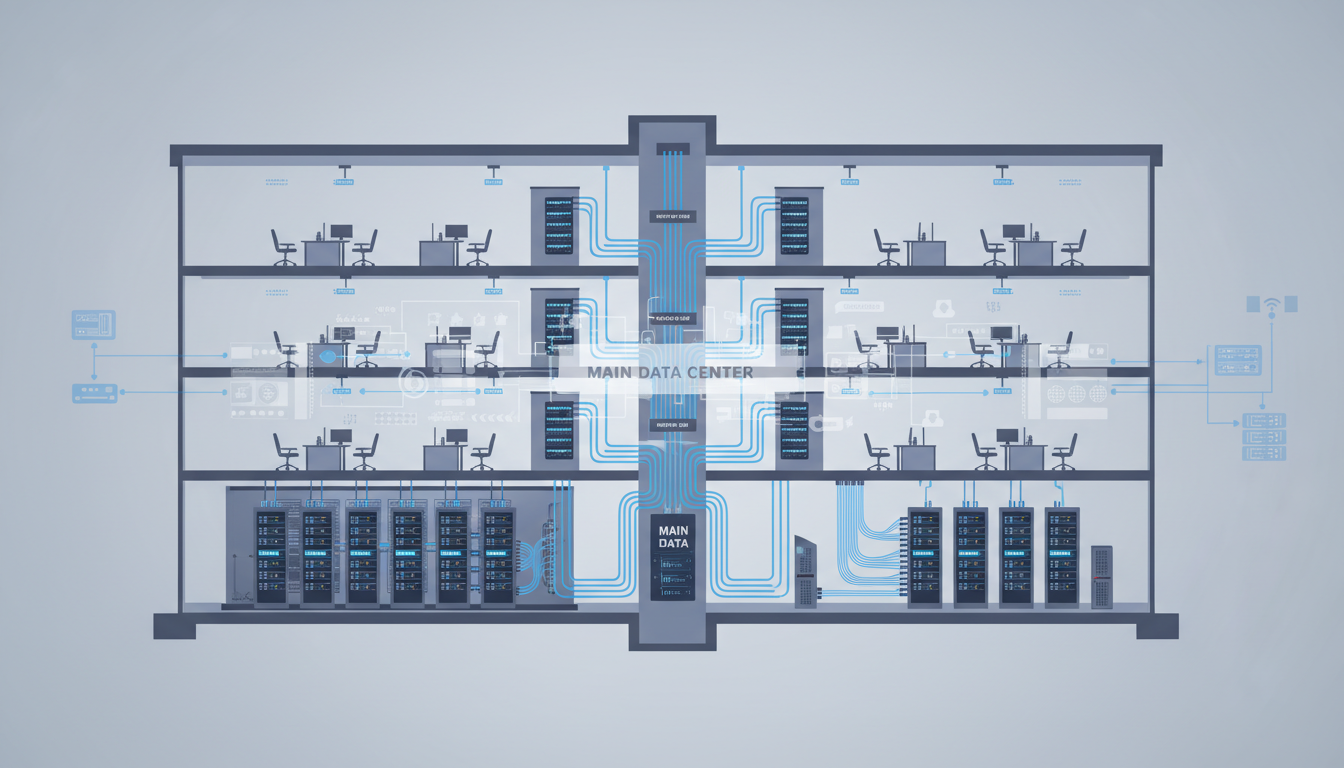
A multi-floor network follows a hierarchical design model with three layers: the core, the distribution layer, and the access layer. Understanding this hierarchy is essential for planning a network that is scalable, manageable, and resilient.
The core layer is the backbone of the network. In a multi-floor office, this typically consists of high-speed fibre optic connections running vertically between floors, connecting the main distribution frame (MDF) in the primary comms room to intermediate distribution frames (IDFs) on each floor. These fibre links carry all inter-floor traffic and must provide sufficient bandwidth to handle the aggregate traffic from every floor without becoming a bottleneck.
The distribution layer sits on each floor, typically in a floor-level comms cabinet or IDF. This is where floor-level switching occurs, VLANs are implemented, and traffic is routed between the floor and the core. Each floor should have its own managed switch (or switches, depending on the number of data points) providing Ethernet connectivity to all desk positions and devices on that floor.
The access layer is where end-user devices connect to the network. This includes the structured cabling from the floor switch to each desk position, the wireless access points providing Wi-Fi coverage, and the wall plates and patch panels that provide the physical connection points.
While Cat6a copper cabling is suitable for horizontal runs on each floor (up to 100 metres), the vertical backbone between floors should always be fibre optic. Fibre provides vastly higher bandwidth (easily 10 Gbps or more), is immune to electromagnetic interference, and supports much longer cable runs. Using copper for the vertical backbone creates a bottleneck that limits the performance of the entire network. Single-mode fibre is recommended for future-proofing, though multi-mode fibre is acceptable for shorter runs within a single building.
Comms Room Planning
Every multi-floor office needs at least one main comms room (housing the core network equipment, firewall, servers, and internet connections) and ideally a comms cabinet or IDF on each additional floor. The comms room is the heart of your network, and its design directly affects the reliability and manageability of your entire infrastructure.
Main Comms Room (MDF) Requirements
The main comms room should be a dedicated, lockable room with controlled access. It needs adequate power supply with an uninterruptible power supply (UPS) to protect against power cuts, a dedicated cooling system (network equipment generates significant heat), proper cable management with structured cable trays and labelled patch panels, and adequate space for current equipment plus future expansion.
Floor-Level Distribution (IDF) Requirements
Each floor should have an intermediate distribution frame, which can range from a full comms cabinet to a wall-mounted enclosure depending on the number of data points being served. The IDF houses the floor-level switch, patch panels for the horizontal cabling on that floor, and the fibre connections to the MDF. Like the MDF, it should have controlled access, adequate power (with UPS), and ventilation.
Choosing IDF Locations
The physical location of each floor-level IDF deserves careful consideration. Ideally, IDFs should be positioned centrally on each floor to minimise the length of horizontal cable runs - remember that structured cabling standards limit copper runs to 90 metres from the patch panel to the wall plate, with an additional 10 metres allowed for patch leads at each end. Locating the IDF at one end of a large floor may result in distant desk positions exceeding this limit, necessitating either a second IDF on that floor or a compromise in cable standard.
In practice, IDF locations are often constrained by the building's layout and the availability of vertical risers. Purpose-built commercial offices usually have dedicated riser cupboards stacked vertically through the building, designed to house cabling and building services. Older or converted buildings may lack such provisions, requiring creative solutions such as using existing lift shaft voids, external risers, or surface-mounted containment. Whatever the physical constraints, ensure that each IDF location provides sufficient space for a full-height or half-height cabinet, has a dedicated power circuit, and maintains adequate airflow to prevent equipment overheating during sustained operation.
Structured Cabling Design
Structured cabling is the physical foundation of your network. It is also the component with the longest lifespan - properly installed Cat6a cabling will serve your business for 15 to 20 years, long outlasting the active equipment connected to it. This makes it worth investing in quality installation now rather than cutting corners that will limit your options in the future.
Horizontal Cabling
Horizontal cabling refers to the cables running from the floor-level IDF to each desk position and device location on that floor. For new installations, Cat6a is the recommended standard. It supports 10 Gigabit Ethernet over runs up to 100 metres, which is more than sufficient for current needs and provides headroom for future bandwidth increases.
Each desk position should have a minimum of two data points - one for a computer and one for a VoIP phone or other device. Meeting rooms should have four to six data points to accommodate conferencing equipment, displays, and temporary connections. Common areas, reception, and break rooms should also have data points for access points, digital signage, or other devices.
Vertical Backbone Cabling
The vertical backbone connects the MDF to each floor-level IDF. This should always be fibre optic cable. For a typical multi-floor office, a minimum of 12-strand single-mode fibre between each IDF and the MDF provides ample capacity for current needs and future growth. Some installations use 24-strand fibre for additional redundancy and capacity.
Cable Pathway Planning and Fire Stopping
The physical routing of cables through a multi-floor building is one of the most challenging aspects of the installation. Cables must follow defined containment routes - typically cable trays in ceiling voids for horizontal runs and vertical risers or conduits for the backbone. The containment must be properly sized to accommodate all planned cables with room for future additions. Industry standards recommend that cable trays should not be filled beyond 40 to 50 per cent of their capacity, allowing space for additional cables and ensuring adequate airflow around existing ones.
Fire stopping is a critical consideration wherever cables pass through fire compartment walls or floors. Building regulations require that any penetration through a fire-rated barrier must be fire-stopped to maintain the integrity of the barrier. Your cabling contractor should use approved fire-stop systems - intumescent collars, fire pillows, or ablative-coated batts - and document every fire stop with photographs and a fire-stop register. This is not just a regulatory requirement; it is a life safety matter. Improperly fire-stopped cable penetrations have been cited as contributing factors in the spread of building fires, and your building insurer may void your cover if fire stops are found to be non-compliant.
Separation from power cabling is another essential routing consideration. Data cables running parallel to mains power cables must maintain a minimum separation distance to avoid electromagnetic interference. For unshielded Cat6a cable, the recommended separation from single-phase power cables is 200 millimetres where they run in parallel, though crossing at right angles requires no separation. Where adequate separation cannot be achieved, shielded cable should be used instead, adding cost but eliminating the interference risk entirely.
| Cable Type | Max Speed | Max Distance | Typical Use | Cost per Point (Installed) |
|---|---|---|---|---|
| Cat6 | 10 Gbps (55m) / 1 Gbps (100m) | 100m | Budget horizontal cabling | £90–£130 |
| Cat6a | 10 Gbps (100m) | 100m | Recommended horizontal cabling | £120–£180 |
| Multi-mode Fibre (OM4) | 100 Gbps (150m) | 550m (at 10G) | Short vertical backbone | £200–£350 per strand pair |
| Single-mode Fibre (OS2) | 100 Gbps+ | 10+ km | Vertical backbone (recommended) | £250–£400 per strand pair |
Wireless Network Design for Multi-Floor Offices
Wi-Fi in a multi-floor office requires particular attention because wireless signals travel between floors, creating potential interference and co-channel contention. A professional wireless survey is essential - this involves an engineer physically mapping the space, measuring signal propagation through floors and walls, identifying sources of interference, and determining the optimal placement and configuration of access points.
Key principles for multi-floor wireless design include using enterprise-grade access points with centralised management (Cisco Meraki, Aruba, Ubiquiti, or Ruckus are popular choices for UK SMEs), carefully planning channel assignments to minimise co-channel interference between floors, using both 2.4 GHz and 5 GHz bands (and 6 GHz where Wi-Fi 6E is supported), implementing separate SSIDs for corporate devices, guest access, and IoT devices, and applying WPA3-Enterprise security with 802.1X authentication for corporate access.
As a rough guide, budget for one enterprise access point per 80 to 120 square metres of open-plan office space, with additional units for meeting rooms, breakout areas, and spaces with dense walls or partitions. For a three-floor office of 500 square metres per floor, you might need 12 to 18 access points in total.
Wireless Roaming and Seamless Handoff
In a multi-floor office, users frequently move between floors for meetings, collaboration sessions, or simply to use facilities on different levels. A well-designed wireless network ensures that devices transition seamlessly between access points as users move, without dropping connections or experiencing noticeable delays. This capability, known as wireless roaming, requires all access points to be managed by a common wireless controller - either a physical appliance or a cloud-based management platform - that coordinates handoffs between access points.
Enterprise wireless systems from vendors such as Cisco Meraki, Aruba, and Ruckus handle roaming automatically when properly configured. The controller monitors client signal strength across all access points and initiates a handoff when a client moves closer to a neighbouring unit. For this to work reliably across floors, the radio frequency power levels on each access point must be carefully tuned to avoid excessive floor-to-floor signal bleed, which can cause devices to remain connected to an access point on a different floor rather than roaming to the closer one on the current level. A professional wireless survey following installation should include roaming tests to verify that handoffs occur cleanly throughout the building.
Network Segmentation and Security
A multi-floor office network should be segmented using VLANs (Virtual Local Area Networks) to separate different types of traffic and different security zones. At minimum, you should have separate VLANs for corporate workstations, VoIP telephony, wireless guest access, IoT and building management systems, and server or infrastructure traffic.
Network segmentation limits the blast radius of a security incident. If a guest device on the visitor Wi-Fi is compromised, it cannot reach your corporate servers because it is on a completely separate VLAN. Similarly, if an IoT device (such as a smart printer or building sensor) is exploited, the attacker cannot pivot to your corporate workstations.
Access control lists (ACLs) and firewall rules should govern traffic flow between VLANs. Not all VLANs need to communicate with each other. Guest traffic should route directly to the internet with no access to internal resources. VoIP traffic should be isolated to ensure quality and security. IoT traffic should be heavily restricted to only the destinations it genuinely needs to reach.
Implementing Segmentation Across Floors
In a multi-floor environment, VLAN implementation requires coordination between the core switches and every floor-level switch. VLANs must be trunked consistently across the backbone so that a device on the corporate VLAN on the third floor can communicate with servers on the corporate VLAN on the ground floor as though they were on the same logical network. This requires careful configuration of trunk ports on every switch in the path and consistent VLAN numbering across the entire infrastructure. A common approach is to assign VLAN ranges by purpose - for example, VLANs 100 to 199 for corporate workstations, 200 to 299 for VoIP, 300 to 399 for guest access, and 400 to 499 for IoT devices. This logical grouping makes configuration more intuitive and troubleshooting faster.
Quality of Service is another critical consideration in a segmented multi-floor network. VoIP traffic is particularly sensitive to latency and jitter, and without proper QoS configuration, a large file transfer or backup operation on the same network segment can degrade call quality. By marking VoIP traffic with a higher priority at the access layer and honouring those markings through the distribution and core layers, you ensure that voice traffic always receives preferential treatment, even during periods of network congestion. This is especially important in multi-floor offices where the fibre backbone carries aggregated traffic from all floors - without QoS, the backbone can become a contention point during peak usage.
For businesses subject to regulatory requirements - financial services, healthcare, legal - network segmentation also serves a compliance function. Regulations such as PCI DSS require that cardholder data is isolated on a separate network segment with documented access controls. The General Data Protection Regulation requires that personal data is protected with appropriate technical measures, which network segmentation directly supports. Documenting your VLAN architecture, firewall rules, and access control policies creates an audit trail that demonstrates compliance to regulators and auditors.
Properly Segmented Network
- Corporate, guest, VoIP, and IoT on separate VLANs
- Firewall rules between all segments
- Guest Wi-Fi isolated from corporate resources
- IoT devices cannot access corporate data
- Compromised device impact limited to its segment
- QoS policies ensure voice quality
- Meets Cyber Essentials requirements
Flat, Unsegmented Network
- All devices on a single network
- No internal traffic controls
- Guest devices can see corporate resources
- Compromised printer can attack file servers
- One breach potentially compromises everything
- Voice quality degraded by data traffic
- Fails Cyber Essentials audit
Internet Connectivity and Redundancy
A multi-floor office with a larger team has a correspondingly greater dependence on internet connectivity. The loss of internet access affects more people and more business processes. For this reason, redundant internet connections are strongly recommended.
The ideal setup for a multi-floor UK office is a primary leased line (100 Mbps to 1 Gbps depending on team size and usage) supplemented by a secondary connection on a different bearer - for example, a primary leased line with FTTP broadband as backup, or a primary FTTP connection with a 4G/5G failover. The firewall should be configured for automatic failover so that if the primary connection fails, traffic seamlessly switches to the backup.
When ordering connectivity, consider that leased lines in the UK typically require 60 to 90 working days for installation. This is one of the longest lead items in any office infrastructure project, so order as early as possible. Also check the building for existing duct routes and whether wayleave agreements are needed from the landlord or building management company.
Budgeting for Multi-Floor Network Infrastructure
The cost of network infrastructure for a multi-floor office varies significantly based on building size, number of floors, team size, and the complexity of the installation. As a general guide for UK businesses, the following cost ranges apply for a three-floor office accommodating 50 to 80 staff members.
Structured cabling (including horizontal Cat6a, vertical fibre, patch panels, and wall plates) typically costs £15,000 to £30,000. Network switching and routing equipment costs £5,000 to £15,000 depending on the brand and specification. Enterprise wireless infrastructure costs £4,000 to £10,000. Firewall and security appliances cost £2,000 to £6,000. And the comms room fit-out (cabinets, UPS, cooling, cable management) costs £3,000 to £8,000. Total infrastructure costs for a mid-range installation are typically £30,000 to £70,000.
These costs represent a significant investment, but this infrastructure will serve your business for many years. Properly installed structured cabling lasts 15 to 20 years. Enterprise-grade networking equipment typically has a 5 to 7 year lifecycle. And the design decisions you make now - adequate data points, fibre backbone, managed switching, proper segmentation - will save you from costly and disruptive retrofits in the future.
Total Cost of Ownership and Ongoing Management
The initial capital expenditure on network infrastructure is only part of the total cost of ownership. Ongoing costs include annual support contracts for networking equipment, licensing fees for wireless management platforms and security appliances, electricity consumption (which can be substantial for a multi-floor deployment with PoE devices), and the labour costs associated with managing and maintaining the network. Budget for these recurring costs from the outset, as they typically add 15 to 25 per cent annually to the initial hardware investment.
For businesses without a dedicated in-house network engineer, engaging a managed service provider to handle day-to-day network management is strongly recommended. A multi-floor network with VLANs, managed switches, enterprise wireless, and a firewall requires ongoing attention - firmware updates, security patches, performance monitoring, capacity management, and incident response all demand specialist knowledge. An undermanaged network will degrade in performance and security over time as configurations drift, firmware falls out of date, and small issues accumulate into significant problems. The cost of a managed network service is typically modest compared to the cost of the infrastructure itself, and it provides peace of mind that your investment is being properly maintained and protected.
Planning a Multi-Floor Office Network?
Cloudswitched designs and deploys enterprise-grade network infrastructure for multi-floor offices across the United Kingdom. From structured cabling and wireless surveys to firewall deployment and network segmentation, we deliver reliable, secure, scalable networks that support your business today and grow with you tomorrow. Contact us for a free site survey and proposal.
Explore Network Admin Services
CloudSwitched
London-based managed IT services provider offering support, cloud solutions and cybersecurity for SMEs.


