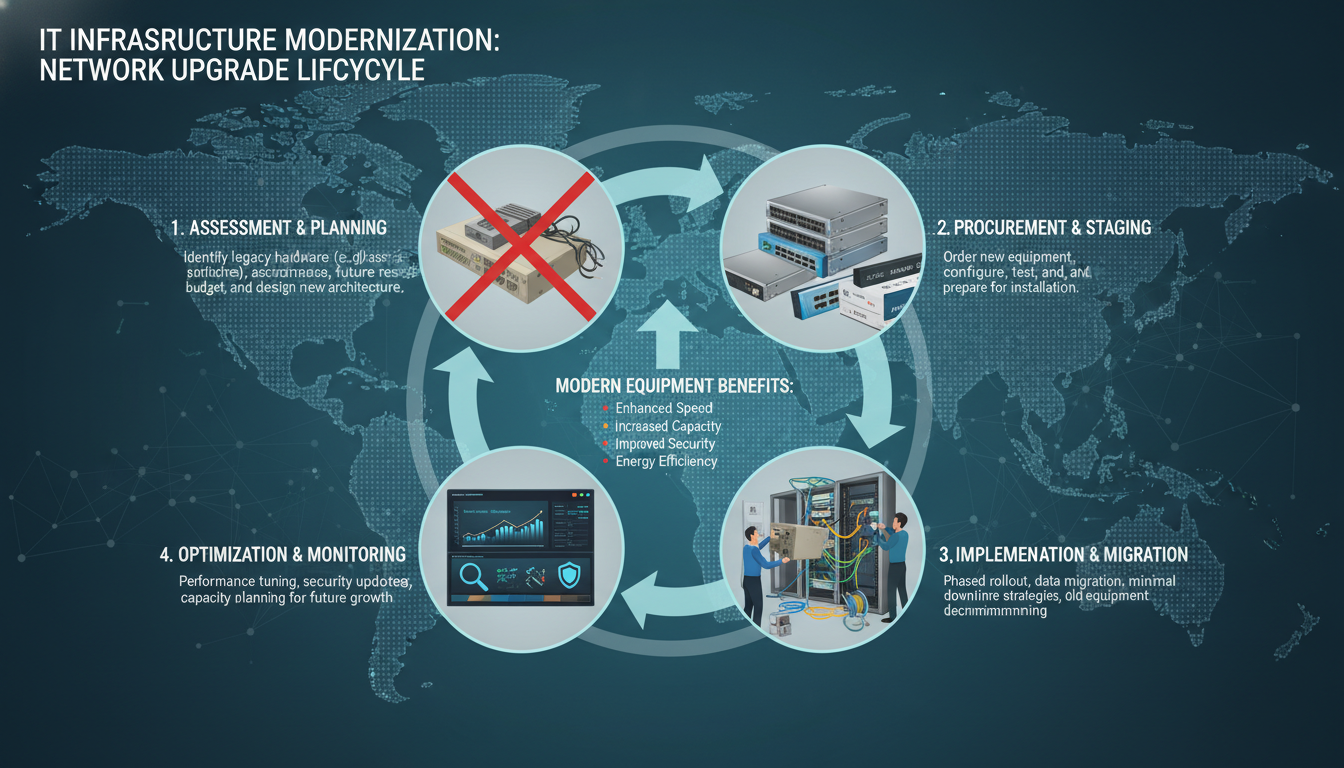
Every piece of network equipment in your business has a finite lifespan. Switches, routers, firewalls, wireless access points, and cabling all degrade over time, and what was cutting-edge five years ago may now be a bottleneck that is holding your business back. A network refresh - the planned replacement and upgrade of your network infrastructure - is one of the most impactful investments a UK business can make, yet it is also one of the most frequently postponed.
The temptation to delay is understandable. If the network appears to be working, why spend money replacing it? The answer is that network degradation is gradual and often invisible until it reaches a tipping point. Slow file transfers, dropped video calls, unreliable Wi-Fi, and intermittent connectivity issues are all symptoms of an ageing network, but because they develop slowly, businesses adapt to them rather than addressing the root cause.
This guide explains how to plan a network refresh properly, from assessing your current infrastructure to designing the replacement, managing the migration, and budgeting for the project. Whether you are a growing SME in Manchester or an established firm in London, the principles are the same.
When Is It Time for a Network Refresh?
Knowing when to refresh your network is just as important as knowing how. There are several clear indicators that your network infrastructure needs attention, and recognising them early allows you to plan proactively rather than react to a crisis.
Age of Equipment
Most enterprise-grade network equipment has a useful life of five to seven years. Beyond this point, manufacturers typically end support, meaning no more firmware updates, security patches, or hardware warranties. Running unsupported equipment is not just a performance risk - it is a security risk, because known vulnerabilities will never be patched. If your core switches, routers, or firewall are more than five years old, it is time to start planning.
Performance Complaints
If your staff are regularly complaining about slow network speeds, Wi-Fi dropping, video calls freezing, or files taking too long to transfer, these are symptoms of a network that has been outgrown. Modern businesses demand far more from their networks than they did even three years ago, with cloud applications, video conferencing, VoIP, and large file transfers all consuming bandwidth that older equipment was never designed to handle.
Security Concerns
Older network equipment often lacks modern security features such as deep packet inspection, intrusion detection and prevention, advanced threat protection, and granular access controls. If your current firewall cannot inspect encrypted traffic, your switches do not support 802.1X authentication, or your wireless access points are still running WPA2 rather than WPA3, a refresh is overdue. The NCSC regularly publishes guidance on network security that older equipment simply cannot meet.
Step 1: Assess Your Current Network
Before you can plan a refresh, you need a thorough understanding of what you currently have. This assessment phase is critical because it establishes the baseline against which the new network will be designed.
Begin with a complete inventory of every piece of network equipment in your organisation. This includes core switches, edge switches, routers, firewalls, wireless access points and controllers, patch panels, structured cabling, UPS systems, and any specialist network equipment such as load balancers or VPN concentrators. For each item, record the make, model, serial number, firmware version, age, warranty status, and physical location.
Next, assess current network performance. Use network monitoring tools to measure bandwidth utilisation, latency, packet loss, and error rates across different parts of the network. Identify bottlenecks - perhaps a Gigabit switch that is struggling to keep up with demand, or a single internet connection that is saturated during peak hours. Understanding where the current network is failing helps you prioritise improvements in the new design.
Document the logical network architecture as well as the physical one. Record VLAN configurations, IP addressing schemes, routing tables, firewall rules, QoS policies, and any network segmentation that is in place. This documentation is essential for designing the replacement network and for planning the migration from old to new.
Businesses often delay network refreshes because the upfront cost seems high. But the hidden costs of running ageing infrastructure are substantial: increased downtime, slower productivity, higher energy consumption (older equipment is less efficient), escalating maintenance costs as equipment fails more frequently, and increased security risk. A study by the Federation of Small Businesses found that UK SMEs lose an average of £2,400 per year in productivity due to slow or unreliable IT infrastructure - much of which is attributable to ageing networks.
Step 2: Define Your Requirements
With a clear picture of your current network, the next step is to define what the new network needs to deliver. This is where you look forward rather than backward, designing for the business you are becoming rather than the business you are today.
Capacity Planning
Consider your current bandwidth consumption and project forward. How many users will you have in three to five years? What new applications or services are you planning to adopt? Will you be increasing your use of cloud services, video conferencing, or IoT devices? A network refresh should be designed with headroom for growth, so you are not in the same position again in three years.
Security Requirements
Modern networks need to support zero-trust security principles, network segmentation, encrypted traffic inspection, and integration with endpoint detection and response (EDR) systems. If your business handles sensitive data or operates in a regulated sector, your network design must comply with relevant standards such as Cyber Essentials, ISO 27001, or PCI DSS.
Resilience and Redundancy
Consider how critical network uptime is to your business. If a network failure would halt operations, you need redundancy built into the design - dual internet connections, redundant core switches, failover firewalls, and UPS-protected power for all network equipment. The level of redundancy should be proportionate to the business impact of downtime.
| Network Component | Current Standard | Recommended Upgrade | Key Benefit |
|---|---|---|---|
| Core Switches | 1 Gbps | 10 Gbps or higher | Eliminates backbone bottlenecks |
| Edge Switches | 100 Mbps / 1 Gbps | 2.5 Gbps / multi-gig | Supports modern Wi-Fi speeds to desktops |
| Wireless | Wi-Fi 5 (802.11ac) | Wi-Fi 6E (802.11ax) | Higher density, lower latency |
| Firewall | Basic stateful inspection | Next-gen with TLS inspection | Inspects encrypted traffic for threats |
| Cabling | Cat5e | Cat6A | Supports 10 Gbps over standard distances |
| Internet | Single FTTC connection | Dual leased lines with failover | Guaranteed bandwidth and resilience |
Step 3: Design the New Network
With requirements defined, your IT provider or network engineer designs the new network. A good design considers physical topology, logical segmentation, security zones, quality of service, management and monitoring, and scalability.
Physical topology defines how devices are connected - the cabling layout, switch stacking or chassis configuration, uplink speeds between switches, and the position of wireless access points. In multi-floor offices common across Birmingham, Leeds, Glasgow, and other UK cities, the physical design must account for riser cabling between floors and the placement of communications cabinets on each floor.
Logical segmentation uses VLANs to separate different types of traffic. A typical design might include separate VLANs for corporate data, voice, guest Wi-Fi, IoT devices, and management traffic. This segmentation improves both performance and security by containing broadcast traffic and limiting the blast radius of any security incident.
The design should include a comprehensive security architecture with a next-generation firewall at the perimeter, network access control (NAC) to authenticate devices before they connect, intrusion detection and prevention systems, and integration with your security information and event management (SIEM) platform if you have one.
Modern Network Design Principles
- Zero-trust: verify everything, trust nothing
- Segmentation: isolate different traffic types
- Redundancy: no single point of failure
- Scalability: design for growth, not just today
- Automation: centralised management and configuration
- Visibility: monitor everything in real time
- Cloud-ready: optimised for SaaS and IaaS traffic
Outdated Approaches to Avoid
- Flat networks with no segmentation
- Single internet connection with no failover
- Unmanaged switches with no monitoring
- Consumer-grade wireless access points
- No network access control for devices
- Manual configuration of each device individually
- Backhauling all cloud traffic through a central firewall
Step 4: Plan the Migration
The migration from your old network to the new one is the most risk-laden phase of the project. A well-planned migration minimises downtime and avoids the kind of problems that can ripple across the business for days or weeks.
There are two broad approaches to network migration: the big-bang approach and the phased approach. A big-bang migration replaces everything at once, typically over a weekend. This is simpler to plan and avoids the complexity of running old and new equipment in parallel, but it carries higher risk because any problems affect the entire network simultaneously.
A phased migration replaces components gradually - perhaps upgrading the core first, then edge switches floor by floor, then wireless, then the firewall. This approach is lower risk because problems are contained to the section being migrated, but it is more complex because old and new equipment must coexist during the transition period.
For most UK SMEs, a hybrid approach works best: replace the core infrastructure in a single planned window, then roll out edge upgrades in phases. Your IT provider will recommend the approach that best suits your specific environment, risk tolerance, and business requirements.
Migration Planning Checklist
Regardless of the approach you choose, thorough migration planning should include a complete backup of all current configurations before any changes are made, a detailed rollback plan that allows you to revert to the old network if the migration encounters problems, a communication plan that informs all staff about the expected downtime window and any changes they need to be aware of, an on-site engineering team with the skills and access required to complete the migration within the planned window, and a comprehensive testing checklist that verifies every aspect of the new network before declaring the migration complete.
Test everything before declaring success. This means testing every physical network port, verifying wireless coverage in every area of the building, confirming internet speeds match expectations, testing VoIP call quality both internally and externally, verifying that every business application works correctly over the new network, and confirming that all security policies are correctly applied. A thorough post-migration test takes time but prevents the frustrating drip-feed of problems that occurs when testing is rushed or incomplete.
Step 5: Budget and Procurement
Network equipment represents a significant capital investment, and it is important to budget accurately. Work with your IT provider to get detailed quotes for all equipment, cabling, installation, configuration, testing, and post-deployment support. Do not forget to include the cost of software licences for firewall subscriptions, wireless controller licences, and network management platforms - these are often recurring annual costs.
For UK businesses looking to spread the cost, many IT providers offer equipment-as-a-service or leasing arrangements where you pay a monthly fee rather than a large upfront sum. This can be particularly attractive for growing businesses that want enterprise-grade infrastructure without the capital outlay. Additionally, some equipment purchases may qualify for the Annual Investment Allowance, providing tax relief on the capital expenditure.
Common Network Refresh Mistakes
Even well-intentioned network refresh projects can go wrong if common pitfalls are not anticipated. Understanding these mistakes helps you plan more effectively and set realistic expectations for the project.
The most frequent mistake is underspecifying the requirements. Businesses that design their new network based solely on current needs, without accounting for growth and emerging technologies, often find themselves in the same position within two to three years. Cloud adoption, video conferencing, IoT devices, and hybrid working all place demands on networks that were not factors even recently. A good network design should have at least 40% headroom above current requirements.
Another common error is neglecting wireless site surveys. Simply placing wireless access points where they seem logical - one per floor, for example - rarely delivers optimal coverage. Building materials, floor layouts, furniture, and interference from neighbouring networks all affect wireless performance. A professional wireless site survey, using tools that measure signal strength and interference throughout the space, ensures access points are positioned for maximum coverage and capacity.
Cutting corners on cabling is a mistake that haunts businesses for years. Structured cabling is the foundation of your network, and it is extremely expensive to replace after installation. Installing Cat5e cabling to save money today means you cannot support 10 Gbps speeds tomorrow. Cat6A cabling costs more upfront but supports the bandwidth requirements of the next decade, making it the smarter long-term investment.
Finally, many businesses fail to document the new network properly. Network documentation - topology diagrams, IP addressing schemes, VLAN configurations, firewall rules, equipment locations, and administrator credentials - is essential for ongoing management, troubleshooting, and future planning. Without documentation, your IT team or provider is working blind, and simple tasks become time-consuming investigations.
The Business Case for a Network Refresh
Presenting the business case for a network refresh to senior management or board members requires translating technical benefits into business outcomes. Frame the investment in terms of reduced risk, improved productivity, lower operating costs, and competitive advantage rather than technical specifications.
Quantify the cost of the current network's shortcomings. How many hours per week do staff lose to slow network performance? What is the cost of a network outage in terms of lost productivity and revenue? What are the potential financial consequences of a security breach enabled by outdated, unpatched network equipment? These figures, combined with the cost of the refresh itself and the expected lifespan of the new equipment, make a compelling case for investment.
For businesses in regulated sectors, the compliance argument is often the strongest. If your current network cannot meet the requirements of Cyber Essentials, ISO 27001, or sector-specific regulations, a network refresh is not optional - it is a regulatory necessity. The cost of non-compliance, whether through fines, lost contracts, or reputational damage, typically far exceeds the cost of upgrading the network.
Post-Refresh: Ongoing Management
A network refresh is not a one-time event - it is the beginning of a new lifecycle. Once the new network is in place, it needs ongoing management to maintain performance, security, and reliability. This includes continuous monitoring with alerting for anomalies, regular firmware updates and security patches, periodic configuration reviews, capacity planning as the business grows, and documentation updates as changes are made.
Partnering with a managed IT provider for ongoing network management ensures that your investment is protected and that your network continues to perform at its best throughout its lifecycle. Rather than waiting for problems to appear, a managed service approach proactively monitors, maintains, and optimises your network every single day. For businesses in Leeds, Cardiff, Glasgow, and across the UK, this partnership model delivers better outcomes than attempting to manage increasingly complex networks with limited internal resources.
Planning a Network Refresh?
Cloudswitched designs, implements, and manages business networks for organisations across the United Kingdom. From initial assessment and design through to procurement, migration, and ongoing management, we deliver end-to-end network refresh projects that are on time, on budget, and built to last. Get in touch to discuss your network requirements.
GET IN TOUCH
CloudSwitched
London-based managed IT services provider offering support, cloud solutions and cybersecurity for SMEs.


