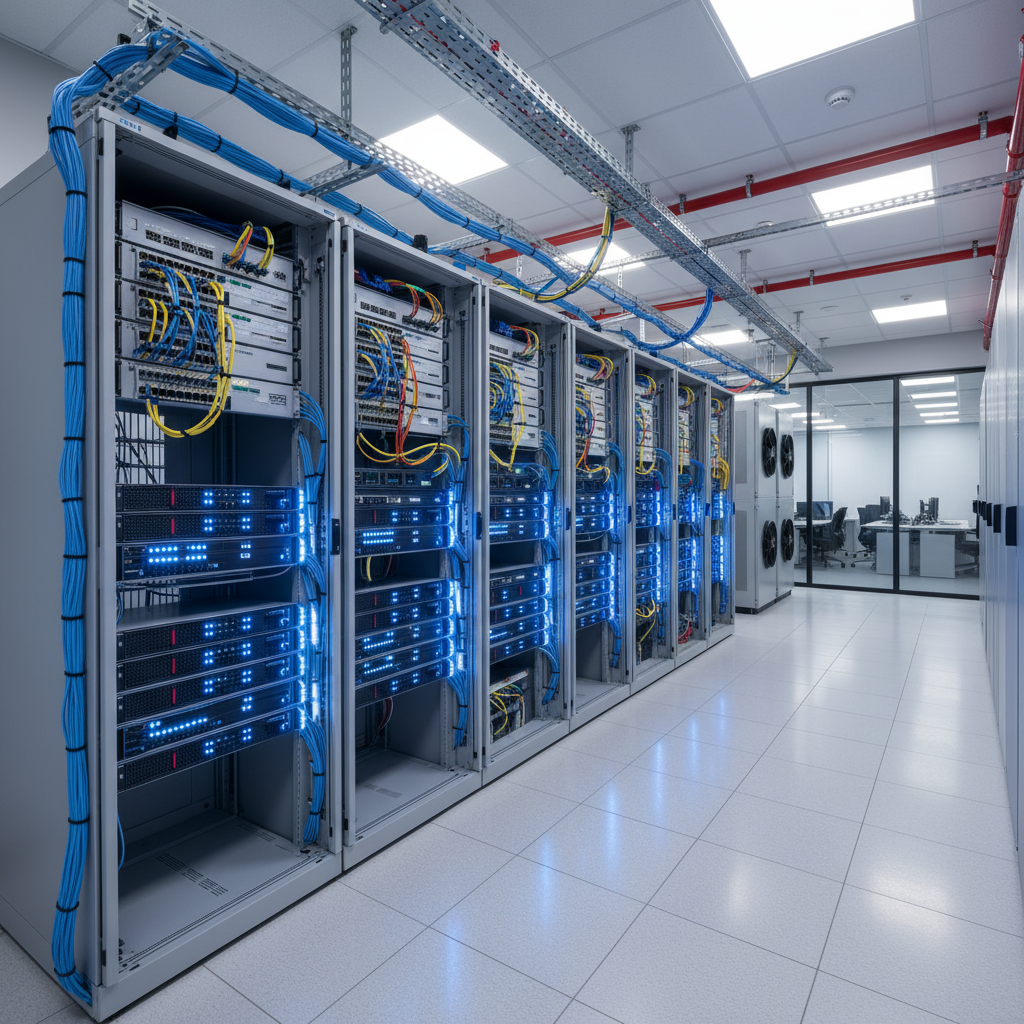
Moving to a new office is one of the most significant events in the life of a growing UK business. There is the excitement of more space, better facilities, and a fresh start - but buried within the logistics of the move is one critical task that can make or break your first weeks in the new premises: setting up your server room correctly.
A poorly planned server room leads to overheating equipment, network outages, security vulnerabilities, and costly rework. A well-planned one provides a stable foundation for your entire technology infrastructure, often for years to come. Whether you are relocating a handful of servers or building a server room from scratch, this guide covers everything you need to consider.
This planning guide is written specifically for UK SMEs and takes into account British building regulations, electrical standards, and climate considerations relevant to offices across England, Scotland, Wales, and Northern Ireland.
The decisions you make about your server room during the planning phase will have consequences for years to come. Unlike a poor paint colour or an awkward desk layout, a server room that is inadequately powered, insufficiently cooled, or poorly cabled cannot be easily corrected without significant disruption and expense. Equipment must be powered down, services interrupted, and in some cases, the entire room must be stripped back and rebuilt. Getting it right the first time is not merely a best practice - it is a financial imperative.
This guide takes you through each critical element of server room planning in the order you should address them. We begin with room selection, move through power and cooling infrastructure, cover cabling and connectivity, and finish with security and fire safety. Each section includes practical guidance specific to the UK market, including relevant British Standards, typical costs, and lessons learned from real-world office relocations.
Choosing the Right Room
The first and arguably most important decision is selecting which room in your new office will house your server equipment. Not every room is suitable, and making the wrong choice can create problems that are expensive and disruptive to fix later.
Location Within the Building
Ideally, your server room should be located in an interior room away from external walls and windows. External walls are subject to temperature fluctuations from weather and sunlight, which makes climate control more difficult and expensive. Ground floor or basement locations are preferable because they can more easily support the weight of server racks and UPS batteries, though basement rooms carry a higher flood risk that must be assessed.
Avoid rooms directly below kitchens, bathrooms, or any plumbing. Water damage is one of the most common causes of catastrophic server failure, and a leaking pipe above your server rack can destroy tens of thousands of pounds worth of equipment in minutes.
Room Size and Capacity Planning
Think beyond your current needs. A server room that is perfectly sized for today's equipment will be too small within two to three years as your business grows. As a general rule, plan for at least 50% more rack space than you currently need. For a typical UK SME with 20 to 50 employees, a room of approximately 10 to 15 square metres is usually sufficient, allowing space for two to three server racks, a UPS system, a network patch panel, and enough clearance for maintenance access.
Structural Considerations and Floor Loading
Server racks, particularly when fully populated, are extremely heavy. A standard 42U rack loaded with servers, switches, and UPS batteries can weigh anywhere from 300 to over 800 kilograms. Most modern office buildings have floor loading capacities of approximately 2.5 to 4.0 kN per square metre for general office use, which may not be sufficient for concentrated loads from multiple fully laden racks. Before committing to a room, obtain the structural loading specifications for the floor and verify that they can support the weight of your planned equipment.
If the floor loading is insufficient, structural reinforcement may be required - an expense that should be identified early in the planning process rather than discovered after racks have been installed. For raised access floors, which are common in purpose-built server rooms, ensure the floor tiles and pedestals are rated for the point loads your equipment will impose. A structural engineer can advise on specific requirements, and this assessment should be completed before any equipment is ordered or installed.
In most cases, converting an existing office room into a server room does not require planning permission. However, if you are making structural changes, installing dedicated cooling systems, or significantly increasing the electrical load on the building, you may need to consult with your landlord and potentially obtain building regulations approval. Electrical work must comply with BS 7671 (the IET Wiring Regulations) and should be carried out by a qualified electrician registered with a competent person scheme such as NICEIC or NAPIT.
Power and Electrical Infrastructure
Server equipment requires clean, reliable power. The electrical infrastructure of your server room is not something to economise on - getting it right from the outset prevents downtime and protects your investment in hardware.
Dedicated Electrical Circuit
Your server room should have its own dedicated electrical circuit, separate from the general office power supply. This prevents situations where someone plugging in a heater or kettle elsewhere in the office trips a breaker and takes down your servers. For a small server room, a 32-amp single-phase supply is typically sufficient. Larger installations may require a three-phase supply.
Uninterruptible Power Supply (UPS)
A UPS provides battery backup that keeps your servers running during short power outages and protects against power surges, sags, and electrical noise. For a UK SME server room, you should size your UPS to support your critical equipment for at least 15 to 30 minutes - long enough to either ride out a brief outage or perform a graceful shutdown of all systems.
Power Distribution Units (PDUs)
Within the server rack, power distribution units distribute electricity from the UPS to individual pieces of equipment. Managed PDUs allow you to monitor power consumption per outlet, remotely reboot individual devices, and set alerts for overloaded circuits. For a new server room, investing in managed PDUs is well worth the additional cost - typically £200 to £500 per unit.
Generator Backup for Extended Outages
A UPS provides protection against short power interruptions, but for extended outages lasting hours or days, a generator may be necessary. Whilst many UK SMEs consider generators an unnecessary expense, the increasing frequency of power disruptions - whether from grid issues, extreme weather, or planned maintenance - makes this a conversation worth having. If your business cannot tolerate more than 30 minutes of downtime, a generator should be part of your resilience planning.
Portable generators are available for temporary deployment, but a permanently installed standby generator with an automatic transfer switch (ATS) provides seamless protection. When the mains supply fails, the ATS detects the outage, starts the generator, and transfers the load within seconds - often before the UPS batteries are significantly depleted. For businesses in sectors such as healthcare, finance, or legal services, where data availability is a regulatory or contractual requirement, generator backup may be essential rather than optional. Costs for a small standby generator suitable for a server room start at approximately £5,000 to £15,000 installed.
Cooling and Climate Control
Servers generate substantial heat, and without adequate cooling, a small server room can reach dangerous temperatures within hours - or even minutes during a cooling failure. Proper climate control is not optional; it is essential for equipment reliability and longevity.
Calculating Your Cooling Requirement
Every piece of IT equipment converts electrical power into heat. The heat output is measured in British Thermal Units (BTUs) or kilowatts (kW). As a rough guide, multiply your total server room power consumption in watts by 3.41 to get the BTU cooling requirement. For a small server room drawing 3kW of power, you would need approximately 10,200 BTU of cooling capacity - plus a safety margin of 20 to 30%.
Cooling Options
For small server rooms, a dedicated split air conditioning unit is usually the most cost-effective solution. These units can maintain precise temperature control and are widely available from UK suppliers. Wall-mounted units from manufacturers such as Daikin, Mitsubishi, or Fujitsu are popular choices. For redundancy, consider installing two units - if one fails, the other can keep the room within safe temperatures until repairs are made.
Portable air conditioning units are not recommended for server rooms. They are less reliable, less efficient, and typically require a vent hose to an external wall or window, which can create security and weatherproofing concerns.
Environmental Monitoring
Install environmental monitoring sensors that track temperature, humidity, and water presence. These sensors should be connected to your monitoring system so that alerts are triggered immediately if conditions move outside safe parameters. Temperature sensors should be placed at the front and rear of each rack, as hot spots can develop even in well-cooled rooms.
Airflow Management and Hot Aisle/Cold Aisle Design
Even in a small server room, proper airflow management makes a significant difference to cooling efficiency and equipment longevity. The hot aisle/cold aisle principle arranges server racks so that the fronts of all racks face each other, creating a cold aisle, and the rears face each other, creating a hot aisle. Cool air is delivered to the cold aisle, drawn through the servers, and expelled as hot air into the hot aisle, where it is collected and returned to the cooling unit.
For a room with only one or two racks, a full hot aisle/cold aisle configuration may not be practical, but the underlying principle still applies. Ensure that cool air from the air conditioning unit flows towards the front of the racks and that hot air exhausting from the rear has a clear path back to the cooling return. Avoid placing racks against walls in a way that traps hot air behind them. Blanking panels should be installed in any unused rack spaces to prevent hot exhaust air from recirculating to the front of the rack, which reduces cooling efficiency and creates hot spots that can shorten equipment life.
Network Cabling and Connectivity
Structured cabling is the backbone of your office network, and the server room is where it all comes together. Poor cabling leads to intermittent connectivity issues, difficult troubleshooting, and a tangled mess that makes future changes time-consuming and risky.
Cable Standards
For new installations in 2026, Cat6A cabling is the recommended minimum standard. Cat6A supports 10 Gigabit Ethernet over distances up to 100 metres, which provides ample headroom for current and near-future networking needs. While Cat6 is still adequate for most SME applications, the price difference with Cat6A is now minimal, making it the sensible default choice.
All cabling should be installed by a qualified installer and certified upon completion. Certification testing verifies that each cable run meets the relevant performance standards and provides documentation that can be invaluable for future troubleshooting.
Patch Panels and Cable Management
Use patch panels to terminate all cable runs in the server room. Every cable from every desk, meeting room, wireless access point, and CCTV camera should terminate at a clearly labelled patch panel in the server rack. From there, short patch leads connect to your network switches. This approach makes moves, additions, and changes straightforward - you simply move a patch lead rather than re-running cables through the building.
Invest in proper cable management accessories: horizontal and vertical cable organisers, Velcro ties (never cable ties for network cables - they can crush and damage the pairs), and clearly labelled patch leads in different colours for different purposes (data, voice, management, and so on).
Fibre Optic Considerations
Whilst Cat6A copper cabling is the standard for horizontal runs to desks and access points, fibre optic cabling has an important role in the server room - particularly for connections between switches, for links to other floors or buildings, and for future-proofing high-bandwidth requirements. Single-mode fibre provides virtually unlimited bandwidth over long distances, whilst multi-mode fibre (typically OM3 or OM4) is more cost-effective for shorter runs within a building.
If your office spans multiple floors or if your server room is located far from the building's incoming telecommunications service, fibre runs should be installed during the initial cabling phase. Adding fibre retrospectively is considerably more expensive and disruptive. Even if you do not need fibre connectivity immediately, installing dark fibre - fibre that is in place but not yet connected to active equipment - during the fit-out is a relatively inexpensive way to future-proof your infrastructure. The cable itself is the least expensive part of a fibre installation; the majority of the cost lies in the labour to pull it through containment and terminate it at each end.
Server Room Best Practices
- Dedicated room with restricted access control
- Redundant cooling with environmental monitoring
- UPS with sufficient runtime for graceful shutdown
- Structured Cat6A cabling with patch panels
- Fire suppression appropriate for electrical equipment
- Clear labelling on all cables, ports, and equipment
Common Server Room Mistakes
- Placing servers in a cupboard with no cooling
- Running all IT equipment off the general office circuit
- No UPS or undersized UPS that provides seconds, not minutes
- Unlabelled spaghetti cabling that nobody understands
- No physical security - anyone can walk in
- No environmental monitoring until equipment fails
Physical Security
Your server room contains your most valuable and sensitive IT assets. Physical security must be taken seriously, not just for data protection reasons but also to satisfy UK GDPR requirements regarding the security of personal data processing equipment.
At minimum, your server room should have a lockable door with access limited to authorised personnel. For enhanced security, consider electronic access control using key cards or PIN codes, which provides an audit trail of who entered the room and when. CCTV monitoring of the server room entrance is also advisable, particularly if your business handles sensitive data or is subject to regulatory requirements.
The server room door should be kept closed at all times - both for security and to maintain proper cooling. Propping the door open because the room is too warm is a clear sign that the cooling system is inadequate and needs upgrading.
Access Logging and Compliance
For businesses subject to regulatory requirements - including UK GDPR, ISO 27001, Cyber Essentials Plus, or industry-specific frameworks such as FCA regulations for financial services - maintaining a verifiable record of who accessed the server room and when is not merely good practice but a compliance obligation. Electronic access control systems automatically log every entry and exit, providing an audit trail that can be produced during compliance audits or security investigations.
These access logs should be retained for a minimum period aligned with your regulatory requirements - typically at least 12 months. The logs should be stored separately from the server room infrastructure itself, so that they remain available even if the server room equipment is compromised. Cloud-based access control platforms that store logs remotely are increasingly popular for this reason. Regular reviews of access logs - monthly at a minimum - help identify unusual patterns such as out-of-hours access or access by individuals who no longer require it, enabling prompt remediation before a security incident occurs.
Fire Suppression
Standard water-based sprinkler systems are not suitable for server rooms because water causes as much damage to electronic equipment as fire does. Instead, server rooms should be protected by a gas-based fire suppression system that extinguishes fire without damaging equipment. Common options include inert gas systems (such as Inergen or Argonite) and clean agent systems (such as FM-200 or Novec 1230).
For very small server rooms where a full gas suppression system is not cost-effective, portable clean agent fire extinguishers should be readily accessible. Ensure all staff who may need to enter the server room know the location of the extinguisher and understand that water or powder extinguishers must never be used on electrical equipment.
Smoke Detection and Early Warning
Standard office smoke detectors may not provide sufficiently early warning in a server room environment. Conventional detectors rely on visible smoke particles reaching the sensor, by which point significant damage may already have occurred. Very Early Smoke Detection Apparatus (VESDA) systems use air sampling technology to detect smoke at the earliest possible stage - often before a fire is visible to the human eye. VESDA continuously draws air from the protected space through a network of sampling pipes, analyses it for the presence of smoke particles, and triggers progressive alerts as smoke levels increase.
For small server rooms where a full VESDA installation is not cost-justified, high-sensitivity spot detectors designed for IT environments offer a middle ground between standard office detectors and aspirating systems. These detectors are more sensitive than standard models and can be configured to trigger alerts at lower smoke thresholds. Whichever detection system you choose, ensure it is integrated with your building fire alarm system and that alerts are also sent to your IT monitoring platform so that your team or managed service provider can respond immediately, even outside office hours.
Server Room Checklist for Your Office Move
Use this checklist to ensure nothing is overlooked during your server room planning and setup.
| Category | Task | Priority |
|---|---|---|
| Room Selection | Choose interior room away from water sources | Critical |
| Electrical | Install dedicated circuit with adequate capacity | Critical |
| Electrical | Install and configure UPS system | Critical |
| Cooling | Install dedicated air conditioning with redundancy | Critical |
| Cooling | Deploy environmental monitoring sensors | High |
| Networking | Install structured Cat6A cabling throughout building | Critical |
| Networking | Set up patch panels with clear labelling | High |
| Security | Install access control on server room door | High |
| Security | Set up CCTV monitoring | Medium |
| Fire Safety | Install appropriate fire suppression or extinguishers | High |
| Documentation | Create network diagrams and equipment inventory | High |
Conclusion
A well-planned server room is an investment that pays dividends in reliability, security, and peace of mind. By addressing power, cooling, cabling, security, and fire safety before you move in, you avoid the costly and disruptive remediation work that results from cutting corners. If your business is planning an office move, make server room planning one of the first items on your agenda - not an afterthought squeezed in during the final week.
The difference between a professionally planned server room and a hastily assembled one becomes apparent within weeks of moving in. Businesses that invest in proper planning enjoy stable, reliable infrastructure that supports their operations without interruption. Those that cut corners find themselves dealing with a succession of problems - overheating, power issues, connectivity faults, and security concerns - each of which consumes time, money, and management attention that would be far better directed elsewhere.
If there is one overarching lesson from the hundreds of office relocations we have supported, it is this: the server room should be planned in parallel with the office fit-out, not after it. Electrical circuits, cable pathways, cooling provisions, and structural requirements all need to be coordinated with the building contractor from the earliest design stages. Attempting to retrofit these elements after the fit-out is complete inevitably results in compromise, additional cost, and a server room that falls short of what your business deserves.
Planning an Office Move?
Cloudswitched specialises in IT relocation for UK businesses. From server room design and structured cabling to network setup and testing, we handle every technical aspect of your move so you can focus on running your business. Get in touch to discuss your upcoming relocation.
Explore IT Office Move Services
CloudSwitched
London-based managed IT services provider offering support, cloud solutions and cybersecurity for SMEs.


