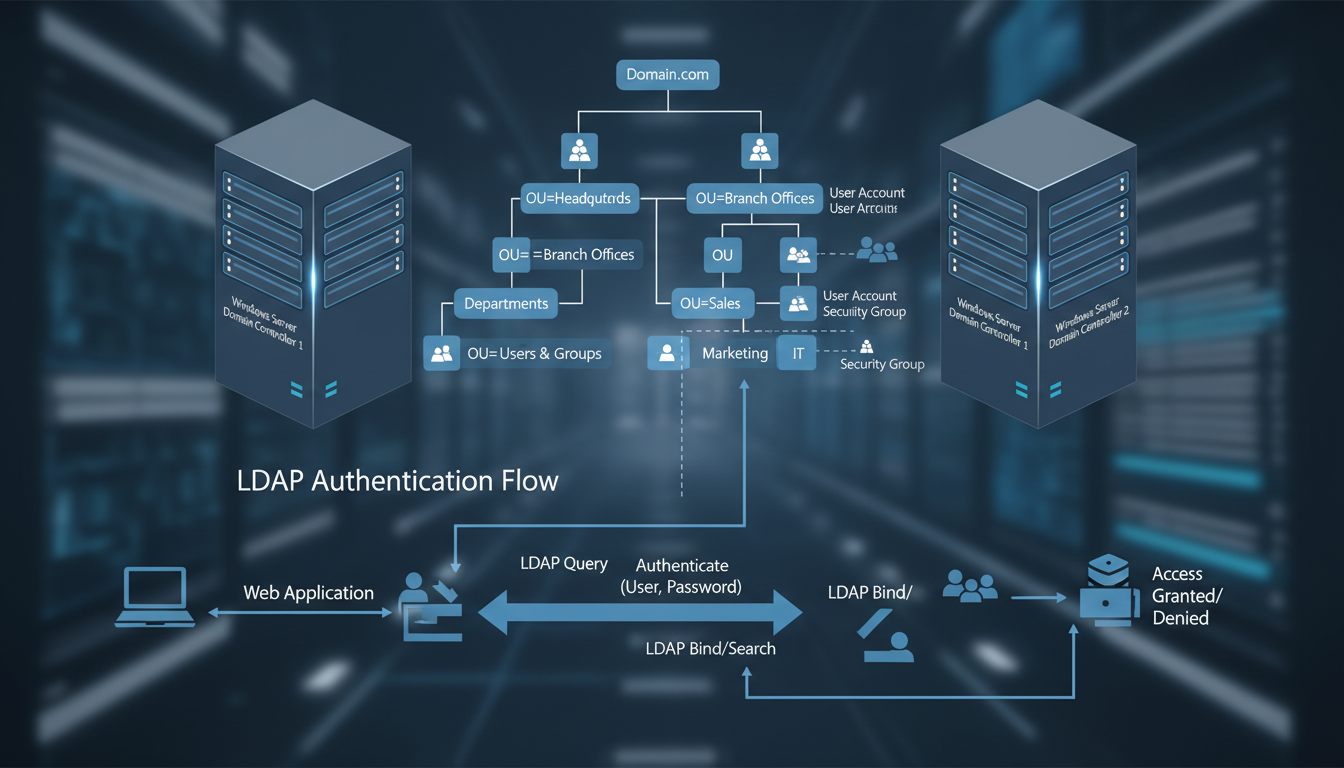
In thousands of offices across the United Kingdom - from accountancy practices in Manchester to logistics firms in Bristol, legal chambers in London to engineering companies in Birmingham - there is a piece of technology silently underpinning almost everything employees do each day. When staff log into their computers each morning, access shared files on the company server, print documents to the office printer, or connect to business applications, they are interacting with Active Directory, whether they realise it or not.
Microsoft Active Directory (AD) has been the backbone of enterprise identity and access management since its introduction in Windows 2000. More than two decades later, it remains the most widely deployed directory service in the world, managing user authentication, device policies, and network resources for organisations of every size. Yet despite its critical importance, Active Directory is often poorly understood by business leaders and even some IT staff. It tends to be treated as plumbing - invisible until something goes wrong, at which point the consequences can be severe.
This guide explains what Active Directory is, how it works, why it matters to your business, and how to manage it effectively in the context of modern hybrid and cloud-first environments.
What Exactly Is Active Directory?
At its simplest, Active Directory is a database and set of services that connect users with the network resources they need to accomplish their work. Think of it as a highly structured telephone directory for your entire IT environment - but instead of just listing names and numbers, it stores detailed information about every user, computer, printer, application, and security policy in your organisation, and uses that information to control who can access what.
When an employee types their username and password at the Windows login screen, Active Directory verifies their identity against its database. If the credentials match, AD creates an authentication token that grants the user access to the resources they are authorised to use - their email, file shares, printers, applications, and network services. This process happens in milliseconds and repeats hundreds of times throughout the working day as the user interacts with different systems.
Active Directory organises these resources into a hierarchical structure. At the top sits the forest - the overall security boundary for your organisation. Within the forest are one or more domains, which represent distinct administrative units. Within each domain, objects (users, computers, groups, printers) are organised into Organisational Units (OUs) that typically mirror your company structure - for example, separate OUs for Finance, Sales, Operations, and IT.
This hierarchical structure is more than just an organisational convenience - it is fundamental to how Active Directory applies security policies and delegates administrative control. Permissions and policies set at a higher level in the hierarchy automatically flow down to objects below, a mechanism called inheritance. A password policy applied at the domain level affects every user in that domain. A software deployment policy linked to the Finance OU affects only computers in that department. This inheritance model allows administrators to manage thousands of objects efficiently with a relatively small number of well-designed policies.
Active Directory also relies on a multi-master replication model, where changes made on any domain controller are automatically replicated to all other domain controllers in the domain. This ensures consistency across your network and provides resilience - if one domain controller fails, the others continue to provide authentication and directory services without interruption. For UK businesses with multiple office locations, this replication extends across sites, ensuring that employees in a branch office can authenticate locally against their nearest domain controller rather than relying on a wide-area network connection back to head office.
A common source of confusion is the relationship between traditional on-premises Active Directory and Microsoft Entra ID (formerly Azure Active Directory). They are related but distinct services. On-premises AD manages resources within your local network - servers, workstations, printers, and file shares on your office network. Entra ID is a cloud-based identity service that manages access to cloud applications like Microsoft 365, Azure resources, and thousands of third-party SaaS applications. Most UK businesses today use both, synchronised together using a tool called Entra Connect (formerly Azure AD Connect), creating a hybrid identity environment that spans both on-premises and cloud resources.
Core Active Directory Services
Active Directory is not a single technology but a collection of related services, each serving a specific purpose. Understanding these services helps you appreciate the breadth of what AD manages in your environment.
Active Directory Domain Services (AD DS)
This is the core directory service that most people mean when they refer to Active Directory. AD DS stores information about members of the domain - users, computers, and groups - and provides authentication and authorisation services. Every time a user logs in, accesses a file share, or connects to a printer, AD DS is involved.
Group Policy
Group Policy is a powerful feature built on top of AD DS that allows administrators to centrally manage and configure settings for users and computers across the network. Through Group Policy Objects (GPOs), your IT team can enforce password complexity requirements, configure desktop wallpapers, map network drives, deploy software, restrict access to control panel settings, configure Windows Update policies, and thousands of other settings - all from a single console, applied automatically to the relevant users and computers.
DNS Services
Active Directory depends heavily on the Domain Name System (DNS) for locating domain controllers and services within the network. AD-integrated DNS zones store their data within Active Directory itself, providing secure dynamic updates and automatic replication between domain controllers. Without properly functioning DNS, Active Directory cannot operate - making DNS health monitoring a critical operational concern.
Active Directory Certificate Services
AD Certificate Services (AD CS) provides a public key infrastructure for your organisation, enabling the creation and management of digital certificates used for securing communications, authenticating devices, and encrypting data. Certificates issued by AD CS are used for securing internal websites with HTTPS, encrypting email with S/MIME, authenticating wireless network connections, and enabling smart card login. For UK businesses handling sensitive data, an internal PKI provides a cost-effective alternative to purchasing certificates from commercial certificate authorities for internal-facing services, whilst ensuring that certificate issuance is controlled and auditable.
Lightweight Directory Access Protocol
LDAP is the protocol that applications use to query and interact with Active Directory. When a business application needs to verify a user's identity, look up their email address, or determine which groups they belong to, it communicates with Active Directory using LDAP. This protocol is supported by virtually every enterprise application, making Active Directory a universal authentication and directory platform. Linux servers, network appliances, VPN concentrators, and third-party applications can all authenticate against Active Directory using LDAP, providing a single source of truth for user identities across your entire technology estate, regardless of the operating system or platform in use.
Why Active Directory Matters for UK Businesses
For UK SMEs, Active Directory is not merely a technical convenience - it is the foundation of your security posture, your compliance obligations, and your operational efficiency. Here is why it deserves serious attention from business leaders as well as IT staff.
Security and Access Control
Active Directory is the gatekeeper for your entire network. Properly configured, it ensures that employees can access only the resources they need for their role - the principle of least privilege. A finance team member can access the accounts file share but not the HR records. A marketing intern can use the design software but cannot install applications or modify system settings. This granular access control is fundamental to protecting sensitive data and meeting your obligations under the UK GDPR and Data Protection Act 2018.
Compliance and Auditing
Regulatory frameworks that apply to UK businesses - including GDPR, PCI DSS for organisations handling payment card data, and sector-specific regulations such as FCA requirements for financial services firms - all require demonstrable control over who can access what data and when. Active Directory provides the audit trail and access controls needed to satisfy these requirements. When the ICO asks how you control access to personal data, your Active Directory configuration and policies form a central part of the answer.
Operational Efficiency
Without Active Directory, managing user accounts, permissions, and device configurations in a business of any size becomes impossibly time-consuming. Imagine manually configuring each of 100 computers with the same security settings, or individually managing file share permissions for 50 employees. AD automates these tasks through Group Policy and centralised management, allowing your IT team or managed service provider to administer your entire environment efficiently from a single console.
| AD Feature | Business Benefit | Compliance Relevance | Risk Without It |
|---|---|---|---|
| User Authentication | Single sign-on across all systems | GDPR Article 32 (security of processing) | Shared passwords, no accountability |
| Group Policy | Consistent security settings company-wide | Cyber Essentials requirement | Inconsistent, unmanaged devices |
| Organisational Units | Department-based access control | Data minimisation principle | Excessive access to sensitive data |
| Security Groups | Role-based permissions management | PCI DSS Requirement 7 | Individual permissions chaos |
| Password Policies | Enforced complexity and expiry | NCSC guidance compliance | Weak passwords, credential theft |
| Audit Logging | Track who accessed what and when | ICO breach investigation requirement | No evidence trail for incidents |
Active Directory in the Hybrid Cloud Era
The technology landscape for UK businesses has shifted dramatically over the past five years. The rapid adoption of cloud services - accelerated by the pandemic - means that most organisations now operate in a hybrid environment where some resources live on-premises and others reside in the cloud. Active Directory has evolved to accommodate this shift, but the hybrid model introduces additional complexity that must be managed carefully.
Microsoft Entra Connect synchronises your on-premises Active Directory with Entra ID in the cloud, creating a unified identity that works across both environments. An employee uses the same username and password to log into their office workstation, access SharePoint Online, connect to the company VPN, and sign into cloud-hosted applications. This seamless experience is only possible because of the synchronisation between on-premises AD and Entra ID running reliably in the background.
However, hybrid identity introduces challenges. Password hash synchronisation, pass-through authentication, and federation services each have different security implications. Conditional access policies in Entra ID can complement on-premises Group Policies but require separate configuration and monitoring. And the attack surface expands - you now need to protect identities in both environments against compromise.
Conditional Access and Zero Trust
One of the most powerful capabilities that hybrid identity enables is Conditional Access, a feature of Entra ID that evaluates the context of every sign-in request and applies appropriate access controls. Rather than simply checking whether a username and password are correct, Conditional Access considers factors such as the user's location, the device they are signing in from, the application they are accessing, and their current risk level. Based on these signals, it can grant access, require additional verification through multi-factor authentication, or block the sign-in entirely.
For UK businesses, Conditional Access enables sophisticated security policies that would be extremely difficult to implement with on-premises Active Directory alone. You can require MFA for all sign-ins from outside the corporate network, block access from countries where your business does not operate, ensure that only managed and compliant devices can access sensitive applications, and automatically respond to detected identity risks by requiring password changes or blocking compromised accounts. These policies align closely with the zero trust security model recommended by the NCSC, which assumes that no user or device should be automatically trusted regardless of their location on the network.
Implementing Conditional Access alongside your existing on-premises Group Policies creates a comprehensive security framework that protects both your local and cloud resources. Group Policy continues to manage device configurations, software settings, and network-level security on your on-premises infrastructure, whilst Conditional Access governs identity-based security decisions for cloud resources and remote access scenarios. Together, they provide layered defence that is significantly more robust than either technology could achieve independently.
On-Premises Active Directory
- Full control over infrastructure and data
- No dependency on internet connectivity
- Granular Group Policy management
- Legacy application compatibility
- Direct hardware control for domain controllers
- Established tooling and expertise
Cloud-Only (Entra ID)
- No on-premises servers to maintain
- Built-in conditional access and MFA
- Automatic updates and patching by Microsoft
- Global availability and redundancy
- Native integration with Microsoft 365
- Modern authentication protocols (OAuth, SAML)
Active Directory Security Best Practices
Given that Active Directory controls access to your entire IT environment, securing it is paramount. The UK NCSC has published extensive guidance on securing Active Directory, and the following best practices should form the foundation of your AD security strategy.
Implement tiered administration to separate high-privilege accounts from day-to-day user accounts. Domain administrator credentials should only be used on dedicated secure workstations, never for browsing the web or checking email. Apply the principle of least privilege rigorously - users and service accounts should have only the minimum permissions necessary for their function. Enable multi-factor authentication for all administrative access and for all cloud-connected identities through Entra ID. Monitor Active Directory logs for suspicious activity using a SIEM solution or your managed IT provider's monitoring platform. Regularly audit group memberships, especially for high-privilege groups like Domain Admins, Enterprise Admins, and Schema Admins.
Keep your domain controllers patched and updated. Active Directory vulnerabilities are regularly discovered and exploited by threat actors - the Zerologon vulnerability in 2020, for example, allowed attackers to take complete control of a domain with a single exploit. Prompt patching is your first line of defence against such threats.
Service Account Management
Service accounts - dedicated Active Directory accounts used by applications and automated processes rather than human users - represent one of the most overlooked security risks in many UK business networks. These accounts often have elevated privileges, rarely have their passwords changed, and are frequently configured with passwords that never expire, creating persistent vulnerabilities that attackers actively seek to exploit. A compromised service account can provide an attacker with ongoing, undetected access to critical systems for months or even years.
Best practice for service account management includes using Group Managed Service Accounts (gMSAs) wherever possible, which allow Active Directory to automatically manage and rotate passwords. For applications that cannot use gMSAs, implement a regular password rotation schedule for service accounts, document which applications and services use each account, and ensure that service accounts have only the minimum permissions necessary for their function. Regularly audit service account usage and investigate any unexpected authentication patterns that might indicate compromise.
Privileged Access Workstations
Domain administration - the management of Active Directory itself - should only be performed from dedicated, hardened workstations known as Privileged Access Workstations (PAWs). These machines are configured with enhanced security controls, restricted internet access, and dedicated monitoring. Administrators should never use their domain admin credentials on a regular workstation that is also used for email, web browsing, and other daily tasks, as these activities expose the workstation to malware and phishing attacks that could capture administrative credentials and provide an attacker with full control over your Active Directory environment.
Common Active Directory Problems and Solutions
Even well-managed Active Directory environments encounter problems. Understanding the most common issues helps you identify them quickly and minimise their impact on your business.
Replication failures between domain controllers can cause inconsistent authentication results - a user might be able to log in at one desk but not another, or a password change might not take effect across all systems. Regular monitoring of replication health using tools like repadmin and dcdiag is essential. DNS issues are another frequent culprit; because AD depends so heavily on DNS, any misconfiguration can cause widespread authentication failures, slow logins, and inability to locate network resources.
Group Policy processing problems can result in security settings not being applied correctly, mapped drives disappearing, or software deployments failing. These issues often stem from GPO inheritance conflicts, WMI filter problems, or network connectivity issues during the policy application window at startup and login.
Account lockouts are perhaps the most visible AD problem for end users. When an account becomes locked due to repeated failed login attempts, the user cannot access any network resource until the lockout is resolved. Common causes include cached credentials on mobile devices, mapped drives with saved passwords, and service accounts configured with user credentials that have expired. Tracking down the source of lockouts requires examining security event logs across multiple domain controllers.
Planning for the Future
Microsoft's strategic direction is clear: the future of identity management is cloud-first with Entra ID. While on-premises Active Directory will continue to be supported for the foreseeable future, new features and capabilities are being developed primarily for the cloud platform. UK businesses should be planning their identity modernisation journey, even if a full migration to cloud-only identity is several years away.
Start by ensuring your Entra Connect synchronisation is healthy and well-configured. Enable Entra ID features like Conditional Access, Identity Protection, and Privileged Identity Management. Begin transitioning Group Policy settings to Intune (Microsoft Endpoint Manager) for cloud-managed devices. And consider whether new deployments - branch offices, new teams, acquired businesses - should be cloud-only from the start rather than extending your on-premises AD footprint.
The transition from on-premises Active Directory to cloud-based identity management is not an overnight process, nor should it be. For most UK businesses, the journey will take several years and proceed incrementally. The key is to ensure that every new decision moves your organisation closer to a modern identity architecture rather than deeper into legacy dependency. When evaluating new applications, prioritise those that support modern authentication protocols such as OAuth 2.0 and SAML, which integrate natively with Entra ID. When refreshing hardware, consider whether Entra-joined devices with Intune management could replace traditional domain-joined machines for some or all of your workforce.
It is also worth considering the skills implications of identity modernisation. The expertise required to manage Entra ID, Conditional Access, and Intune differs from traditional Active Directory administration. Whether your IT is managed internally or by a service provider, ensuring that the team has the right skills for hybrid and cloud identity management is essential. Microsoft offers specific certification paths for identity and access management that cover both on-premises and cloud technologies, and investing in this training now will prepare your organisation for the inevitable continued shift towards cloud-first identity services.
Need Help With Active Directory?
Cloudswitched provides expert Active Directory management, hybrid identity configuration, and cloud migration services for UK businesses. Whether you need to secure your existing AD environment, implement Entra ID, or plan a full identity modernisation programme, our experienced engineers can help. Contact us for a free assessment.
Explore Network Admin Services
CloudSwitched
London-based managed IT services provider offering support, cloud solutions and cybersecurity for SMEs.


