For most UK businesses, connecting to Microsoft Azure and other cloud services over the public internet works perfectly well. Standard broadband or leased line connections provide adequate bandwidth and acceptable latency for everyday cloud workloads. But for organisations with demanding requirements - financial services firms in the City of London processing millions of transactions, healthcare providers in Birmingham transferring large medical imaging files, manufacturing companies in the Midlands running real-time IoT analytics, or legal firms in Leeds handling sensitive client data - the public internet introduces unacceptable risks around performance, reliability, and security.
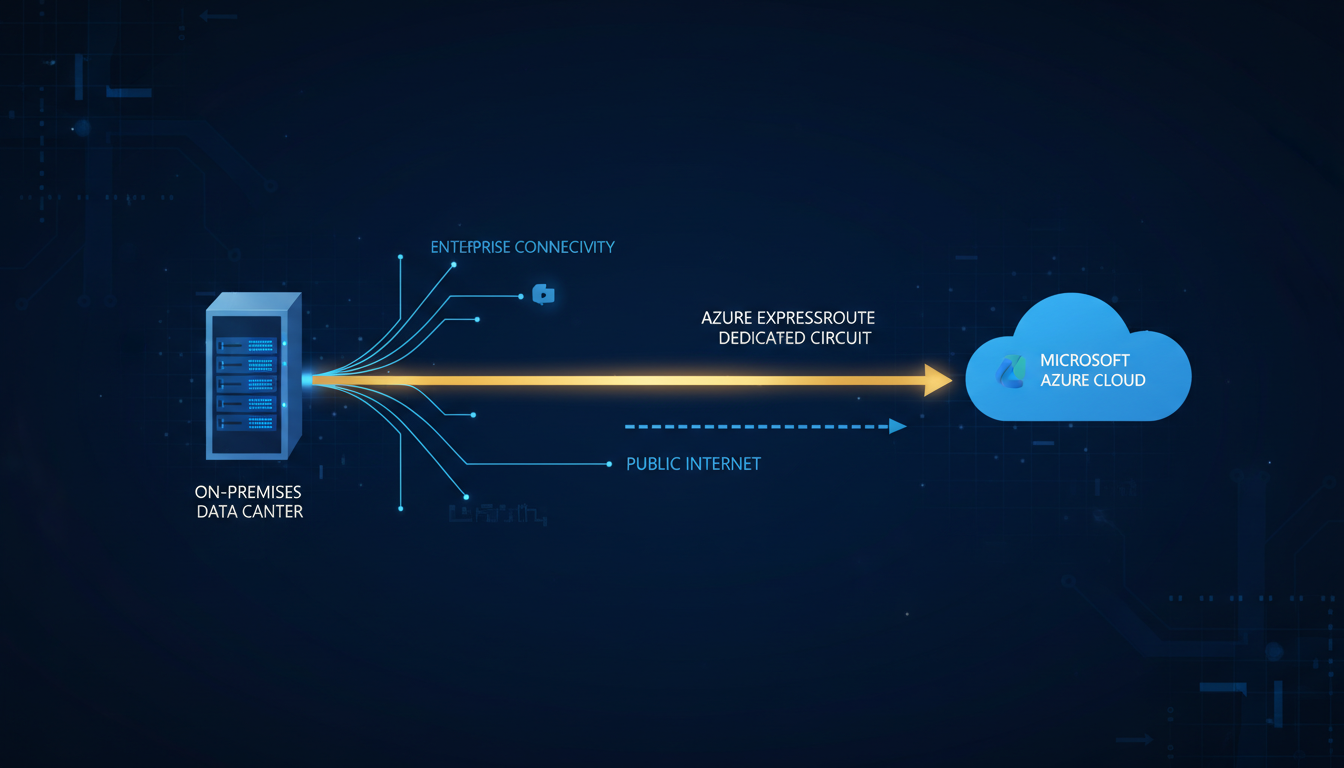
Azure ExpressRoute is Microsoft's solution for organisations that need a private, dedicated connection between their on-premises infrastructure and Azure cloud services. Unlike a standard internet connection, ExpressRoute establishes a direct link through a connectivity partner - bypassing the public internet entirely. This delivers lower latency, higher bandwidth, more consistent performance, and enhanced security for organisations whose cloud workloads demand more than the public internet can reliably provide.
This guide explains what Azure ExpressRoute is, how it works, when UK businesses should consider it, what it costs, and how to implement it successfully. Whether you are evaluating ExpressRoute for the first time or comparing it against alternative connectivity options, this guide provides the information you need to make an informed decision.
How Azure ExpressRoute Works
ExpressRoute creates a private connection between your on-premises network and Microsoft's Azure cloud infrastructure. This connection does not traverse the public internet. Instead, it passes through a connectivity provider - also known as an exchange provider or network service provider - that has a direct physical connection to Microsoft's network at a peering location.
In the United Kingdom, Microsoft operates Azure regions at two data centre locations: UK South (London) and UK West (Cardiff). ExpressRoute peering locations in the UK include facilities in London (Equinix LD5, Telecity Docklands), with additional connectivity options through European peering locations in Amsterdam, Dublin, and Paris. Your connectivity provider establishes a dedicated circuit from your premises (or from a co-location facility) to one of these peering points, where it connects directly to Microsoft's global network.
Once the circuit is established, you can access Azure services - virtual machines, storage accounts, SQL databases, Azure Active Directory, and Microsoft 365 - over the private connection. Traffic between your office and Azure never touches the public internet, which eliminates the variability, congestion, and security risks associated with internet-based connectivity.
ExpressRoute supports two peering configurations. Azure Private Peering connects your on-premises network to Azure virtual networks, giving you private IP connectivity to your Azure VMs, databases, and other resources as if they were on your local network. Microsoft Peering provides access to Microsoft's public services - including Microsoft 365, Dynamics 365, and Azure PaaS services - over the private connection. Most UK businesses deploy both peering types to ensure all Microsoft traffic benefits from the dedicated connection.
When Does Your UK Business Need ExpressRoute?
ExpressRoute is not necessary for every organisation. Many UK businesses operate successfully with standard internet connections to Azure, particularly those with modest cloud workloads and no stringent latency or compliance requirements. However, several scenarios make ExpressRoute either strongly recommended or essential.
High-bandwidth workloads. If your organisation regularly transfers large volumes of data between on-premises and Azure - such as database replication, media file processing, backup to Azure, or large-scale data analytics - ExpressRoute provides the bandwidth and consistency that the public internet cannot guarantee. A standard 100 Mbps leased line may suffice for general internet browsing and email, but transferring terabytes of data to Azure for analytics requires dedicated bandwidth that does not compete with other internet traffic.
Latency-sensitive applications. Real-time applications such as VoIP, video conferencing (when hosted on Azure), financial trading platforms, and industrial control systems require consistent low-latency connectivity. Internet latency is variable and unpredictable, with occasional spikes caused by congestion, routing changes, or peering disputes. ExpressRoute delivers consistent, predictable latency because the traffic follows a dedicated path through the connectivity provider's network.
Regulatory and compliance requirements. Organisations in regulated industries - financial services (FCA-regulated), healthcare (NHS and private providers), legal services, and government - may have compliance requirements that prohibit sensitive data from traversing the public internet. ExpressRoute satisfies these requirements by providing a private connection that does not cross public network infrastructure. For businesses pursuing ISO 27001 certification or demonstrating GDPR compliance, the ability to document a private connection to cloud services strengthens the overall security posture.
Azure ExpressRoute
- Private dedicated connection, no public internet
- Consistent low latency (sub-10ms from UK)
- Bandwidth from 50 Mbps to 100 Gbps
- 99.95% SLA uptime guarantee
- Predictable performance under all conditions
- Enhanced security for regulated industries
- Direct access to Azure and Microsoft 365
- Supports hybrid cloud architectures
Standard Internet Connection
- Shared public infrastructure with all users
- Variable latency with unpredictable spikes
- Bandwidth shared with all internet traffic
- No SLA for cloud service performance
- Performance degrades during peak hours
- Data traverses public networks
- No guaranteed path to Microsoft services
- Limited hybrid cloud capabilities
ExpressRoute Pricing for UK Businesses
ExpressRoute pricing has two components: the Microsoft circuit charge and the connectivity provider charge. Understanding both is essential for accurate budgeting.
Microsoft charges a monthly fee based on the circuit bandwidth and billing model. There are two billing models: Metered (you pay for the circuit plus a per-GB charge for outbound data transfer) and Unlimited (you pay a higher flat fee but with unlimited data transfer). For most UK businesses, the Unlimited model provides better value and predictable costs, particularly for data-intensive workloads.
| Circuit Bandwidth | Microsoft Fee (Unlimited) | Typical Provider Fee | Total Monthly Cost |
|---|---|---|---|
| 50 Mbps | £85/month | £300 - £600/month | £385 - £685 |
| 100 Mbps | £170/month | £400 - £800/month | £570 - £970 |
| 200 Mbps | £340/month | £600 - £1,200/month | £940 - £1,540 |
| 500 Mbps | £680/month | £1,000 - £2,000/month | £1,680 - £2,680 |
| 1 Gbps | £1,190/month | £1,500 - £3,500/month | £2,690 - £4,690 |
| 10 Gbps | £4,760/month | £5,000 - £12,000/month | £9,760 - £16,760 |
Implementation Steps
Implementing ExpressRoute requires coordination between your organisation, your connectivity provider, and Microsoft. The typical implementation timeline for a UK business is four to eight weeks, depending on the complexity of the deployment and the connectivity provider's lead times.
Step 1: Determine your bandwidth requirements based on current and projected cloud usage. Analyse your existing internet traffic to Azure services, accounting for growth over the circuit contract period (typically 12-36 months).
Step 2: Select a connectivity provider. In the UK, major providers include BT, Vodafone, Colt Technology Services, Equinix, and Megaport. Compare pricing, contract terms, SLAs, and the physical routing of their circuits. For maximum resilience, consider using two different providers for redundant circuits.
Step 3: Order and provision the circuit. Your connectivity provider installs the physical connection from your premises to the peering location. Simultaneously, provision the ExpressRoute circuit in the Azure portal. Once both sides are ready, the provider establishes the BGP peering sessions that route traffic between your network and Azure.
Step 4: Configure routing. Define which traffic should use the ExpressRoute circuit and which should continue to use the internet. Typically, all Azure and Microsoft 365 traffic is routed over ExpressRoute, while general internet browsing continues over your standard connection.
Step 5: Test and validate. Verify connectivity, latency, throughput, and failover behaviour. Test that critical applications perform as expected over the ExpressRoute circuit. Confirm that failover to the internet (or to a secondary ExpressRoute circuit) works correctly if the primary circuit fails.
ExpressRoute with Microsoft 365
A common question from UK businesses is whether ExpressRoute should be used for Microsoft 365 traffic. Microsoft's official guidance is nuanced: they support ExpressRoute for Microsoft 365 but recommend it only for specific scenarios where performance or compliance requirements justify the additional complexity and cost.
For most UK businesses, Microsoft 365 performs well over a standard internet connection because Microsoft has invested heavily in their global network edge, placing Points of Presence close to UK internet exchanges. However, if your organisation experiences inconsistent Microsoft 365 performance due to internet congestion, if you have compliance requirements that mandate private connectivity, or if you are already deploying ExpressRoute for Azure services and want all Microsoft traffic on the private circuit, enabling Microsoft Peering for Microsoft 365 is straightforward.
Be aware that Microsoft requires organisations to submit a request and receive approval before enabling ExpressRoute for Microsoft 365. This process involves demonstrating a legitimate business need and agreeing to implement the appropriate routing configurations to ensure optimal traffic flow.
Resilience and Redundancy
A single ExpressRoute circuit introduces a single point of failure in your cloud connectivity. For organisations where Azure connectivity is business-critical, Microsoft strongly recommends deploying redundant circuits - ideally through different connectivity providers and different peering locations - to ensure continued access to cloud services if one circuit fails.
In the UK, a common resilience pattern is to deploy one circuit through a provider in London and a second through a different provider, potentially connecting through a different peering location. This ensures that a provider outage, a peering location failure, or a physical cable break does not sever your Azure connectivity. BGP routing automatically redirects traffic to the surviving circuit within seconds of a failure, providing seamless failover that is transparent to users.
For the highest levels of resilience, some UK organisations combine ExpressRoute with a VPN gateway as a backup. If both ExpressRoute circuits fail - an extremely unlikely scenario - the VPN gateway provides connectivity over the public internet as a last resort. This belt-and-braces approach ensures that cloud connectivity is maintained under virtually any failure scenario.
ExpressRoute Global Reach and Multi-Cloud Connectivity
For UK businesses with international operations or complex multi-cloud architectures, ExpressRoute offers capabilities that extend well beyond simple point-to-point connectivity between your office and Azure. Understanding these advanced features helps organisations plan their network architecture for long-term scalability and flexibility.
ExpressRoute Global Reach is a feature that allows you to connect your on-premises sites to each other through the Microsoft backbone network. If your organisation has offices in London and Edinburgh, each with its own ExpressRoute circuit, Global Reach enables traffic between those offices to flow through the Microsoft network rather than over the public internet or through a separate MPLS circuit. This can simplify your wide-area network architecture and reduce costs by consolidating connectivity through a single provider relationship with Microsoft.
For organisations using multiple cloud providers - perhaps Azure for core infrastructure and another provider for specialised workloads - ExpressRoute can be part of a broader multi-cloud connectivity strategy. Several UK connectivity providers offer services that combine ExpressRoute with direct connections to other cloud platforms, enabling unified private connectivity across your entire cloud estate. This approach ensures consistent performance and security regardless of which cloud platform hosts a particular workload.
Monitoring and Optimising Your ExpressRoute Deployment
Once your ExpressRoute circuit is operational, ongoing monitoring and optimisation ensure you continue to receive maximum value from your investment. Microsoft provides several tools for monitoring ExpressRoute performance, including Azure Monitor, Network Watcher, and ExpressRoute-specific metrics in the Azure portal.
Key metrics to monitor include circuit utilisation (to ensure you have adequate bandwidth headroom for growth), BGP session status (to detect routing issues before they affect users), latency measurements (to track any degradation in performance over time), and failover test results (to confirm that your redundancy configurations work as expected). We recommend establishing baseline measurements immediately after deployment and setting up automated alerts for any significant deviations from those baselines.
Bandwidth optimisation is particularly important for managing costs. If your 1 Gbps circuit consistently utilises less than 40% of its capacity, you may be able to downgrade to a 500 Mbps circuit and save several hundred pounds per month. Conversely, if utilisation regularly exceeds 70%, you should plan for an upgrade before performance is affected. Most connectivity providers allow bandwidth upgrades with minimal disruption, often taking effect within hours rather than weeks, so there is little risk in starting with a smaller circuit and scaling up as needed.
Regular architecture reviews are also essential. As your Azure environment evolves - new workloads, new regions, new services - your ExpressRoute configuration may need to evolve with it. An annual connectivity review with your managed IT provider ensures your ExpressRoute deployment continues to align with your business requirements and takes advantage of any new features or pricing options that Microsoft has introduced since your initial deployment.
Security considerations also extend into the operational phase of an ExpressRoute deployment. Whilst ExpressRoute itself provides a private connection, you must still implement appropriate security controls at the network boundaries. This includes configuring route filters to ensure only authorised network prefixes are advertised over the BGP sessions, implementing access control lists on your edge routers, and maintaining firewall rules that govern which traffic is permitted to flow between your on-premises network and Azure. Regular security audits of your ExpressRoute configuration help identify any drift from your intended security posture and ensure compliance with regulatory requirements.
Documentation is an often-overlooked aspect of ExpressRoute management. Maintain detailed records of your circuit configurations, routing policies, failover procedures, and connectivity provider contact information. In the event of a circuit failure at three o'clock in the morning, having clear, up-to-date documentation enables your IT team or managed service provider to diagnose and resolve the issue far more quickly than if they are working from memory or outdated notes. Cloudswitched maintains comprehensive documentation for all client ExpressRoute deployments as part of our managed Azure support service, ensuring rapid incident response and minimal downtime.
Connect Your Business to Azure with Confidence
Cloudswitched designs and implements Azure ExpressRoute solutions for UK businesses that demand reliable, high-performance cloud connectivity. Our Azure-certified engineers will assess your requirements and deliver a solution tailored to your organisation.
Is ExpressRoute Right for Your Business?
Cloudswitched helps UK businesses evaluate, design, and implement Azure ExpressRoute solutions tailored to their specific requirements. Whether you need a single circuit for enhanced performance or a fully redundant multi-provider deployment for mission-critical workloads, our Azure-certified team can guide you through every step of the process.
Book a Free Consultation
CloudSwitched
London-based managed IT services provider offering support, cloud solutions and cybersecurity for SMEs.


