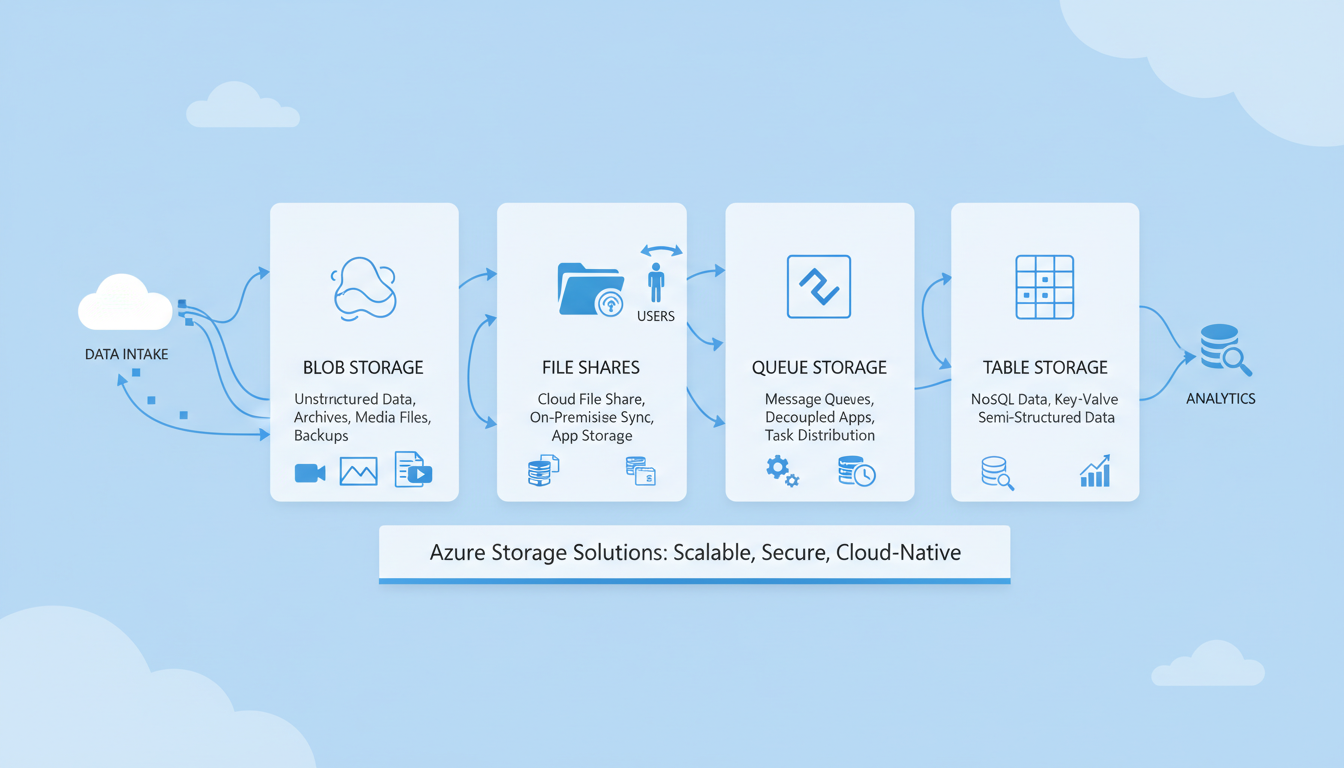
Microsoft Azure offers one of the most comprehensive cloud storage ecosystems available to UK businesses. But with four distinct storage services - Blob Storage, Azure Files, Queue Storage, and Table Storage - all sitting under the same Azure Storage Account umbrella, it is easy to become confused about which service to use for what purpose. Each service is designed for a fundamentally different type of data and workload, and choosing the wrong one can lead to poor performance, excessive costs, and architectural headaches down the line.
This guide breaks down each Azure storage service in plain language, explains when and why you would use each one, provides practical UK-focused examples, and helps you make informed decisions about your cloud storage architecture. Whether you are an IT administrator planning an Azure migration, a developer building cloud-native applications, or a business owner trying to understand your cloud costs, this guide will give you the clarity you need.
Azure storage is used by thousands of UK organisations, from NHS trusts storing medical imaging data to fintech startups processing millions of transactions. Understanding the storage options is fundamental to getting value from your Azure investment.
Azure Blob Storage
Blob Storage is Azure's object storage service and is by far the most widely used of the four storage types. The term "blob" stands for Binary Large Object, and it is designed to store massive amounts of unstructured data - data that does not conform to a specific data model or schema. This includes documents, images, videos, audio files, log files, backups, virtual machine disk images, and essentially any file you need to store in the cloud.
Blob Storage organises data into containers, which function similarly to folders. Within each container, you store individual blobs. There are three types of blobs: block blobs (for general files up to approximately 190 TB), append blobs (optimised for append operations, ideal for logging), and page blobs (for random read/write operations, used primarily for virtual machine disks).
Access Tiers
One of Blob Storage's most powerful features is its access tier system, which allows you to optimise costs based on how frequently you access your data. The Hot tier is for data accessed frequently - your active documents, current project files, and frequently accessed media. The Cool tier is for data accessed less often but still needs to be available quickly - think quarterly reports or last month's backups. The Cold tier is for rarely accessed data that you still need occasionally. The Archive tier is for data that almost never needs to be accessed but must be retained - regulatory archives, historical records, and long-term backups.
The cost difference between tiers is significant. Archive storage in the UK South region costs a fraction of Hot storage per gigabyte, but retrieval from Archive takes hours rather than milliseconds. For UK businesses with GDPR data retention requirements, the Archive tier provides an extremely cost-effective way to store historical data for the required periods without paying premium storage prices.
Lifecycle Management Policies
One of the most powerful cost-optimisation features of Azure Blob Storage is lifecycle management. Rather than manually moving data between access tiers, you can create automated policies that transition blobs based on their age or last access time. For example, a UK accountancy firm could configure a policy that keeps client documents in the Hot tier for 30 days after upload, moves them to Cool after 30 days, transitions to Cold after 90 days, and archives them after one year. This automation ensures that storage costs decrease naturally as data ages, without any manual intervention required from your IT team.
Lifecycle management policies are configured at the storage account or container level and support filtering by blob name prefix, allowing you to apply different policies to different types of data within the same account. For organisations managing large volumes of data - such as NHS trusts handling medical imaging, engineering firms storing CAD files, or media companies archiving video content - lifecycle policies can reduce annual storage costs by 60 to 80 per cent compared to keeping all data in the Hot tier. The policies are straightforward to configure through the Azure Portal and can be adjusted at any time as your data access patterns evolve.
Practical Blob Storage Examples for UK Businesses
A UK-based legal practice might use Blob Storage to archive completed case files. Active cases are stored in the Hot tier for rapid access during ongoing proceedings, whilst completed cases are automatically transitioned through the tiers until they reach Archive storage, where they remain for the mandated retention period at minimal cost. This approach satisfies the Solicitors Regulation Authority retention requirements without incurring the expense of keeping years of historical data on premium storage. When a case needs to be revisited - for an appeal or a regulatory enquiry - the relevant files can be rehydrated from Archive storage within a few hours.
A manufacturing company in the Midlands might use Blob Storage as a data lake, ingesting production line sensor data, quality control images, and supply chain documents into a centralised repository. By combining Blob Storage with Azure Data Lake Storage Gen2 capabilities - which are built on top of Blob Storage and add hierarchical namespace support - the company can run analytics across all its unstructured data using tools such as Azure Synapse Analytics or Databricks, gaining operational insights that would be impossible with traditional file server storage. This pattern is increasingly common across UK manufacturing as Industry 4.0 adoption accelerates.
| Access Tier | Storage Cost (UK South) | Access Cost | Retrieval Time | Best For |
|---|---|---|---|---|
| Hot | £0.015/GB/month | Lowest | Milliseconds | Active data, frequently accessed files |
| Cool | £0.008/GB/month | Moderate | Milliseconds | Infrequent access, 30+ day retention |
| Cold | £0.004/GB/month | Higher | Milliseconds | Rare access, 90+ day retention |
| Archive | £0.001/GB/month | Highest | Hours (up to 15) | Compliance archives, long-term backup |
Azure Files
Azure Files provides fully managed file shares in the cloud that are accessible via the industry-standard SMB (Server Message Block) and NFS (Network File System) protocols. If your business currently uses shared network drives - the classic mapped drive that every UK office worker is familiar with - Azure Files is the cloud equivalent.
The key advantage of Azure Files over traditional on-premises file servers is that you do not need to manage any hardware. There are no servers to maintain, no disks to replace, and no storage arrays to monitor. Azure handles all of that. You simply create a file share, set the size quota, and connect your users.
Azure Files is particularly valuable for UK businesses that are migrating from on-premises file servers to the cloud. Using Azure File Sync, you can keep a local cache of frequently accessed files on an on-premises server while storing the complete data set in Azure. This gives your users the speed of local access for their most-used files while providing the capacity and resilience of cloud storage for the full dataset. It is an excellent transitional technology for organisations that are not ready to go fully cloud-based in one step.
Performance Tiers and Sizing
Azure Files offers two performance tiers: Standard and Premium. Standard file shares use hard disk drive storage and are suitable for general-purpose file sharing, departmental drives, and archival workloads where sub-millisecond latency is not critical. Premium file shares use solid-state drive storage and deliver significantly higher throughput and lower latency, making them appropriate for performance-sensitive workloads such as database hosting, development environments, and applications that perform intensive random file operations.
When sizing your Azure file shares, consider both capacity and performance requirements carefully. Standard shares are billed based on used capacity, meaning you only pay for the data you actually store. Premium shares are billed based on provisioned capacity, and performance scales with the provisioned size - a larger share delivers more input/output operations per second and higher throughput. For most UK SME file-sharing scenarios, Standard shares provide more than adequate performance at a significantly lower cost. Premium shares become relevant when you need consistent sub-millisecond latency or throughput exceeding what Standard shares can deliver, which is typically the case for software development builds or database workloads.
Migrating from On-Premises File Servers
For UK businesses looking to retire ageing Windows file servers, Azure Files combined with Azure File Sync provides a well-proven migration path that minimises disruption. The migration typically begins with deploying a File Sync agent on your existing file server. This agent synchronises your file data to an Azure file share in the background, without disrupting user access during the process. Once the initial synchronisation is complete - which can take days or weeks depending on data volume and available bandwidth - you can enable cloud tiering on the local server.
Cloud tiering replaces less frequently accessed files on the local server with lightweight placeholder files, freeing up local disk space whilst maintaining the appearance of a complete file system to users. When a user opens a tiered file, it is automatically and transparently downloaded from Azure. Over time, you can progressively reduce your reliance on the on-premises server. Some organisations choose to maintain a local cache permanently for performance reasons, particularly in locations with limited internet bandwidth, whilst others eventually decommission the on-premises server entirely and access Azure Files directly over the internet or via a VPN connection. This flexibility makes Azure File Sync particularly attractive for UK businesses that need a gradual, low-risk migration path rather than a disruptive weekend cutover that risks data loss or extended downtime.
This is one of the most common questions UK IT administrators ask. The answer depends on your use case. Azure Files is ideal for lift-and-shift migration of existing file server workloads, applications that require SMB file share access, and scenarios where you need a traditional mapped drive experience. SharePoint (and OneDrive for Business) is better for document collaboration, version control, co-authoring, and integration with Microsoft 365 workflows. For most UK SMEs, the answer is both - SharePoint for collaborative document work and Azure Files for legacy applications and traditional file storage that does not need collaboration features.
Azure Queue Storage
Queue Storage is the most technical of the four services and is primarily used by developers building distributed applications. A queue is essentially a messaging pipeline - one application puts a message into the queue, and another application picks it up and processes it. The two applications do not need to be running at the same time, and they do not need to communicate directly with each other.
This decoupling is extremely valuable for building resilient, scalable applications. Consider a UK e-commerce business that needs to process orders. When a customer places an order, the web application puts an order message into a queue. A separate processing application picks up that message, validates the order, charges the payment, and updates the inventory. If the processing application is temporarily unavailable - perhaps during a deployment or update - the messages simply accumulate in the queue and are processed when the application comes back online. No orders are lost.
Azure Queue Storage can hold millions of messages, each up to 64 KB in size. Messages can have a visibility timeout, which means once a message is picked up for processing, it becomes invisible to other consumers for a defined period. If the processing application crashes before completing the work, the message becomes visible again and another consumer can pick it up. This ensures reliable, at-least-once processing of every message.
Common Queue Patterns for UK Applications
Beyond simple task distribution, Azure Queue Storage supports several messaging patterns that are valuable for UK businesses building cloud-native applications. The competing consumers pattern involves multiple worker processes reading from the same queue simultaneously, allowing you to scale processing capacity by simply adding more workers during peak demand. During busy periods - such as Black Friday for UK retailers, tax deadline season for accountancy firms, or enrollment periods for universities - you can spin up additional workers to handle the increased message volume, then scale back down when demand subsides, paying only for the compute resources you actually use.
The priority queue pattern uses multiple queues with different processing priorities to ensure that urgent work is handled first. A UK insurance company processing claims might route urgent claims - such as those involving hospitalisation or vehicle write-offs - to a high-priority queue that is processed immediately, whilst routine claims go to a standard queue processed in order of receipt. This ensures that time-sensitive work is handled promptly without requiring all messages to be processed with the same urgency or consuming the same level of resources.
Queue Storage vs Azure Service Bus
Azure also offers Service Bus, a more feature-rich messaging service that supports advanced scenarios such as guaranteed message ordering, dead-letter queues for failed messages, duplicate detection, and publish-subscribe topics for broadcasting messages to multiple consumers. For simple, high-volume messaging where you need basic queue functionality at the lowest possible cost, Azure Queue Storage is the better choice. For enterprise messaging scenarios that require transactional guarantees, complex routing logic, or integration with existing enterprise messaging infrastructure, Azure Service Bus is worth the additional cost and configuration complexity.
Many UK organisations use both services within their architecture, choosing the right tool for each specific workload. Queue Storage handles high-volume, low-complexity tasks such as log processing, image thumbnail generation, or batch job scheduling, whilst Service Bus manages mission-critical workflows such as payment processing, regulatory reporting, or inter-service communication where message guarantees and ordering are essential. Understanding the strengths and limitations of each service allows you to choose the most appropriate and cost-effective solution for each workload in your application portfolio.
Azure Table Storage
Table Storage is a NoSQL key-value store that provides fast, cost-effective storage for structured data that does not require the complexity of a full relational database. It stores data in tables, with each row (called an entity) identified by a partition key and a row key. Entities can have up to 252 properties (columns), and different entities in the same table can have different properties - there is no fixed schema.
Table Storage is ideal for storing large volumes of structured data where you do not need complex queries, joins, or relationships. Common use cases include application logging and diagnostics data, IoT device telemetry, user profile data, and metadata catalogues. For UK businesses running IoT deployments - increasingly common in manufacturing, logistics, and smart building management - Table Storage provides an extremely cost-effective way to store millions of sensor readings without the overhead of a relational database.
It is worth noting that Azure also offers Cosmos DB Table API, which provides a premium version of Table Storage with global distribution, guaranteed low latency, and automatic indexing. For most UK SME use cases, standard Table Storage is more than sufficient, but organisations with high-performance or globally distributed requirements should consider Cosmos DB.
Designing Effective Partition Strategies
The performance of Azure Table Storage depends heavily on your choice of partition key. The partition key determines how data is distributed across storage nodes, and a well-chosen partition key ensures even distribution of load and fast query performance. For a UK logistics company tracking delivery events, using the delivery date as the partition key and the consignment number as the row key would allow efficient queries for all deliveries on a given date, which is the most common access pattern for operational dashboards and customer service enquiries.
Avoid using partition keys that create hot partitions - where a disproportionate amount of traffic is directed to a single partition. For instance, using a boolean status field as a partition key would funnel most queries to one of two partitions, severely limiting throughput. Instead, choose keys that distribute data evenly and align with your most frequent query patterns. Microsoft recommends keeping individual partition sizes manageable and designing your key strategy for the queries you will run most often, rather than trying to optimise for every possible access pattern at the expense of your primary workload.
Table Storage for IoT and Telemetry Data
The United Kingdom has seen rapid growth in Internet of Things deployments across sectors including manufacturing, agriculture, smart buildings, and energy management. Table Storage provides an ideal repository for the high-volume, low-complexity data that IoT devices generate at scale. A UK smart building management company, for example, might ingest millions of sensor readings per day covering temperature, humidity, energy consumption, and occupancy data from commercial properties across the country. The simplicity and cost-effectiveness of Table Storage makes it an excellent fit for this type of high-throughput, write-heavy workload.
By using the device identifier as the partition key and a reverse timestamp as the row key, the system can efficiently retrieve the most recent readings for any given sensor - the most common query pattern for real-time monitoring dashboards. The cost-effectiveness of Table Storage means that storing years of historical telemetry data is economically viable, enabling long-term trend analysis and predictive maintenance capabilities that would be prohibitively expensive with a traditional relational database. For UK organisations pursuing net-zero carbon targets, this historical data is invaluable for tracking energy consumption patterns and demonstrating compliance with environmental reporting requirements.
Blob Storage Use Cases
- Document storage and archiving
- Media files (images, video, audio)
- Backup and disaster recovery
- Static website hosting
- Data lake for analytics
- Virtual machine disk images
- Application logs and diagnostics
Azure Files Use Cases
- Replacing on-premises file servers
- Shared drives for departments
- Application configuration files
- Legacy application file storage
- Development and testing environments
- Lift-and-shift cloud migrations
- Hybrid cloud with Azure File Sync
Choosing the Right Storage Service
With four storage services to choose from, the decision can feel overwhelming. But in practice, the choice is usually straightforward once you understand your data and access patterns. If you are storing files that applications or users access directly, and you need SMB protocol support, use Azure Files. If you are storing large volumes of unstructured data - documents, images, backups, archives - use Blob Storage. If you are building applications that need asynchronous message passing between components, use Queue Storage. If you need to store large volumes of structured data without the complexity of a relational database, use Table Storage.
Many UK organisations use multiple storage services within the same Azure Storage Account. A typical setup might use Blob Storage for backups and document archives, Azure Files for shared departmental drives, and Queue Storage for application message processing. The storage account provides a single billing and management point for all of these services, simplifying administration.
Cost Optimisation Strategies
Azure storage costs can grow significantly if not actively managed, particularly for organisations with large and growing data volumes. Several strategies can help UK businesses keep their storage expenditure under control. First, implement lifecycle management policies on all Blob Storage accounts to automatically tier data based on access patterns rather than paying Hot tier prices for data that is rarely accessed. Second, regularly audit your storage accounts to identify and remove orphaned data - virtual machine disks from deleted VMs, old deployment artefacts, temporary files that were never cleaned up, and snapshots that are no longer needed. Third, choose the correct redundancy level for each workload. Locally redundant storage is significantly cheaper than geo-redundant storage, and for non-critical data such as development environments or easily reproducible cached data, locally redundant storage may be perfectly adequate.
Azure provides cost analysis tools within the Azure Portal that break down storage spending by account, service type, and access tier. Setting up budget alerts ensures that unexpected cost increases are caught early before they become significant. For UK businesses spending more than £500 per month on Azure storage, a quarterly cost review with your cloud services provider can often identify savings of 20 to 40 per cent through tier optimisation, redundancy right-sizing, lifecycle policy adjustments, and the removal of unused resources that accumulate over time.
Building a Real-World Storage Architecture
In practice, a well-designed Azure storage architecture for a typical UK business combines multiple storage services working together as an integrated platform. Consider a mid-sized professional services firm with 150 employees. Their architecture might include Azure Files providing shared drives for each department, replacing the ageing Windows Server that has been running in the office server room for eight years. Blob Storage holds client document archives, project deliverables, and email backups, with lifecycle policies automatically tiering data through Hot, Cool, and Archive as it ages. Queue Storage handles asynchronous tasks such as document format conversion, report generation, and notification delivery within their custom line-of-business applications.
This approach provides enterprise-grade storage infrastructure without the capital expenditure, maintenance burden, or scalability constraints of on-premises hardware. For a firm storing 5 TB of active data with an additional 20 TB of archived data, the monthly Azure storage cost is typically between £100 and £200 - a fraction of the cost of owning and maintaining equivalent on-premises storage infrastructure when you factor in hardware depreciation, electricity, cooling, backup systems, software licences, and the IT staff time required to manage physical storage arrays and tape backup rotations.
Security and Compliance Considerations
Azure Storage provides robust security features that are essential for UK businesses, particularly those subject to GDPR and sector-specific regulations. All data is encrypted at rest using 256-bit AES encryption, and you can optionally use customer-managed keys stored in Azure Key Vault for additional control. Data in transit is encrypted using HTTPS/TLS. Access can be controlled through Azure Active Directory, shared access signatures (SAS tokens), or storage account access keys, with Azure AD being the recommended approach for enterprise environments.
For UK data residency requirements, both UK South (London) and UK West (Cardiff) regions are available, ensuring that your data remains within the United Kingdom. You can also configure geo-redundant storage (GRS) that replicates data between UK regions for disaster recovery purposes while maintaining UK data residency. This is particularly important for organisations in regulated sectors such as financial services, healthcare, and legal, where data sovereignty is a compliance requirement.
Network Security and Private Endpoints
Beyond encryption, Azure Storage provides several network-level security features that UK businesses should consider implementing as part of a defence-in-depth strategy. Service endpoints allow you to restrict storage account access to traffic originating from specific Azure virtual networks, preventing access from the public internet entirely. Private endpoints go a step further by assigning a private IP address from your virtual network to the storage account, ensuring that all traffic between your applications and storage travels over the Microsoft backbone network rather than the public internet.
For UK businesses handling sensitive data - particularly those in healthcare, financial services, or government supply chains - private endpoints provide an additional layer of assurance that data never traverses the public internet, even in encrypted form. Combined with Azure Private Link, you can access storage accounts from on-premises networks via ExpressRoute or a site-to-site VPN without any exposure to the internet whatsoever. This architecture satisfies the most stringent data handling requirements whilst maintaining the scalability, flexibility, and cost benefits of cloud storage. Many UK public sector organisations mandate this level of network isolation for any cloud storage holding citizen data.
Access Management Best Practices
Securing access to your Azure storage accounts requires a defence-in-depth approach combining multiple layers of controls. Disable storage account key access where possible and use Azure AD authentication instead, as this provides fine-grained role-based access control and full audit logging of who accessed what data and when. When shared access signatures are necessary - for example, to provide temporary access to external partners, auditors, or third-party applications - always use user delegation tokens rather than account-key-based tokens, set the shortest practical expiry time, and restrict permissions to the absolute minimum required for the specific task at hand.
Enable Microsoft Defender for Storage to gain real-time threat detection capabilities across your storage accounts. This service monitors for suspicious activity such as unusual access patterns, access from known malicious IP addresses, potential data exfiltration attempts, and anomalous blob deletions that might indicate a ransomware attack. For UK businesses subject to regulatory reporting requirements, the alerts generated by Defender for Storage can be forwarded to your security information and event management system or security operations centre, ensuring that potential storage security incidents are investigated promptly and documented as part of your incident response and compliance reporting processes.
Need Help with Azure Storage for Your Business?
Cloudswitched provides expert Azure consultancy and managed cloud services for businesses across the United Kingdom. From storage architecture design and migration planning to ongoing management and cost optimisation, we help you get the most from your Azure investment. Contact us to discuss your cloud storage requirements.
GET IN TOUCH
CloudSwitched
London-based managed IT services provider offering support, cloud solutions and cybersecurity for SMEs.


