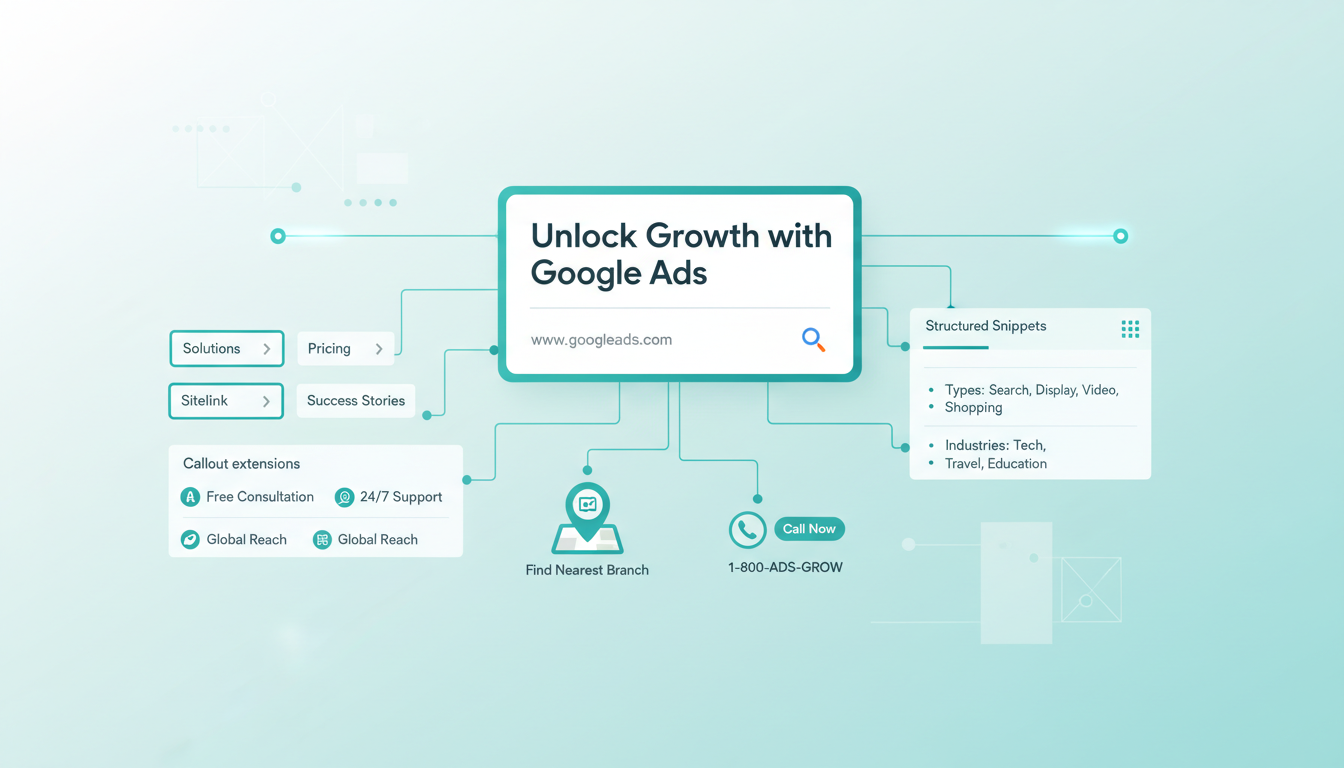
Google Ads extensions - now officially renamed "assets" by Google - are one of the most underutilised features in the platform. These additional pieces of information expand your ads beyond the standard headline-and-description format, providing potential customers with more reasons to click and more ways to engage with your business. For UK advertisers looking to squeeze every ounce of performance from their campaigns, mastering extensions is not optional - it is essential.
Extensions serve a dual purpose. They make your ads more informative and useful to searchers, which increases click-through rates. They also make your ads physically larger on the search results page, pushing competitors further down the screen and commanding more visual real estate. Google has consistently rewarded advertisers who use extensions with better ad positions and lower costs per click, making them one of the most cost-effective optimisations available.
Understanding How Extensions Impact Performance
The impact of ad extensions on campaign performance is well documented and consistently significant. Google's own research indicates that ads with extensions achieve click-through rate improvements of 10-25% compared to ads without them. For UK businesses operating in competitive markets, this advantage can be the difference between a profitable campaign and a marginal one.
It is worth emphasising that adding extensions to your ads costs nothing in itself. You only pay when someone clicks on your ad, regardless of which extension triggered the click. This means there is virtually no downside to implementing relevant extensions - even a modest improvement in CTR delivers free incremental value to your campaigns.
Extensions also contribute to your Ad Rank calculation. Google considers your expected impact from extensions when determining where your ad appears and how much you pay per click. An account with well-configured extensions can achieve the same ad position as a competitor whilst bidding less per click, simply because the extensions improve the overall quality and relevance of the ad experience.
Sitelink Extensions
Sitelinks are the most widely used extension type and arguably the most valuable. They add additional links below your main ad, directing users to specific pages on your website. For example, a sitelink for a UK accounting firm might include links to "Tax Returns," "Company Accounts," "VAT Services," and "Free Consultation."
Effective sitelinks should point to genuinely useful landing pages that align with different user intents. Someone searching for your brand name might want to navigate directly to a specific service page, a pricing page, or a contact page. Well-chosen sitelinks give them that shortcut, improving the user experience and increasing the likelihood of conversion.
Best practices for sitelinks include using descriptive text (not just "Learn More" or "Click Here"), including description lines where possible, creating at least 8-10 sitelinks per campaign so Google can rotate the most relevant ones, and ensuring that each sitelink leads to a distinct page. Google will not show sitelinks that point to the same URL as your main ad or each other.
For UK businesses with seasonal offerings, consider creating date-specific sitelinks. A retailer might swap "Summer Sale" sitelinks for "Black Friday Deals" or "January Clearance" as appropriate. This keeps your extensions current and relevant throughout the year.
Call Extensions and Call Assets
For businesses where phone calls are a primary conversion channel - and this includes many UK service businesses, from tradespeople to professional services firms - call extensions are indispensable. They add a clickable phone number to your ad on mobile devices and display a phone number on desktop, making it effortless for potential customers to ring you directly.
Call extensions work particularly well for businesses that handle enquiries over the phone, where the speed and personal touch of a phone conversation can make the difference in winning a customer. Emergency services (locksmiths, plumbers, electricians), medical and dental practices, legal services, and estate agents are all examples of businesses that benefit enormously from call extensions.
To get the most from call extensions, enable call reporting so you can track which campaigns, ad groups, and keywords are driving phone calls. Set up a minimum call duration threshold (such as 60 seconds) to distinguish genuine enquiries from accidental calls or quick hangups. Consider using Google forwarding numbers to capture call data within the Google Ads interface, though some businesses prefer to use dedicated call tracking providers for more detailed analytics.
If your business has limited phone coverage (for example, you only answer calls during office hours), set your call extensions to show only during those hours. There is nothing more frustrating for a potential customer than clicking a call extension only to reach voicemail. Use the ad scheduling feature within the extension settings to align call visibility with your team's availability.
Callout Extensions
Callouts are short phrases (up to 25 characters each) that highlight key selling points of your business. Unlike sitelinks, callouts are not clickable - they simply add extra text to your ad to reinforce your message. Think of them as free bonus advertising copy.
Effective callout examples for UK businesses include "Free UK Delivery," "No Hidden Fees," "24/7 Emergency Service," "FCA Regulated," "Established 1985," "Price Match Guarantee," and "Rated 5 Stars on Trustpilot." The key is to highlight differentiators and trust signals that might tip the balance in your favour when a searcher is deciding which ad to click.
Create at least 8-10 callouts per campaign to give Google sufficient variety. Include a mix of benefit-focused callouts (what the customer gains), credential-focused callouts (why they should trust you), and action-focused callouts (what they should do next). Avoid duplicating information that already appears in your headlines or descriptions - callouts should add new information, not repeat existing messaging.
Structured Snippets
Structured snippets provide additional context about your products or services using predefined header categories. Available headers include Amenities, Brands, Courses, Degree programmes, Destinations, Featured hotels, Insurance coverage, Models, Neighbourhoods, Service catalogue, Shows, Styles, and Types.
For a UK travel agency, the "Destinations" header might list popular holiday spots: "Spain, Greece, Turkey, Portugal, Italy." An insurance broker could use the "Insurance coverage" header to display: "Home, Motor, Business, Travel, Life." A university might use "Courses" to highlight their most popular programmes.
The key to effective structured snippets is relevance. Choose the header category that most naturally fits your business, and populate it with specific, useful information. Generic or vague snippets add clutter without adding value. Each snippet should give the searcher a clear reason to consider your business over the alternatives.
Location Extensions
For businesses with physical premises - whether that is a single shop in a market town or a chain with locations across the UK - location extensions display your address and a map marker alongside your ads. On mobile, they can include a link to directions via Google Maps, making it effortless for nearby customers to find you.
Location extensions are set up by linking your Google Ads account to your Google Business Profile. This connection also enables your ads to appear in Google Maps search results, opening up an additional channel for local discovery. Ensure that your Google Business Profile is complete, accurate, and well-maintained, as this information feeds directly into your location extensions.
| Extension Type | Best For | Key Benefit | Minimum Recommended |
|---|---|---|---|
| Sitelinks | All businesses | Direct users to specific pages | 8-10 per campaign |
| Call Extensions | Phone-based businesses | Enable direct phone calls | 1 per campaign |
| Callouts | All businesses | Highlight key selling points | 8-10 per campaign |
| Structured Snippets | Businesses with defined categories | Showcase product/service range | 2 headers, 4+ values each |
| Location | Physical locations | Show address and map link | All locations |
| Price | E-commerce and services | Display pricing upfront | 5-8 items |
| Image | Visual products/services | Add visual appeal to text ads | 3-5 images |
Price Extensions
Price extensions display your products or services with their prices directly in the ad, formatted as a scrollable carousel on mobile or a list on desktop. This transparency can significantly improve click quality - users who see your prices before clicking are pre-qualified, meaning they are less likely to bounce from your landing page due to unexpected pricing.
For UK service businesses, price extensions work particularly well for standardised offerings. An MOT and service centre might display "Full Service - From £149," "MOT Test - £35," "Brake Inspection - Free." A cleaning company could list "Regular Clean - From £15/hr," "Deep Clean - From £25/hr," "End of Tenancy - From £200."
When setting up price extensions, use the "From" qualifier when prices vary, and ensure that the prices displayed match what customers will find on your website. Misleading pricing will erode trust and increase bounce rates, ultimately damaging your Quality Score and campaign performance.
Image Extensions
Image extensions are a relatively newer addition to the Google Ads toolkit, allowing you to add relevant images alongside your text ads. In a search results page dominated by text, a visually appealing image can make your ad stand out dramatically. Google reports that ads with image extensions see an average 10% increase in click-through rate.
Images must meet Google's strict quality requirements: they should be relevant to the ad content, high quality (minimum 314x314 pixels for square format), and compliant with advertising policies. Avoid images with text overlays, logos, or heavy graphics - product shots, lifestyle images, and professional photography tend to perform best.
For UK businesses, consider seasonal image variations. A garden centre might use blooming flower images in spring, barbecue scenes in summer, and autumn leaf arrangements in October. This subtle seasonal relevance can make your ads feel more current and engaging.
Promotion Extensions
Promotion extensions highlight special offers and discounts with an eye-catching tag icon. They are ideal for sales events, seasonal promotions, or any time-limited offer. The extension includes a monetary or percentage discount, an occasion (such as "Summer Sale" or "Black Friday"), and optional promotion details.
UK retailers can time promotion extensions to align with key shopping events: January sales, Easter offers, bank holiday promotions, summer clearance, Black Friday, and Christmas deals. The promotion extension's built-in scheduling feature allows you to set start and end dates, ensuring your promotional messaging stays current without manual intervention.
Promotion extensions are particularly effective when combined with a genuine sense of urgency. Including specific end dates ("Offer ends 31st March") or limited availability ("First 100 customers only") can drive higher click-through rates by encouraging immediate action.
Lead Form Extensions
Lead form extensions allow users to submit their contact information directly from the search results page, without visiting your website. This reduces friction and can significantly increase lead volumes, particularly for businesses targeting mobile users who may find navigating a full website cumbersome.
The lead form collects basic information such as name, email address, phone number, and postcode. You can also add qualifying questions to ensure the leads you receive are relevant. For example, a B2B software company might ask about company size, while a home improvement business might ask about the type of project.
Lead form extensions bypass your website entirely, which means your landing page analytics will not capture these conversions. Ensure that your CRM or lead management system is set up to receive and process leads from Google Ads lead forms. Additionally, under UK GDPR regulations, you must include a privacy policy link in your lead form and handle the collected data in compliance with data protection requirements.
Optimised vs Basic Extension Setup: The Performance Gap
The difference between a thoughtfully optimised extension configuration and a basic or neglected setup can be dramatic. Many UK advertisers add a handful of extensions when they first create their campaigns and never revisit them, missing out on significant performance gains. The comparison below illustrates how a comprehensive extension strategy outperforms a minimal approach across every meaningful metric, and highlights why regular extension maintenance should be part of your ongoing campaign management routine.
Fully Optimised Extensions
Basic Extension Setup
Accounts with fully optimised extensions consistently outperform basic setups by substantial margins. The compounding effect of higher click-through rates, improved Quality Scores, and lower cost-per-click means that the gap in overall campaign ROI between these two approaches widens over time. For UK businesses in competitive sectors such as financial services, legal, or home improvements, where cost-per-click can exceed ten to fifteen pounds, even a modest improvement in Quality Score from better extensions can translate into thousands of pounds in annual savings.
The effort required to maintain a comprehensive extension strategy is relatively modest - perhaps an hour per month for most accounts. This time investment pays for itself many times over through improved ad performance, making extension optimisation one of the highest-ROI activities in Google Ads management. Businesses that treat extensions as a one-time setup task rather than an ongoing optimisation opportunity are leaving measurable performance on the table and ceding competitive advantage to rivals who take a more diligent approach.
Developing an Extension Strategy
The most effective approach to extensions is not simply enabling every available type but developing a coherent strategy that aligns with your business goals and target audience. Start by identifying which extensions are most relevant to your business model and customer journey, then implement and optimise those first.
Every UK business running Google Ads should, at minimum, have sitelinks, callouts, and structured snippets configured. These three extension types are universally applicable and provide the foundational additional information that improves ad quality and click-through rates. Beyond that, layer in extensions that match your specific business needs - call extensions for phone-dependent businesses, location extensions for businesses with premises, price extensions for transparent service-based businesses, and so on.
Set extensions at both the account level and the campaign or ad group level where appropriate. Account-level extensions serve as a baseline that applies across all campaigns, while campaign- or ad-group-level extensions can be tailored to specific products, services, or audiences. For instance, you might have generic callouts at the account level ("Free Delivery," "UK Based") and specific callouts at the ad group level ("Specialist Kitchen Design" or "Award-Winning Wedding Venue").
Review extension performance regularly using the Extensions tab in Google Ads. Pay attention to which extensions are serving (Google chooses which to show based on predicted performance), their click-through rates, and their contribution to overall ad performance. Pause underperforming extensions and test new variations to continuously improve results.
Extension Health Check: Measuring Your Setup Quality
Evaluating the health of your extension setup requires looking beyond simple activation. It is not enough to have extensions enabled - they need to be well-configured, regularly updated, and performing effectively. The following metrics represent key areas that UK advertisers should assess when auditing their extension strategy. These benchmarks are based on best-practice standards observed across high-performing Google Ads accounts in the UK market, and a shortfall in any area indicates an opportunity for meaningful improvement.
Extension type coverage measures whether you are utilising all relevant extension types for your business model. Most UK advertisers score well on the basics - sitelinks and callouts - but significantly underutilise newer extension types such as image extensions and promotion extensions. Sitelink relevance assesses whether your sitelinks point to current, active pages and use descriptive, compelling text rather than generic phrases. Callout differentiation evaluates whether each callout adds unique selling points rather than repeating information already present in your ad copy or other extensions.
The two areas where UK advertisers most frequently fall short are ad group level customisation and review cadence. Setting extensions only at the account or campaign level means missing the opportunity to tailor messaging to specific product categories or audience segments. Similarly, many businesses set up their extensions once and never revisit them, allowing outdated information to persist and missing opportunities to test new messaging. Building a monthly extension review into your campaign management routine - even a brief thirty-minute audit - can identify quick wins that meaningfully improve performance over time and ensure your extensions remain aligned with your current offerings and promotional calendar.
Common Extension Mistakes to Avoid
Despite their simplicity, extensions are frequently mismanaged. The most common mistake is neglect - setting up extensions once and never reviewing them. Outdated sitelinks pointing to pages that no longer exist, call extensions showing numbers that are no longer in service, or promotional extensions advertising offers that expired months ago all damage your credibility and waste opportunities.
Another common error is redundancy. If your headline already says "Free Consultation," repeating this in a callout extension wastes valuable character space. Each extension should add new, complementary information that strengthens your overall ad message. Think of your ad as a team, with each element playing a distinct role.
Finally, avoid the temptation to use every extension type regardless of relevance. A purely online business has no need for location extensions. A B2B company selling complex enterprise software probably should not use price extensions if their pricing requires customised quotes. Irrelevant extensions clutter your ad and can confuse potential customers, undermining rather than enhancing performance.
Extensions represent one of the easiest and most impactful ways to improve your Google Ads performance. They cost nothing to implement, they improve click-through rates, they boost Quality Scores, and they provide a better experience for your potential customers. If you have been overlooking extensions in your campaigns, correcting that oversight could be the single most valuable change you make this quarter.
Maximise Your Google Ads Performance with Expert Extension Setup
Our Google Ads team ensures every extension opportunity is captured and optimised for your campaigns. From sitelinks to lead forms, we configure your account for maximum visibility and click-through rates. Let us review your extension strategy today.
Optimise Your Ads Extensions
CloudSwitched
London-based managed IT services provider offering support, cloud solutions and cybersecurity for SMEs.


