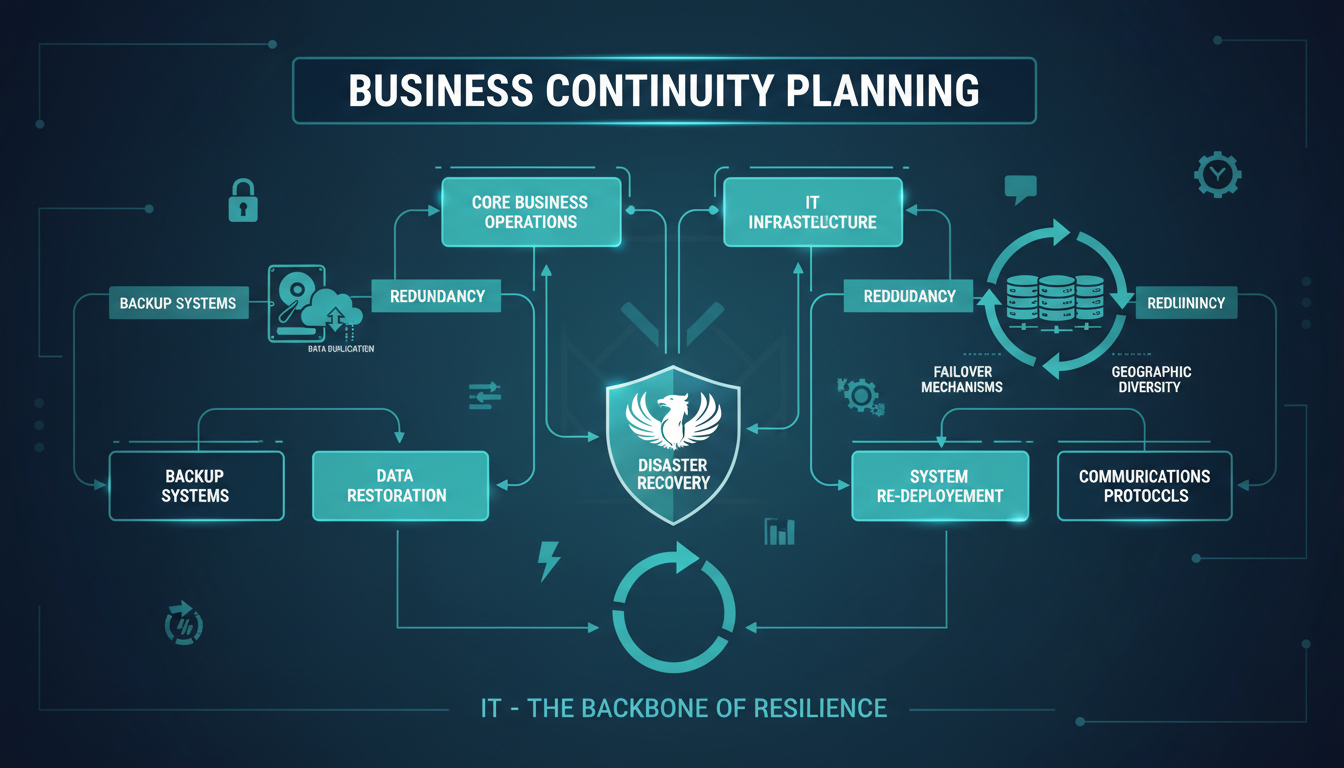
Business continuity planning is the process of creating systems and procedures that enable an organisation to continue operating during and after a disruptive event. While business continuity encompasses many aspects of an organisation - from premises and personnel to supply chains and communications - information technology sits at the very heart of modern business continuity. Without functioning IT systems, the vast majority of UK businesses simply cannot operate at all.
Despite this critical dependency, many organisations treat IT as an afterthought in their business continuity planning, or worse, assume that having a backup constitutes a complete IT continuity strategy. A backup is one component of IT business continuity, but it is far from sufficient on its own. True IT business continuity requires a comprehensive understanding of your technology dependencies, clearly defined recovery objectives, tested disaster recovery procedures, and the infrastructure to support rapid recovery.
This article explores how IT underpins business continuity, the key frameworks and concepts involved, and provides a practical guide to building an IT business continuity plan that actually works when you need it most.
The distinction between having IT systems and being genuinely resilient is one that many UK businesses fail to appreciate until it is too late. An organisation might have excellent day-to-day IT infrastructure - fast servers, reliable internet, modern applications - and yet be profoundly vulnerable to disruption because no thought has been given to what happens when that infrastructure fails. Business continuity is not about the technology you use when everything is working; it is about the technology, processes, and preparations you have in place for when things go wrong.
The COVID-19 pandemic provided a stark illustration of this principle. Businesses with mature IT continuity planning pivoted to remote working within days, maintaining operations with minimal disruption. Those without such planning spent weeks scrambling to procure laptops, configure VPN access, and set up cloud collaboration tools - all while their competitors continued to serve customers and win contracts. The pandemic was not a traditional IT disaster, but it was a business disruption that required an IT-enabled response, and the businesses with continuity plans were demonstrably better prepared.
In the current economic climate, where margins are tight and competition is fierce, the ability to maintain operations through disruption is a genuine competitive advantage. Clients and partners increasingly expect their suppliers to demonstrate business continuity capability, and many procurement processes now include questions about disaster recovery and business continuity as standard evaluation criteria.
Understanding RTO and RPO
Two concepts are fundamental to IT business continuity planning: Recovery Time Objective (RTO) and Recovery Point Objective (RPO). Every business owner and IT decision-maker should understand these terms, as they directly determine the technology and investment required for your continuity strategy.
Recovery Time Objective (RTO) is the maximum acceptable amount of time that a system can be down after a disruption before the impact on the business becomes unacceptable. An RTO of four hours means that if your email server goes down, you need it restored within four hours. An RTO of zero means the system must be available continuously with no downtime at all.
Recovery Point Objective (RPO) is the maximum acceptable amount of data loss measured in time. An RPO of one hour means you can tolerate losing up to one hour of data. If your backup runs every hour and a disaster strikes, you lose at most one hour of work. An RPO of zero means no data loss is acceptable, which requires real-time replication technology.
Different systems within your organisation will have different RTOs and RPOs based on their criticality. Your email system might have an RTO of two hours, while your customer database might need an RTO of 30 minutes. Your accounting system might tolerate an RPO of 24 hours (because transactions can be re-entered), while your trading platform might require an RPO of zero.
| System | RTO | RPO | Recovery Method | Estimated Cost |
|---|---|---|---|---|
| Email (Microsoft 365) | 1 hour | 0 (cloud-hosted) | Cloud failover | Included in licence |
| File Server | 4 hours | 1 hour | Backup restore to standby | £200-500/month |
| Line-of-business application | 2 hours | 30 minutes | VM replication | £300-800/month |
| Customer database | 30 minutes | 5 minutes | Real-time replication | £500-1,500/month |
| Website | 1 hour | 24 hours | CDN failover / rebuild | £50-200/month |
| VoIP phone system | 30 minutes | N/A | Cloud failover | Included in service |
Setting appropriate RTOs and RPOs requires honest conversations between IT and the business. There is a natural tendency for business stakeholders to demand zero downtime and zero data loss for every system, but achieving those objectives requires significant investment in high-availability infrastructure that may not be justified for all systems. The purpose of defining RTOs and RPOs is to make these trade-offs explicit, ensuring that investment is directed where it will deliver the greatest protection for the most critical systems.
It is also important to recognise that RTOs and RPOs are not static. As your business evolves, the criticality of different systems changes. A system that was merely useful three years ago may now be essential to your core operations. Conversely, a system that was once critical may have been superseded by a cloud service with built-in resilience. Your RTOs and RPOs should be reviewed at least annually, and whenever there is a significant change to your business processes or IT infrastructure, to ensure they remain aligned with your actual business needs.
The Cost of Getting RTO and RPO Wrong
The consequences of poorly defined recovery objectives can be severe. If your RTO is set too aggressively for your budget, you will invest in expensive infrastructure that may never be needed. If it is set too loosely, you may find that an outage lasting longer than expected causes customer defections, regulatory penalties, or reputational damage that takes years to repair. Similarly, an RPO that is too loose may result in the loss of critical transactions, leading to financial discrepancies and compliance issues. The business impact analysis exists precisely to ensure that these objectives are grounded in reality rather than guesswork.
Business Impact Analysis for IT Systems
A Business Impact Analysis (BIA) is the formal process of identifying which IT systems are critical to your operations and quantifying the impact of their unavailability. This is the starting point for any serious IT business continuity plan and should involve input from every department in your organisation, not just IT.
For each IT system, the BIA should determine: what business processes depend on this system, what happens if this system is unavailable for one hour, four hours, one day, one week, what is the financial impact of each duration of outage, are there manual workarounds available, and what is the maximum tolerable period of disruption before the business suffers irreversible harm.
The results of the BIA directly inform your RTO and RPO for each system, which in turn determines the technology and investment required. Systems with aggressive RTOs and RPOs (close to zero) require expensive high-availability solutions such as real-time replication and automatic failover. Systems with more relaxed objectives can be protected with simpler, less expensive backup and restore procedures.
A Virtual CIO (vCIO) brings strategic IT leadership to businesses that do not have a full-time Chief Information Officer. In the context of business continuity, a vCIO conducts the business impact analysis, designs the continuity strategy, selects appropriate technologies, manages the budget, coordinates testing, and ensures the plan evolves as your business changes. For UK SMEs spending between £50,000 and £500,000 annually on IT, a vCIO service typically costs £1,000 to £3,000 per month and delivers strategic value that far exceeds this investment.
Conducting a thorough BIA requires methodical engagement with every department in your organisation. Finance, operations, sales, customer service, human resources, and legal all depend on IT systems in different ways and to different degrees. A common mistake is to have the IT department conduct the BIA in isolation, making assumptions about business impact without consulting the people who actually use the systems daily. The result is a plan that protects systems IT considers important, which may not align with what the business actually needs most urgently.
The BIA process should also consider seasonal and time-sensitive factors. A retailer's IT systems are far more critical during the Christmas trading period than in January. An accountancy practice's systems are most critical during tax season. Your business continuity plan should account for these variations, potentially applying more aggressive RTOs during peak periods and more relaxed objectives during quieter times. This nuanced approach ensures that your investment in continuity is proportionate to the actual risk at any given time.
Quantifying the Financial Impact of Downtime
One of the most valuable outputs of the BIA is a clear, quantified understanding of what downtime actually costs your organisation. This goes beyond the obvious direct costs - lost revenue, wasted staff time, and emergency recovery expenses - to include indirect costs such as customer dissatisfaction, reputational damage, regulatory penalties, and the long-term impact on client retention. When the board can see that a single day of IT downtime costs the business tens of thousands of pounds in direct losses and considerably more in indirect consequences, the investment case for proper continuity planning becomes compelling.
Key Components of an IT Business Continuity Plan
Data Backup and Recovery
Backup is the foundation of IT business continuity but must be implemented correctly to be effective. Follow the 3-2-1 rule: maintain three copies of your data, on two different types of media, with one copy stored off-site. For UK businesses, off-site typically means a UK-based cloud data centre, ensuring your data remains within UK jurisdiction for GDPR purposes.
Your backup strategy must align with your RPO for each system. If your RPO for a file server is one hour, your backups must run at least hourly. If your RPO for a database is five minutes, you need continuous data protection or transaction log backups every five minutes. Test your restores regularly - a monthly restore test of critical systems is the minimum acceptable frequency.
Disaster Recovery Infrastructure
Backup alone does not address your RTO. Having a backup of your file server is useless if you do not have replacement hardware to restore it to. Disaster recovery infrastructure provides the compute, storage, and network resources needed to bring your systems back online within your RTO.
For many UK SMEs, cloud-based disaster recovery offers the best balance of capability and cost. Services such as Azure Site Recovery or Veeam Cloud Connect allow you to replicate your servers to a cloud data centre, where they can be started as virtual machines within minutes of a disaster. You pay only for the storage used during normal operations, plus compute costs during an actual failover event.
Cloud-Based Disaster Recovery
- Lower upfront investment
- Pay-as-you-go compute costs
- Geographic separation from primary site
- Rapid scalability during a disaster
- Automated failover capabilities
- Regular testing without disruption
- UK data centre options available
Traditional On-Premise DR
- High capital expenditure for standby hardware
- Ongoing maintenance and power costs
- Requires a second physical site
- Fixed capacity limits
- Manual failover processes
- Testing disrupts production
- Hardware depreciates regardless of use
Communication Systems
During a disaster, communication is critical. Your business continuity plan must ensure that staff, clients, and suppliers can be reached even if your primary office and IT systems are unavailable. Cloud-based communication systems - Microsoft Teams, cloud-hosted VoIP, and mobile devices - provide resilience that traditional on-premise phone systems cannot match.
Ensure that key contact information is accessible outside your IT systems. A printed contact list stored securely off-site, or a contact list synced to personal mobile phones, ensures that your crisis management team can be assembled even if email and the corporate directory are unavailable.
Remote Working Capability
The ability for staff to work remotely is a powerful business continuity tool. If your office is inaccessible due to fire, flood, or building damage, remote working allows operations to continue from staff homes or temporary locations. This requires cloud-hosted applications (or VPN access to recovered systems), laptops rather than desktops for key staff, and tested remote access procedures.
Documentation and Runbooks
Perhaps the most overlooked component of IT business continuity is documentation. When a disaster strikes, you need clear, step-by-step procedures that any competent IT professional can follow - not just the one person who configured the system originally. Recovery runbooks should document every step of the recovery process for each critical system, including server names, IP addresses, software versions, licence keys, configuration settings, and the sequence in which systems must be restored.
These runbooks must be stored in a location that is accessible during a disaster. Keeping your disaster recovery documentation on the server that has just failed is a surprisingly common oversight. Store copies in multiple locations: a cloud document repository, a printed binder kept off-site, and on the mobile devices of key recovery personnel. Update the documentation whenever systems change, and verify its accuracy during each recovery test.
Supply Chain and Vendor Dependencies
Modern business IT relies on a web of third-party services and vendors. Your business continuity plan must account for the possibility that one or more of these dependencies may themselves experience a disruption. What happens if your internet service provider has an outage? What if your cloud hosting provider experiences a regional failure? What if your line-of-business application vendor goes offline? For each critical vendor dependency, identify alternative arrangements: a secondary internet connection from a different provider, the ability to fail over to a different cloud region, or manual procedures that can sustain operations while a vendor resolves their issue.
Testing Your IT Business Continuity Plan
An untested business continuity plan is not a plan - it is a collection of assumptions. Testing reveals gaps, outdated procedures, misconfigured systems, and unrealistic expectations that would otherwise only become apparent during an actual disaster, when the stakes are highest and the pressure is greatest.
There are several levels of testing, each with increasing rigour and realism. A tabletop exercise involves walking through a disaster scenario on paper, discussing each step of the response and identifying gaps. This is low-cost and low-risk but limited in what it can validate. A component test involves testing individual elements - restoring a server from backup, failing over to cloud DR, or activating remote access for all staff. A full simulation involves declaring a simulated disaster and executing the entire continuity plan as if it were real, measuring actual recovery times against your RTOs.
UK businesses should conduct tabletop exercises quarterly, component tests monthly, and a full simulation at least annually. After each test, document lessons learned and update the plan accordingly. The plan should also be reviewed and updated whenever there is a significant change to your IT infrastructure, business processes, or organisational structure.
The cadence of testing should accelerate as your organisation matures its continuity capabilities. In the first year of implementing a new plan, focus on tabletop exercises and component tests to build familiarity and identify the most critical gaps. In the second year, progress to full simulations with measured recovery times. By the third year, your testing programme should include unannounced tests - where the recovery team is not given advance notice - to verify that your procedures work under realistic conditions of surprise and pressure.
Each test should have clearly defined success criteria established before the test begins. A vague conclusion that the test was successful is meaningless without specific, measurable objectives. Define what success looks like in advance: all critical systems restored within RTO, all staff able to access remote working within two hours, customer-facing services restored with no data loss beyond RPO. After each test, conduct a formal debrief to discuss what went well, what did not, and what changes are needed. Document these findings and assign responsibility for implementing improvements before the next test cycle.
Creating a Culture of Resilience
Business continuity is not solely a technical challenge - it is an organisational one. The best technology in the world is worthless if staff do not know what to do during a disruption, if crisis communication plans exist only on paper, or if senior management does not take continuity planning seriously. Building a culture of resilience means integrating continuity awareness into everyday operations: including it in staff inductions, conducting regular awareness briefings, and ensuring that continuity planning has visible sponsorship from the board. When everyone in the organisation understands their role during a disruption, the recovery process is faster, smoother, and more likely to succeed.
Regulatory Requirements for Business Continuity in the UK
Several UK regulations and standards require or strongly recommend business continuity planning with an IT component. The FCA requires regulated financial services firms to have business continuity arrangements proportionate to the nature, scale, and complexity of their activities. The SRA expects law firms to have business continuity plans that protect client data and ensure continuity of service. The NHS requires healthcare providers to maintain business continuity plans that include IT systems critical to patient care.
ISO 22301, the international standard for business continuity management systems, provides a comprehensive framework that many UK organisations use as the basis for their planning. While certification is not mandatory for most businesses, following the ISO 22301 framework ensures a thorough and structured approach to business continuity that will satisfy most regulatory requirements.
Cyber Essentials, while primarily a cybersecurity certification, indirectly supports business continuity by requiring controls that reduce the likelihood of cyber incidents causing business disruption. The NCSC also publishes specific guidance on business continuity planning, recommending that organisations identify critical services, assess the impact of disruption, and implement measures to ensure recovery within acceptable timeframes.
Beyond formal regulatory requirements, many UK industries have de facto continuity expectations driven by client contracts and supply chain standards. Large enterprises increasingly require their suppliers to demonstrate business continuity capability as a condition of doing business. If your organisation supplies goods or services to larger companies, government bodies, or the NHS, you may find that business continuity certification - or at least documented evidence of continuity planning - is required to retain your contracts and win new ones.
The insurance industry also plays a significant role. Cyber insurance policies, which are becoming increasingly important for UK businesses, often require evidence of business continuity planning, including regular backup testing and documented disaster recovery procedures. Failure to maintain these controls can void your coverage or result in reduced payouts when you need to claim. Treating business continuity as a compliance requirement rather than just good practice ensures that your investment in planning delivers tangible benefits in terms of contract eligibility and insurance coverage.
Ultimately, IT business continuity planning is about ensuring that your organisation can survive, recover, and continue serving its customers regardless of what disruption it faces. Whether the threat is a ransomware attack, a hardware failure, a natural disaster, or a pandemic, the organisations that have invested in comprehensive, tested continuity plans are the ones that emerge intact. Those that have not are left to hope that nothing goes wrong - and hope, as any experienced IT professional will tell you, is not a strategy.
Build Your IT Business Continuity Plan
Cloudswitched provides Virtual CIO services that include comprehensive IT business continuity planning, from business impact analysis through to disaster recovery implementation and regular testing. Protect your business against disruption with a plan that actually works.
Explore Virtual CIO Services
CloudSwitched
London-based managed IT services provider offering support, cloud solutions and cybersecurity for SMEs.


